Warm up now. Book January. New year head start: 30 days free on any paid plan. Claim 30 days freeConnect your own mailbox and we add a free one on our domain, for warmup and replies. See how it works

Skip to content
Warmerly Closely

Closely sends the follow-up. Warm the email.

Closely automates LinkedIn from $65 a month and puts email steps in the same sequence. Warmerly warms the mailbox those emails send from, then sends cold email, from $19 a month. They overlap on sequences, so this page shows where each one stops.

Warmerly Starter$19/ month5 mailboxes, no cap on sends
Closely Starter$65/ month1 LinkedIn account, $39 billed annually

Closely read on closelyhq.com/pricing, its product pages and help centre,

LinkedIn accounts · monthly billing1 dot ≈ $12
Warmerly LinkedIn, $19 an account, packs of 3 and 5Closely, by plan (Starter, Growth, Essential)
Closely climbs in steps of 1, 3 and 5 accounts. Warmerly's LinkedIn add-on is lighter and has no step. Mailboxes and Closely's wider bundle are not in either bar.
The first month

A profile and a mailbox warm up differently.

Gmail and Outlook judge how many messages a mailbox sends. LinkedIn judges how many actions a profile takes. Both start small on purpose. Drag through the first 30 days. Closely's help centre states two weeks of LinkedIn ramp and then says and so on, so its row stops at day 14. It lists no mailbox warmup, so there is no mailbox row for it.

Mailbox
LinkedIn

Lit dot: what the ramp allows that day. Faint dot: room above the mailbox provider's cap, or the top of Closely's stated range.

Warmerly mailbox
25warmup emails a day

Warmerly LinkedIn account
8connection requests a day

Closely LinkedIn account
8 to 11requests a day, as it states

Mailbox ramp: the anchor points in Warmerly's capacity code (4 a day at day 0, 8 at day 3, 15 at day 7, 25 at day 14, 35 at day 21, 50 at day 30, straight lines between), held to 40 a day on Gmail and 30 on Outlook. LinkedIn: connection requests start at half the ceiling (10 a day and 50 a week on a standard account, 20 and 100 on Premium) and reach it on day 15. Closely: its help article on warm-up periods gives 3 to 5 requests a day in the first week and 8 to 11 in the second, and no figure after that; it also says LinkedIn sets about 100 connection requests a week. These are ceilings, not promises: weekends run lower, and LinkedIn's and the mailbox provider's own limits and signals still decide. closelyhq.com and help.closelyhq.com, read 21 October 2026.

Running both

What the stack costs.

Set how many LinkedIn accounts you automate, from 1 to 5, and how many mailboxes you send from. Three stacks, one scale, list prices. Closely's plans cover 1, 3 or 5 accounts, so 2 or 4 pays for a spare. Warmerly's LinkedIn add-on is a lighter product than Closely's bundle, so the lowest bar is not the whole story.

Closely billing

Warmerly: the Free plan covers 1 mailbox, Starter 5 ($19), Growth 25 ($49), Agency 100 ($179). A LinkedIn account is $19 a month on top with no trial; 3 accounts are $49 as a pack and 5 are $75, and 4 accounts are drawn as the pack of 5 with one spare. Closely: Starter $65 a month (1 LinkedIn account), Growth $159 (3), Essential $259 (5) billed monthly, or $39, $95 and $155 a month billed annually; every plan lists unlimited email accounts. More than 5 accounts is Closely's Custom plan, which has no price listed, and Warmerly sets a limit above 100 mailboxes on request (email us).

Warmerly, both channels$57

Closely, LinkedIn and its email steps$159

Closely for LinkedIn, Warmerly for email$178

Warmerly email planWarmerly LinkedIn accountsClosely plan

Side by side

Two different front doors.

What each product puts in front of you. Warmerly is built around the mailbox you warm and the campaign you send from it. Closely is built around LinkedIn sequences and a Smart Inbox. Our screens are real, with sample data. For Closely we describe what its own pages say rather than show a picture.

WarmerlySample data
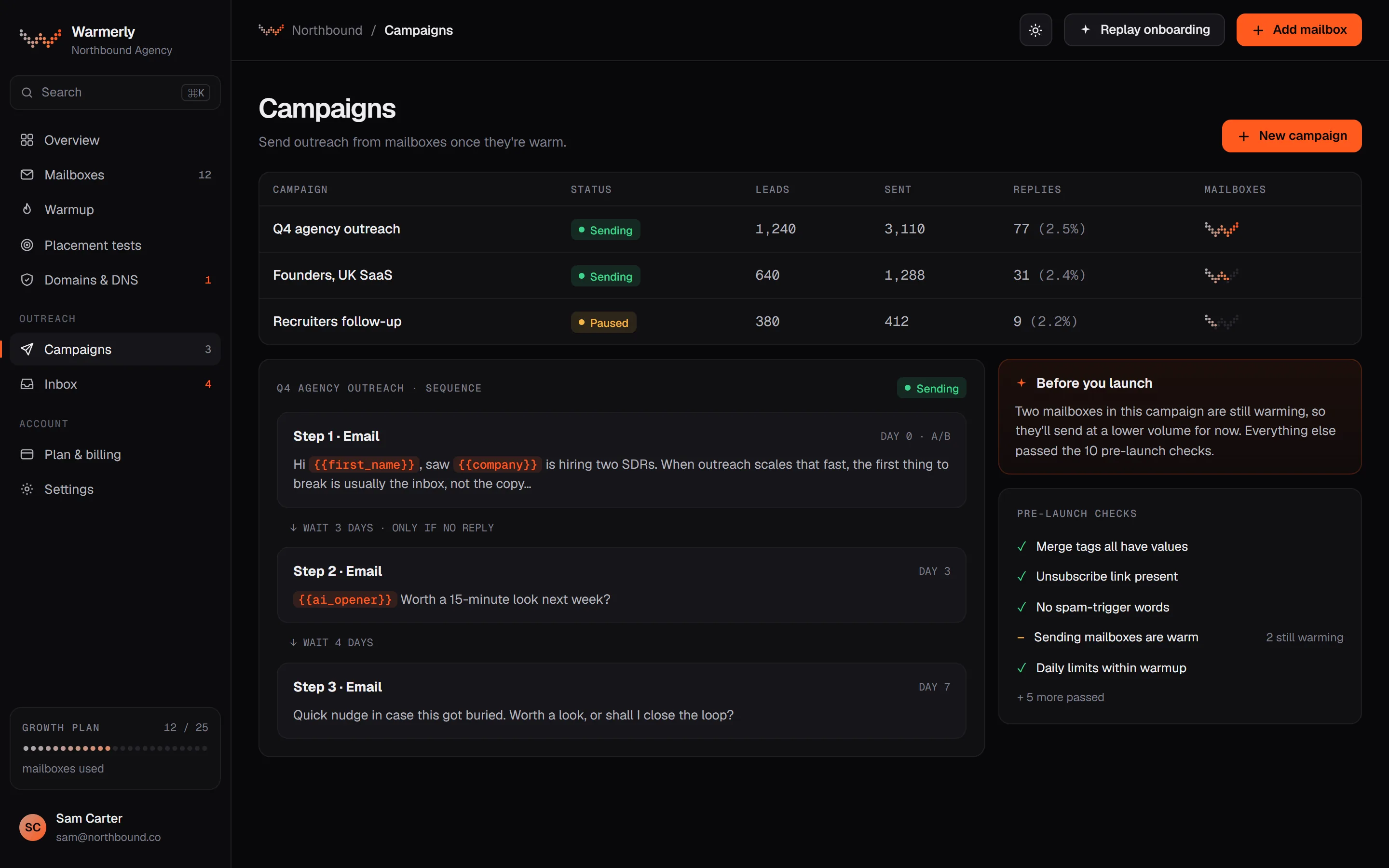
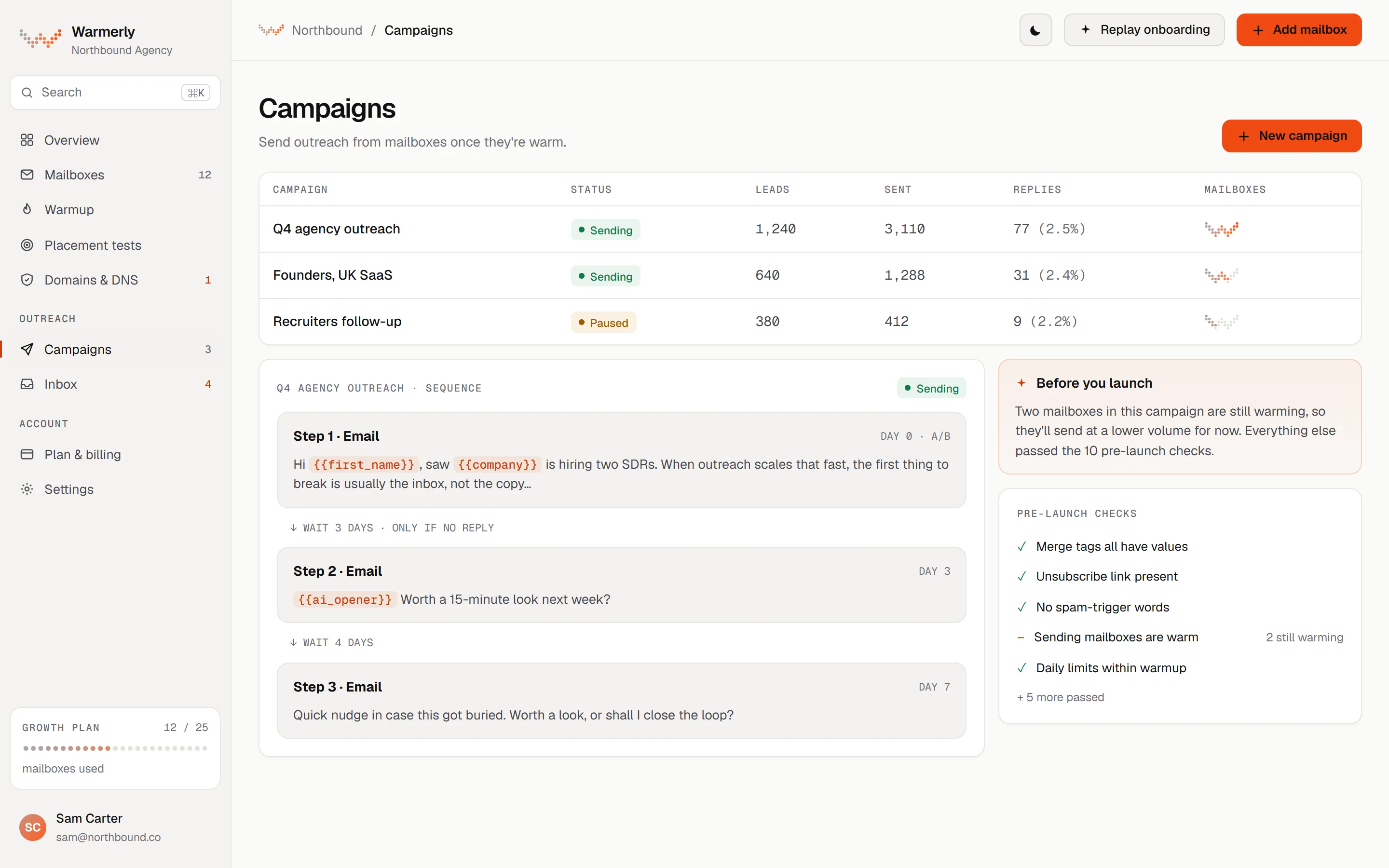
Warmerly campaigns screen: campaign list with status, leads, sent and replies, a three-step sequence and the pre-launch checks, sample dataWarmerly campaigns screen: campaign list with status, leads, sent and replies, a three-step sequence and the pre-launch checks, sample data
Campaigns. A campaign list, its sequence, and a pre-launch check that warns when sending mailboxes are still warming.Warmerly app, sample data.
CloselyDescribed, not pictured
LinkedIn sequences

Profile visits, connection requests, follow-ups, post likes and endorsements in one sequence, with email steps and four conditions: if connected, if email found, if email opened and if email clicked.

LinkedIn campaigns. Its LinkedIn automation page and its help article on conditions describe the sequence steps and the four conditions.Read on closelyhq.com and help.closelyhq.com, 21 October 2026. We show no Closely screenshot because we hold none we may reuse.
WarmerlySample data
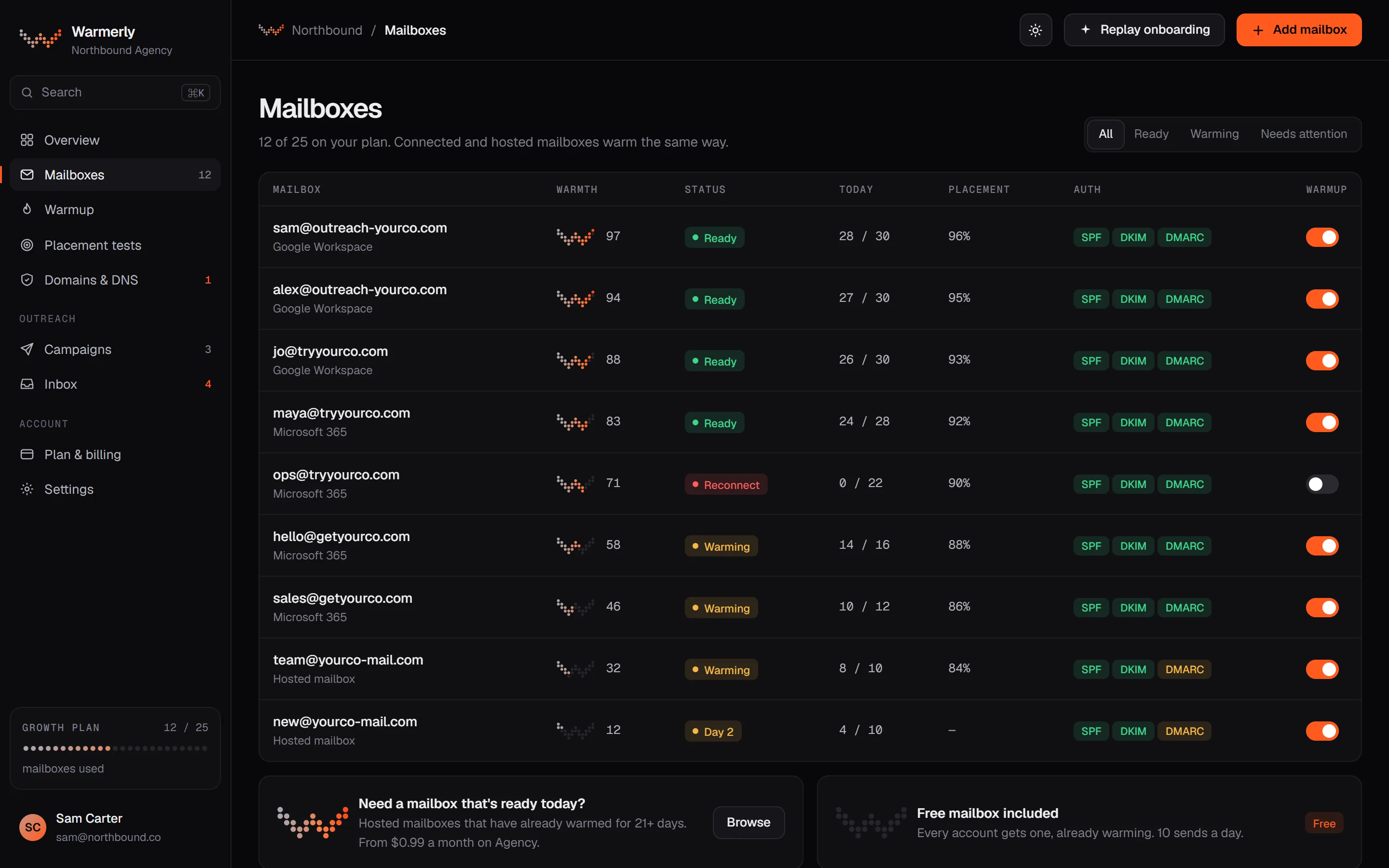
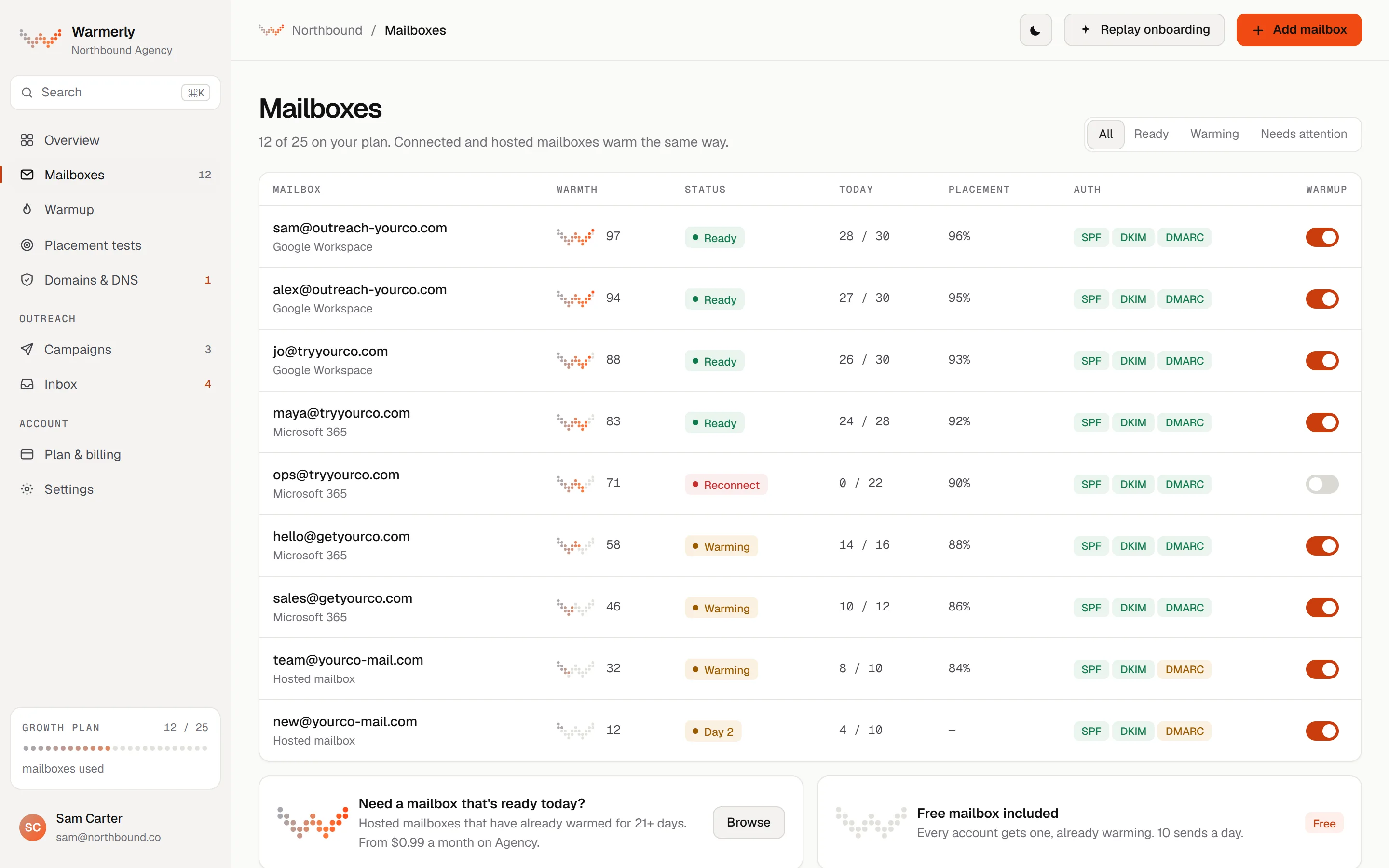
Warmerly mailboxes screen: every mailbox with its warmth, sends so far today against its daily limit and its DNS status, sample dataWarmerly mailboxes screen: every mailbox with its warmth, sends so far today against its daily limit and its DNS status, sample data
Mailboxes. Every mailbox with its warmth, the sends so far today against its daily limit, and its DNS status.Warmerly app, sample data.
CloselyDescribed, not pictured
Email accounts

Gmail, Outlook, and SMTP and IMAP accounts for the email steps. Its help article on daily limits gives 50 emails a day by default and 200 at most for each account.

Email accounts. Its pricing page lists unlimited email accounts on every plan. We found no warmup status or DNS view for them.Read on closelyhq.com and help.closelyhq.com, 21 October 2026. We show no Closely screenshot because we hold none we may reuse.
WarmerlySample data
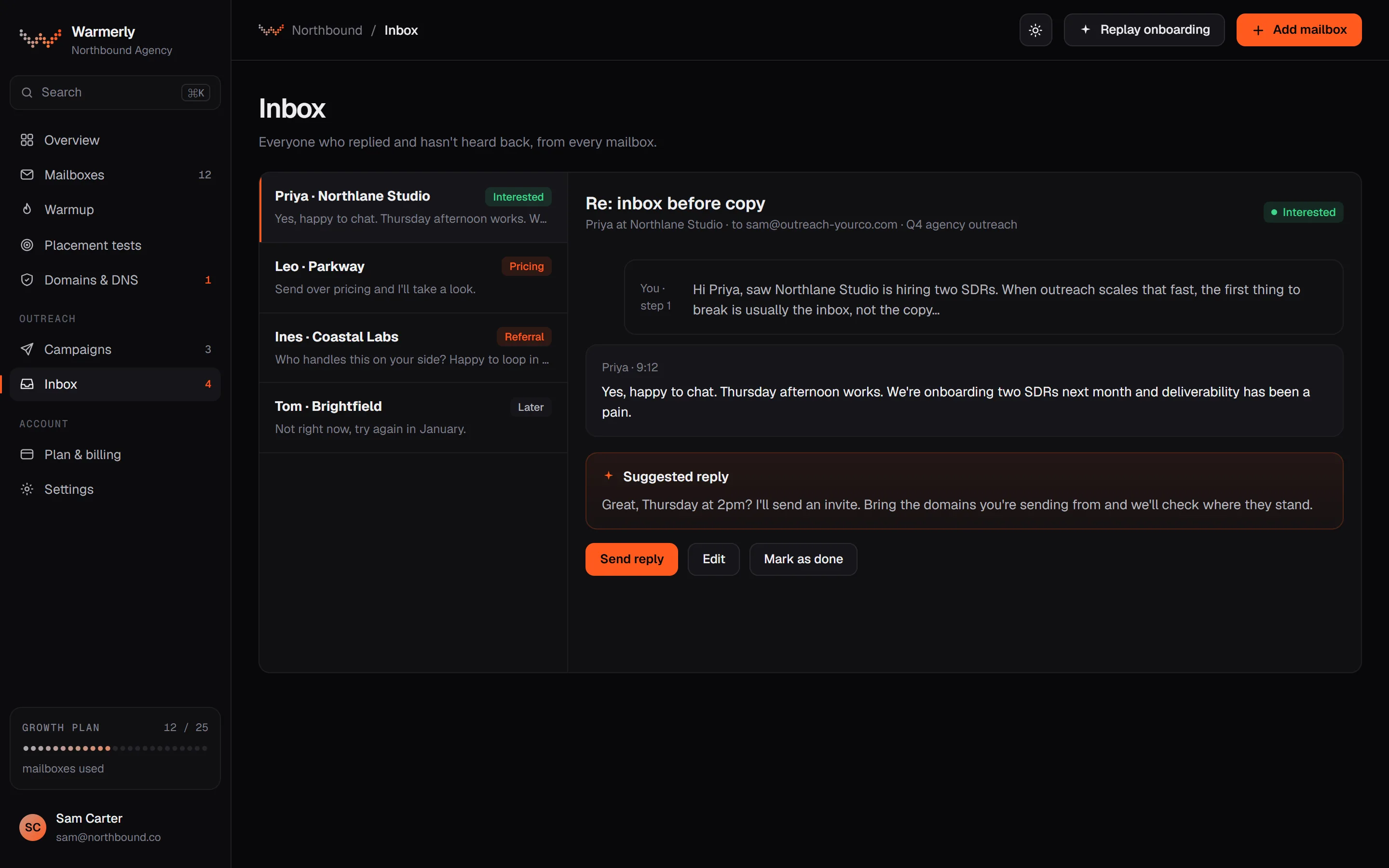
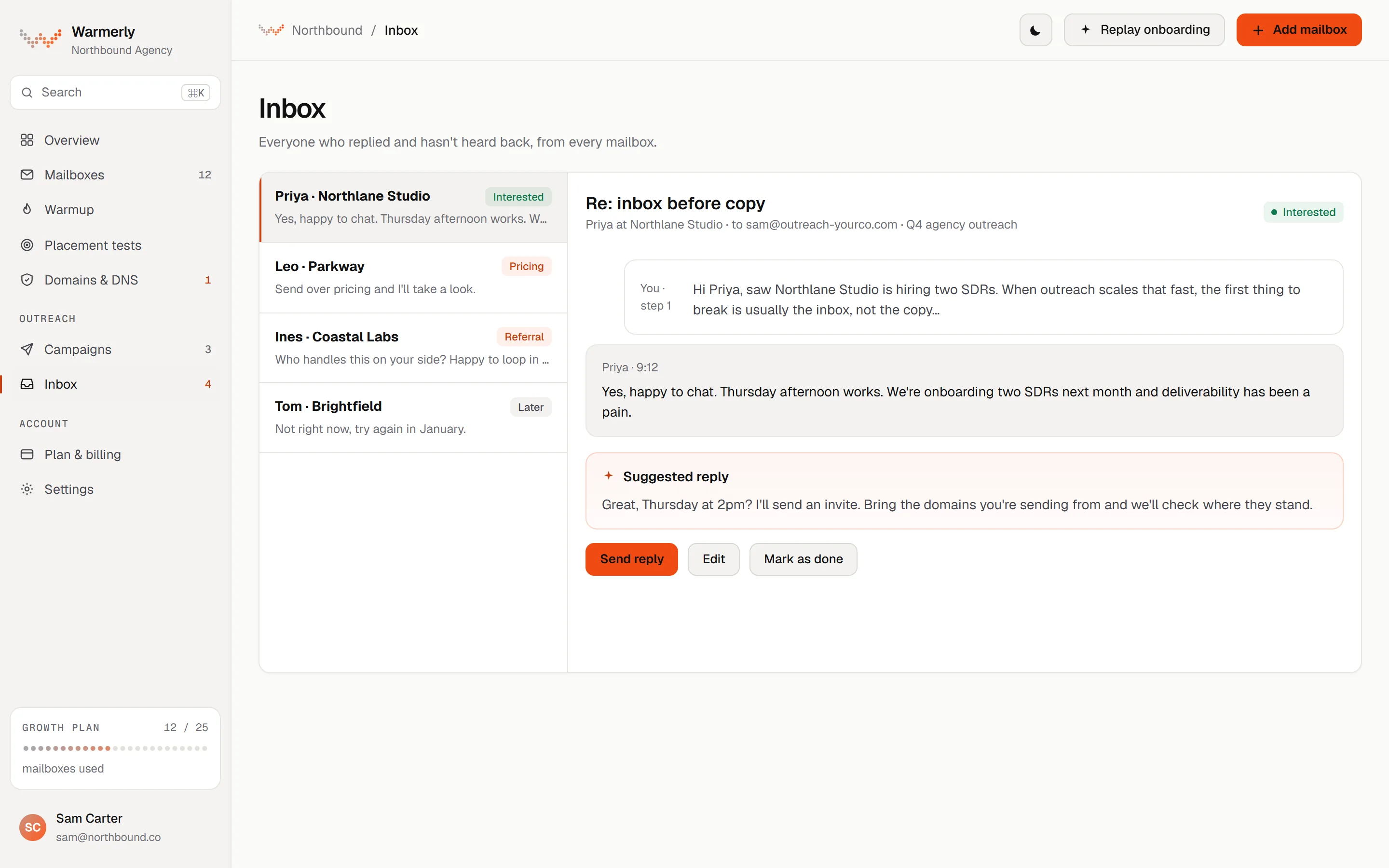
Warmerly inbox screen: everyone who replied, with the thread and a suggested reply, sample dataWarmerly inbox screen: everyone who replied, with the thread and a suggested reply, sample data
Inbox. Everyone who replied, with the thread and a suggested reply.Warmerly app, sample data.
CloselyDescribed, not pictured
Smart Inbox

Conversations with tags, templates and teammate presence. Its help overview describes managing LinkedIn conversations, with filters by account, campaign or tags.

Smart Inbox. Its pricing page lists the Smart Inbox and its help overview of the Inbox tab describes the filters and .txt exports.Read on closelyhq.com and help.closelyhq.com, 21 October 2026. We show no Closely screenshot because we hold none we may reuse.
Limits

Different things, capped.

Closely lists unlimited email accounts and caps what each account sends a day. Warmerly caps how many mailboxes your plan connects and does not meter sends on paid plans. On LinkedIn the two weekly numbers differ. Bars are drawn to one scale in each card, not across cards, and none of them is a target.

A Per day

Emails for each account

Warmerly30 by default
Closely50 by default

Warmerly's default is 30 a day for each mailbox, with a ramp for young mailboxes, a bounce brake and no monthly cap on paid plans. Closely's help article sets 50 a day by default and 200 as the most for each email account, and warns that starting above 50 without bulk-sending history may look suspicious. Read 21 October 2026.

B Starter plan

Email accounts connected

Warmerly5
CloselyUnlimited

Warmerly Growth gives 25 mailboxes and Agency 100; more than 100 is on request (email us). Closely's pricing page lists unlimited email accounts on every plan, so it is ahead on how many accounts you can connect.

C Per week

LinkedIn connection requests

Warmerly50 (Premium 100)
CloselyAbout 100

Closely's 2022 help article says LinkedIn sets a limit of about 100 connection requests a week and that Closely adds none. Warmerly caps a standard account at 50 a week and Premium at 100, ramped over about two weeks. LinkedIn's own rules and your profile's health decide what is safe.

Features

Line by line, losses included.

An orange dot marks where Warmerly is ahead. A purple dot marks where Closely is. Where Closely's own pages do not say, the cell says so rather than guess, and it may exist elsewhere.

Warmerly and Closely compared on price, LinkedIn, mailbox warmup, email sending, teams, integrations and data hosting
FeatureWarmerlyClosely
Main jobEmail warmup, then cold email from the warmed mailboxes. LinkedIn is a paid add-on.LinkedIn automation, with email steps in the same sequence.
Starting price (per month)$19 a month on Starter (5 mailboxes), or a free plan with no card. A LinkedIn account is $19 a month on top.$65 a month for 1 LinkedIn account, billed monthly; $39 billed annually.
What the price covers5 mailboxes on Starter, with warmup, DNS checks and cold email, and no cap on sends. LinkedIn is $19 a month per account on top.Unlimited email accounts and campaigns, an inbox, CRM integrations and webhooks on every plan; finders and AI features from Growth.
Free trialA free plan with no card, or a 7-day trial on paid email plans. LinkedIn accounts have no trial.A free trial on every plan; its length, card terms and end are not stated.
LinkedIn automationAn add-on from $19 a month per account: connection requests and messages in a sequence.The core product: profile visits, connection requests, follow-ups, post likes and endorsements, with several lead sources.
Warm-up and daily limitsA shared daily budget per account: 10 invitations a day and 50 a week on a standard account, ramped over 15 days.Warm-up on by default: 3 to 5 requests a day in week 1 and 8 to 11 in week 2; custom limits only with warm-up off.
Own IP address per accountEach LinkedIn account runs on its own managed proxy, per our provider. Not a listed Warmerly feature, and no region choice.A dedicated residential IP per LinkedIn account, on every plan.
Sequence builder and conditionsA drag-and-drop canvas that branches on opened, clicked, replied or timeout, with email, LinkedIn and wait steps.Four conditions with yes and no branches: if connected, if email found, if email opened and if email clicked.
Mailbox warmupOn every mailbox: threaded conversations with quoted replies, and spam rescue.Not offered. Its help article suggests warming sending accounts with another tool; its warm-up is for the LinkedIn account.
SPF, DKIM, DMARC and placement checksSPF, DKIM, DMARC and MX every six hours with 16 blocklists, and a placement test with limited accuracy.Not listed. Its help article points to outside tools for each check.
Email sending and mailboxesGmail, Outlook, Zoho or any SMTP and IMAP mailbox; 30 emails a day per mailbox by default, a ramp, a bounce brake and 13 kinds of pre-launch check.Gmail, Outlook, SMTP and IMAP; 50 a day by default and 200 at most per account, and 5,000 recipients per campaign.
Reply inboxOne queue of everyone who replied, across email and LinkedIn, with labels and a suggested reply.A Smart Inbox with tags, templates and teammate presence; its help overview covers LinkedIn conversations.
Lead finding, data and exportsA company database, an email finder and verifier with monthly allowances by plan, plus LinkedIn people search.Email and phone finders, live scraping and AI scoring from Growth; exports from Sales Navigator, posts and events on every plan.
Teams and white labelAgency plan, $179 a month: client workspaces, three roles. No white label.Roles, a white label option with a client portal and branded reports, and a success manager from Essential.
Integrations and APIThe API, webhooks and an MCP server on every plan; no CRM sync found.Native Salesforce, Pipedrive, HubSpot, GoHighLevel and Zoho, and webhooks, on every plan; no public API found.
Data hostingHosted in the EU, per our trust page, with the services behind it listed.Servers in the USA, per its privacy policy; no sub-processors listed in its DPA.
Warmerly is aheadClosely is ahead

Closely details read on closelyhq.com/pricing, its product and legal pages and help.closelyhq.com on ; they are what Closely says about itself, not our testing, and several help articles are one to three years old. Warmerly details come from our own product. Prices and features change, so check the vendor's site before you decide. A marked cell is where one side is ahead on what is published; unmarked rows are even, a different job, or not comparable.

Honest ledger

Where each one is ahead.

On LinkedIn, data and agency tools, Closely goes further. On the email half, Warmerly warms the mailbox and checks it on a schedule, and Closely leaves both to outside tools. Neither list is a ranking.

WarmerlyWhere it leads
  1. Mailbox warmup and spam rescueThreaded conversations on every mailbox. Closely lists no mailbox warmup and points to another tool.
  2. Domain checks every six hoursSPF, DKIM, DMARC and MX per domain, plus 16 blocklists. Closely's help article sends you to outside checkers.
  3. Guard rails on sendingA ramp for young mailboxes, a bounce brake and 13 kinds of pre-launch check. We found none of these on Closely's pages.
  4. No step to the next plan$19 for each LinkedIn account, or $49 for 3 and $75 for 5. At 2 accounts that is $38, where Closely moves you to Growth at $159 monthly.
  5. EU hosting and a free planCustomer data hosted in the EU, and one mailbox free with no card. Closely says its servers are in the USA.
CloselyWhere it leads
  1. LinkedIn as the whole productProfile visits, connection requests, follow-ups, post likes and endorsements, with leads from search, Sales Navigator, Recruiter, posts and groups.
  2. Phone numbers and exportsA phone finder and live scraping from Growth, and exports from Sales Navigator, posts and events on every plan. Warmerly has none of these.
  3. White label and a client portalA white label option with branded reports and a success manager from Essential. Warmerly has client workspaces and no white label.
  4. CRM syncNative Salesforce, Pipedrive, HubSpot, GoHighLevel and Zoho, with webhooks, on every plan. We found no CRM sync on Warmerly.
  5. A stated dedicated IP and unlimited email accountsA dedicated residential IP per LinkedIn account, and unlimited email accounts, on its pricing page. Ours is a managed proxy with no region choice.
Inside Warmerly

What stands behind the send.

If your sequence ends in an email, this is the mailbox behind it, which Closely's help article leaves to outside tools. The LinkedIn card shows the daily budget Warmerly gives a LinkedIn account, so you can judge that half too.

Email warmup

Threaded warmup emails

Your mailbox writes to a network of other mailboxes, and Warmerly's warmup engine writes back with the earlier message quoted, so each exchange is a thread, not a one-line ping.

sam@outreach-yourco.com09:14
Quick one before Thursday: are we still on for the Q3 planning notes?
priya@northlane.studio09:52
Yes, send the draft over. Thursday afternoon works.
> are we still on for the Q3 planning notes?
Thread, sample
Authentication

SPF, DKIM and DMARC, per domain

Each domain is checked every six hours, with MX and blocklists, and a plain explanation when something is missing.

SPFVerified
DKIMVerified
DMARCMissing on yourco-mail.com
MXVerified
DNS check, sample
LinkedIn add-on

A daily budget per account

At full ramp on a standard account. Connection requests are also capped at 50 a week.

Connection requests10
Messages50
Profile views40
Reactions20
Comments5
Posts2
From the product's safety limits
warmerly · warmup
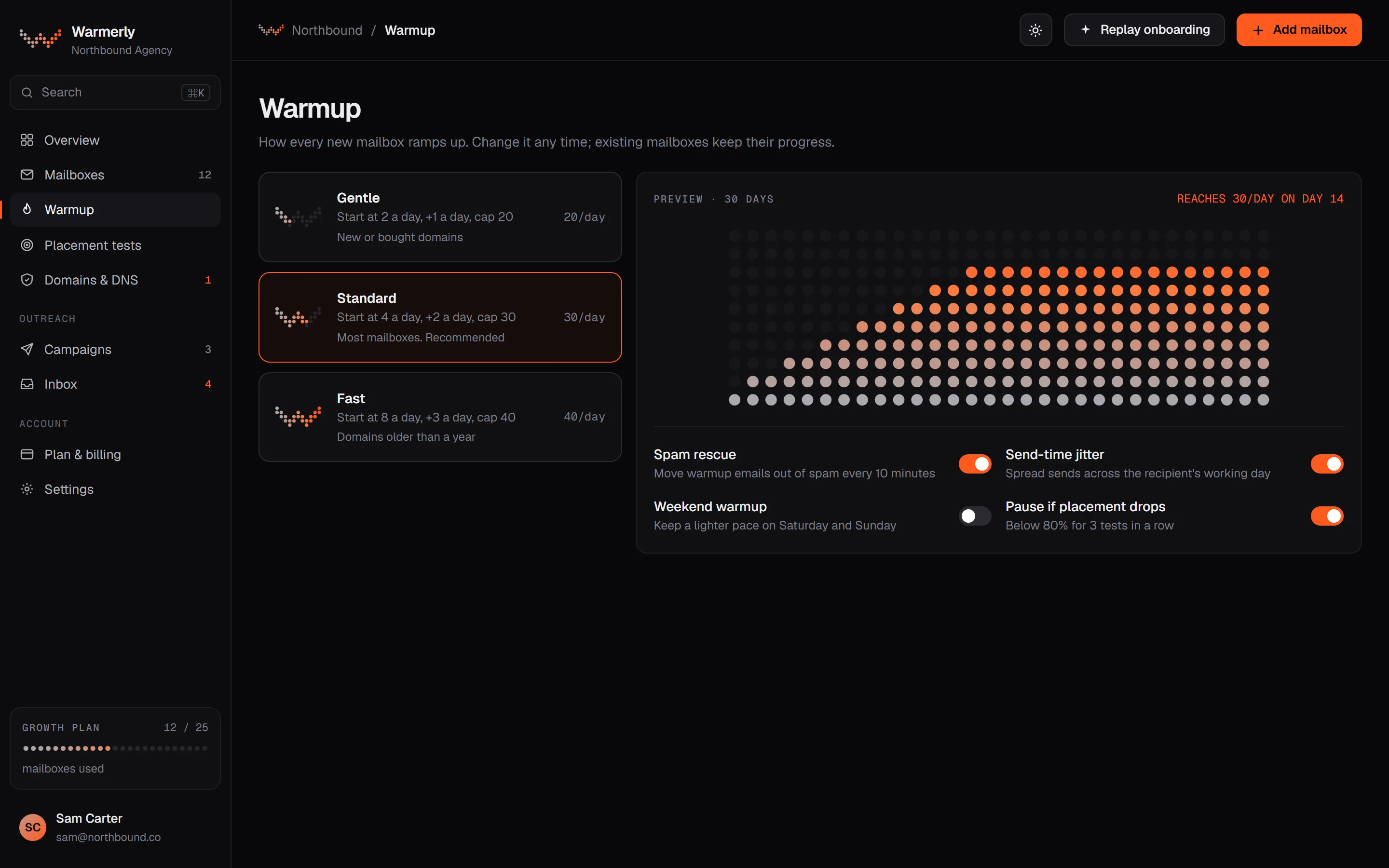
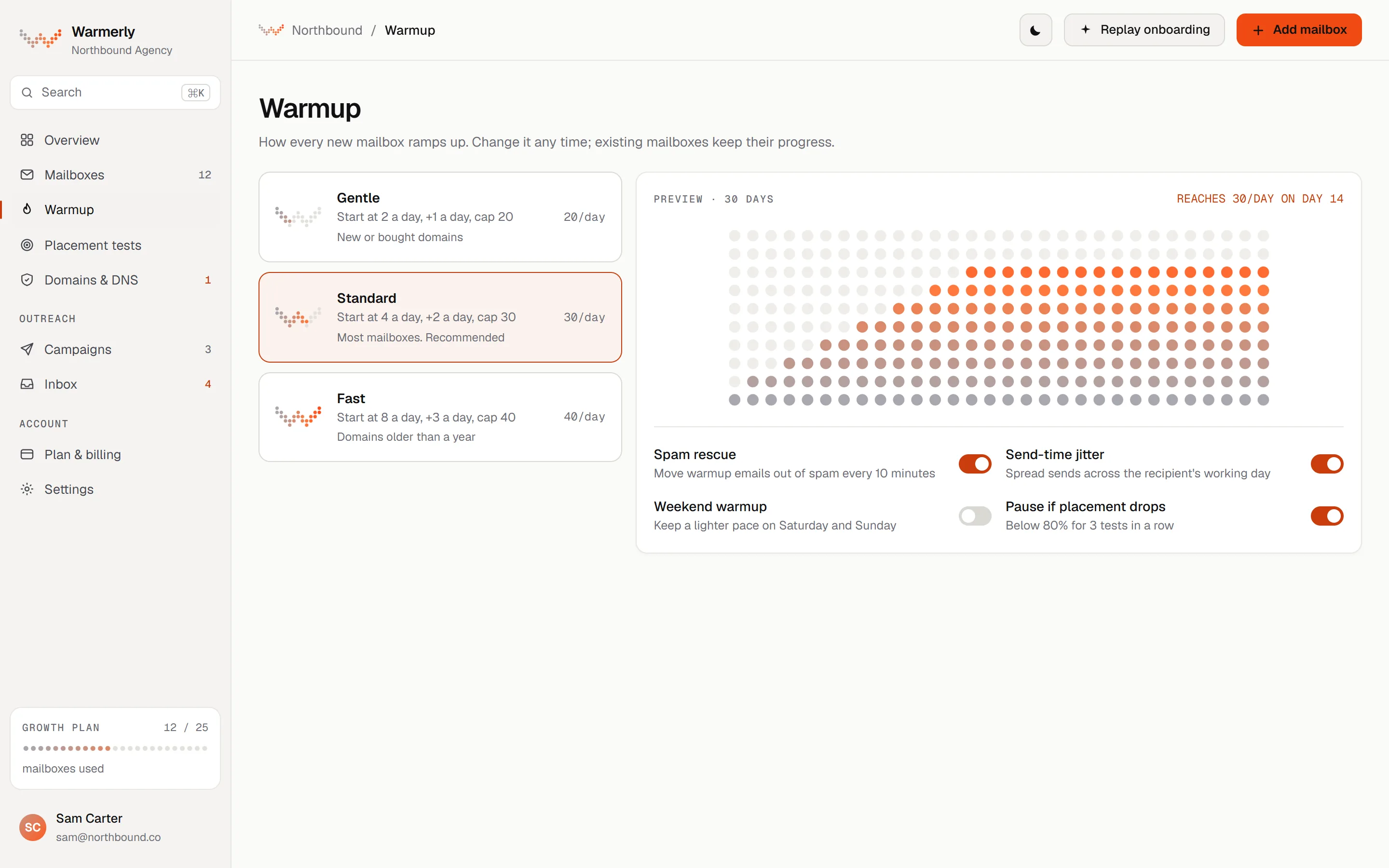
Warmerly warmup screen showing the warmup status of connected mailboxes, sample dataWarmerly warmup screen showing the warmup status of connected mailboxes, sample data
Sample data
The warmup screen: the mailbox you send cold email from, warming before the first campaign goes out.

Closely leaves mailbox warmup to other tools, and we offer no phone finder or CRM sync. Plenty of teams run

both.
Together

Switching, or adding a lane.

Most teams will not need to switch at all. Keep Closely on LinkedIn, and connect the mailboxes you send cold email from to Warmerly if you want them warmed on a published ramp and checked every six hours. Here is a sample fortnight for one prospect, with the two lanes taking turns.

One prospect, 14 daysA sample, not a recommended cadence
WarmerlyEmail lane
  1. Day 1Email 1, from a warmed mailbox
  2. Day 6Email 2, if no reply
  3. Day 13Last note
CloselyLinkedIn lane
  1. Day 0Connection request
  2. Day 3First message, after they accept
  3. Day 10Follow-up message
01Warmerly

Connect the sending mailboxes

Gmail or Microsoft 365, on the free plan with no card. Warmup starts at once and the DNS checks run.

02Closely

Keep LinkedIn where it is

Your accounts, campaigns and lists stay in Closely. Nothing changes there.

03Warmerly

Send once they are warm

Launch cold email from the same mailboxes. If you later want LinkedIn steps in the same sequence, the add-on is $19 an account.

AClosely

Take your leads with you

The Closely pages we read list CSV files as a way to bring leads in and .txt exports from its inbox, but we found no stated export of a campaign's leads. Look in the app for a list export first. If you can export the list you want to email, import the CSV into a Warmerly campaign. The guide is How do I import leads from a CSV?

BWarmerly

Rebuild the email steps

There is no tool that reads a Closely sequence, so you write the email steps again in the Warmerly sequence editor. The LinkedIn steps stay in Closely unless you add the $19 LinkedIn account and rebuild those too.

CWarmerly

Let the mailbox warm first

A newly connected mailbox ramps from 4 warmup emails a day to 25 by day 14 and 50 by day 30. Start with small sends and raise them as the ramp allows, rather than copying a Closely volume across on day one.

If you do leave Closely, its help article on cancelling says you cancel through a pop-up that sends a request to its team, and that you keep all features until the date shown. It gives no refund or trial terms (help.closelyhq.com, read 21 October 2026).

Verdict

Our verdict.

Closely is the LinkedIn and data specialist: more actions and lead sources, phone numbers, white label, CRM sync and a stated dedicated IP that Warmerly does not match. Warmerly is the email specialist: it warms the mailboxes and checks their DNS every six hours, then sends cold email from any mailbox, from $19 a month with no cap on sends, with customer data hosted in the EU. They overlap on sequences, an email finder and an inbox, and little else. Pick by the channel that brings you meetings, or run both.

Pick

Warmerly if

  • Cold email is your main channel
  • You need the mailboxes warmed and their DNS watched
  • You run 2 or 4 LinkedIn accounts and do not want a spare
  • You need customer data hosted in the EU
Pick

Closely if

  • LinkedIn is your main channel
  • You need phone numbers or exports from Sales Navigator, posts and events
  • You want white label, a client portal or native CRM sync
  • You run exactly 1, 3 or 5 LinkedIn accounts and can pay annually
Or

Both, side by side

  • You run LinkedIn and email as two channels
  • You want each tool to do the job it is built for
  • Warmerly warms the mailboxes whichever tool sends the email
  • You would rather add than migrate
Questions

Warmerly vs Closely, answered.

Is Warmerly a Closely alternative?

Only in part. Closely is LinkedIn automation first: LinkedIn and email steps in one sequence, an inbox, email and phone finders, CRM sync and white label, priced by LinkedIn account. Warmerly is email first: it warms Gmail, Outlook, Zoho and SMTP mailboxes, checks their DNS, then sends cold email from them, and offers LinkedIn as a $19 a month add-on for each account. If LinkedIn is your main channel, Closely goes further. If cold email is, Warmerly is built for it. Plenty of teams need both.

How much does Closely cost?

Closely's pricing page shows Starter at $65 a month billed monthly or $39 billed annually for 1 LinkedIn account, Growth at $159 or $95 for 3, and Essential at $259 or $155 for 5. Custom has no price listed. Every plan lists unlimited email accounts and a free trial, with no length stated (closelyhq.com/pricing, read 21 October 2026).

Does Closely warm up email mailboxes?

Not as a feature we found. Its pricing page lists LinkedIn account warmup and no mailbox warmup, and its help article on spam suggests warming sending accounts with another tool. Closely may offer something we did not find, so check with them.

Does Closely check SPF, DKIM and DMARC?

We found no in-app check. Its help article on spam tells you to test SPF with mail-tester.com and links Google and Microsoft guides for DKIM and DMARC. Warmerly checks SPF, DKIM, DMARC and MX every six hours, with 16 blocklists.

Does Warmerly do LinkedIn?

Yes, as a separate paid add-on: $19 a month per LinkedIn account, or $49 for 3 and $75 for 5, with no trial. It sends connection requests and messages in the same sequence as email, has a LinkedIn warmup that starts paused until you switch it on, and has a reply assistant. A standard account is limited to 10 connection requests a day and 50 a week (Premium 20 and 100), ramped over the first two weeks. Closely goes further on LinkedIn: profile visits, post likes, endorsements, more lead sources, conditions on whether a lead connected, and a dedicated residential IP on every plan.

Where does Closely host data?

Its privacy policy says its servers are based in the USA, so data is generally processed and hosted outside the EU, and its data processing agreement lists no sub-processors (read 21 October 2026; the policy is dated 1 May 2022). Warmerly's trust page says customer data is hosted in the EU.

Can I use Warmerly and Closely together?

Yes. They do different jobs, so many teams will not need to switch at all. Keep Closely for LinkedIn, and connect the mailboxes you send cold email from to Warmerly so they are warmed and monitored whichever tool sends.

Can I try Warmerly before paying?

Yes. There is a free plan with one mailbox, capped sends and no card, and paid email plans have a 7-day trial. LinkedIn accounts have no trial. Closely shows a free trial on every plan but does not state its length.

Keep Closely for LinkedIn. Warm the mailbox.

Connect a mailbox. Warmerly runs alongside Closely, so you can see your mailbox warm before you change anything.

Free plan, no card. Paid email plans: 7-day trial, first charge on day 8. LinkedIn accounts are $19 a month each, with no trial.