Warm up now. Book January. New year head start: 30 days free on any paid plan. Claim 30 days freeConnect your own mailbox and we add a free one on our domain, for warmup and replies. See how it works

Skip to content
Warmerly Meet Alfred

Two starting points. Run both.

Meet Alfred automates LinkedIn from $59 a seat a month, and adds email and X from $99. Warmerly warms your email mailboxes, then sends cold email from them, from $19 a month. This page shows where each one stops.

Warmerly Starter$19/ month5 mailboxes, no cap on sends
Meet Alfred Business$99/ seatThe first plan with email

Meet Alfred read on meetalfred.com/pricing, its home page and help centre,

Shared ground, drawn in dotsNot to scale
Warmerly's sideMailbox warmup, DNS checks, a free plan, an email limit per mailbox
Shared groundSequences with email and LinkedIn steps, a reply inbox, lead finding, an API
Meet Alfred's sideX steps, InMail, group and event campaigns, Teams and white label
The first month

A mailbox and a profile start small.

Gmail and Outlook judge how many messages a mailbox sends. LinkedIn judges how many actions a profile takes. Drag through the first 30 days to see the ramps Warmerly uses for each. Meet Alfred's pages list no ramp, so its row stays empty rather than guess.

Mailbox
LinkedIn

Lit dot: what the ramp allows that day. Faint dot: room the curve has above the mailbox provider's cap.

Warmerly mailbox
25warmup emails a day

Warmerly LinkedIn account
8connection requests a day

Meet Alfred
No ramp listed

Its email help says to start below 100 emails a day for the first few weeks. It says you can adjust daily LinkedIn limits and states no defaults, so no figures are drawn.

Mailbox ramp: the anchor points in Warmerly's capacity code (4 a day at day 0, 8 at day 3, 15 at day 7, 25 at day 14, 35 at day 21, 50 at day 30, straight lines between), held to 40 a day on Gmail and 30 on Outlook. LinkedIn: connection requests start at half the ceiling (10 a day and 50 a week on a standard account, 20 and 100 on Premium) and reach it on day 15. These are ceilings, not promises: weekends run lower, and LinkedIn's and the mailbox provider's own limits and signals still decide. Meet Alfred: help.meetalfred.com article on email campaigns and meetalfred.com home page, read 21 October 2026.

On screen

What Warmerly shows you.

Warmerly is built around the mailbox you warm and the campaign you send from it. We show no Meet Alfred screenshots: we could not confirm the right to reuse them, so see meetalfred.com for its product.

WarmerlySample data
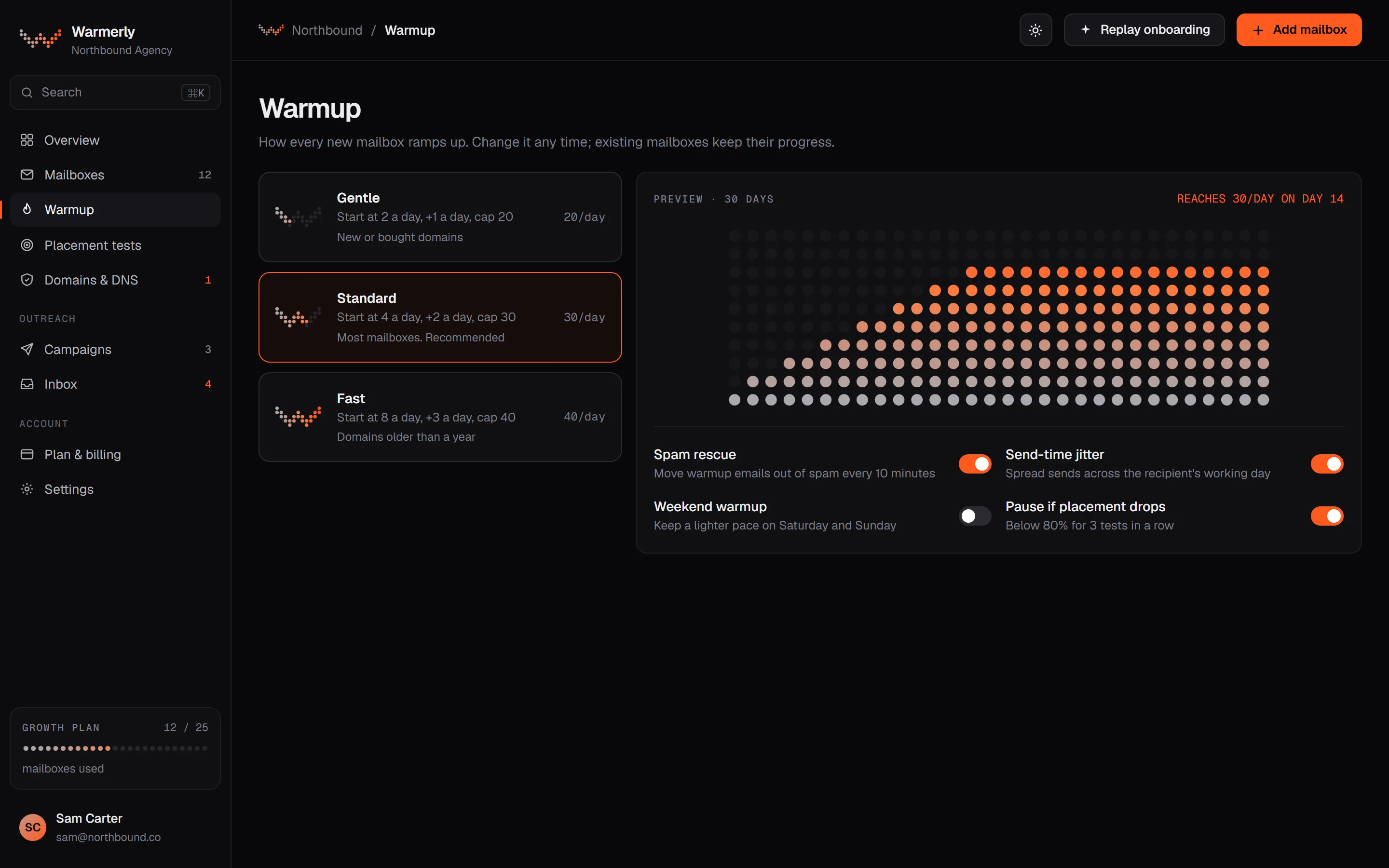
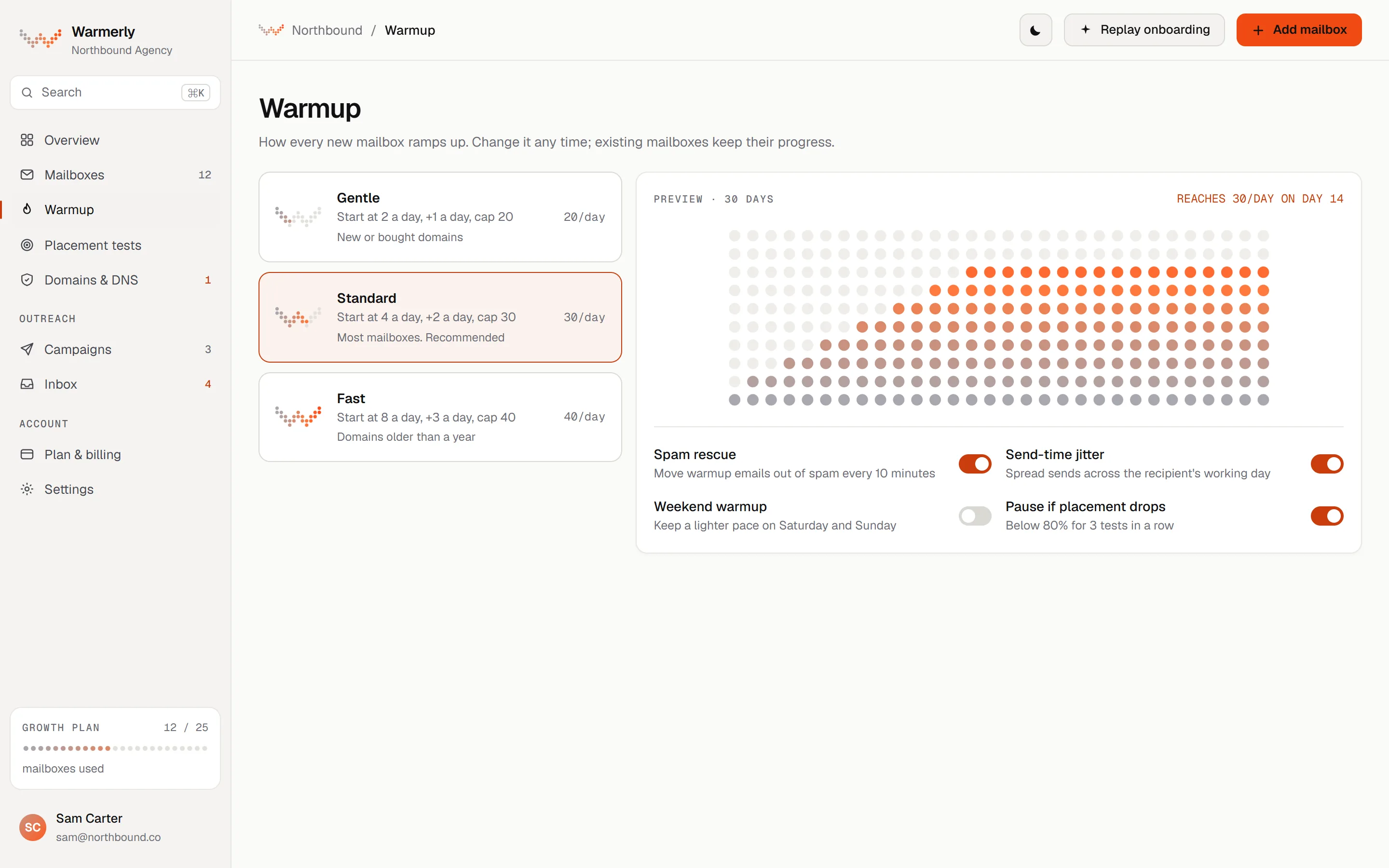
Warmerly warmup screen: every mailbox with its warmup day, today's limit and the reason for it, sample dataWarmerly warmup screen: every mailbox with its warmup day, today's limit and the reason for it, sample data
Warmup. Every mailbox with its warmup day, today's limit and the reason for itWarmerly app, sample data.
WarmerlySample data
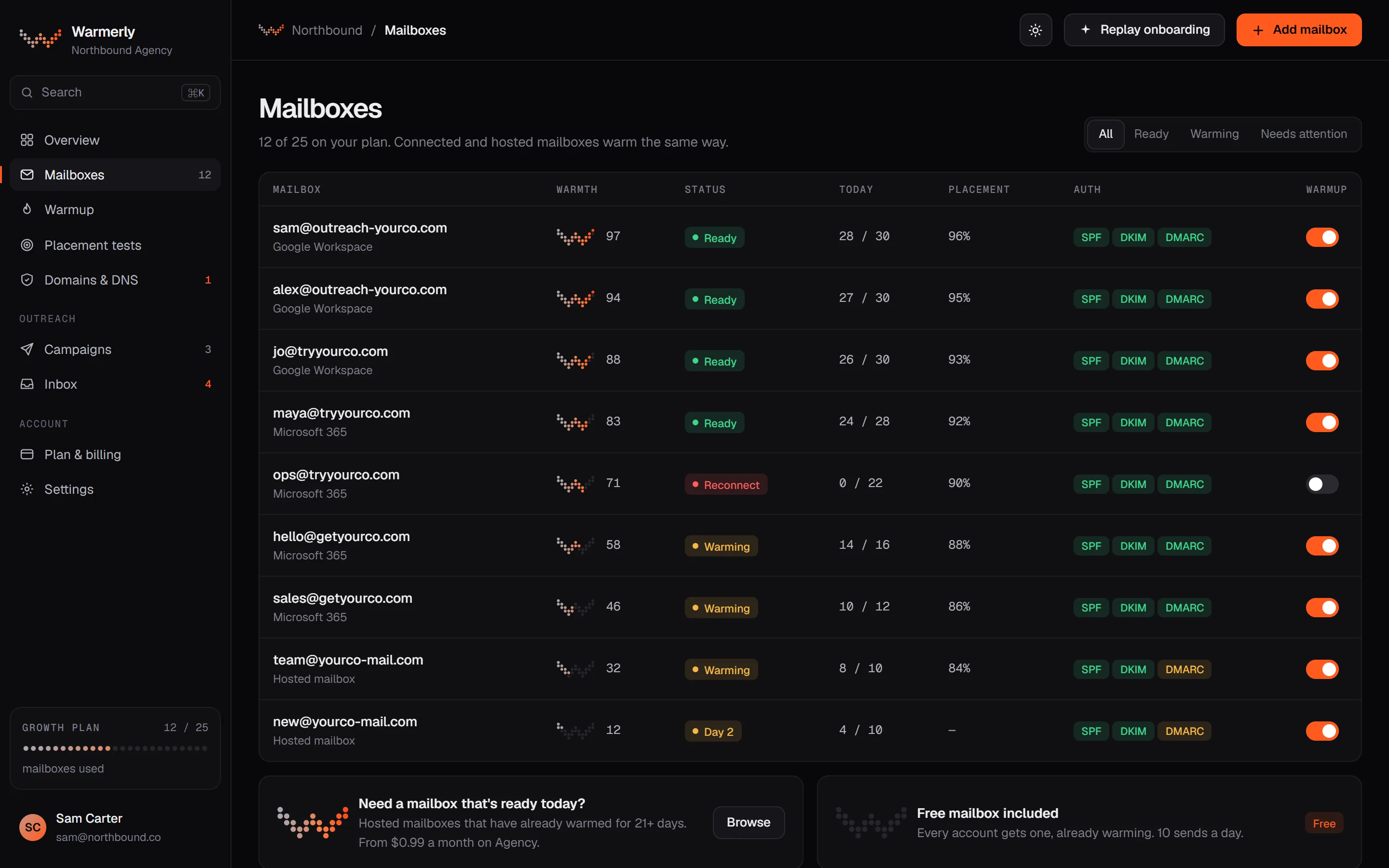
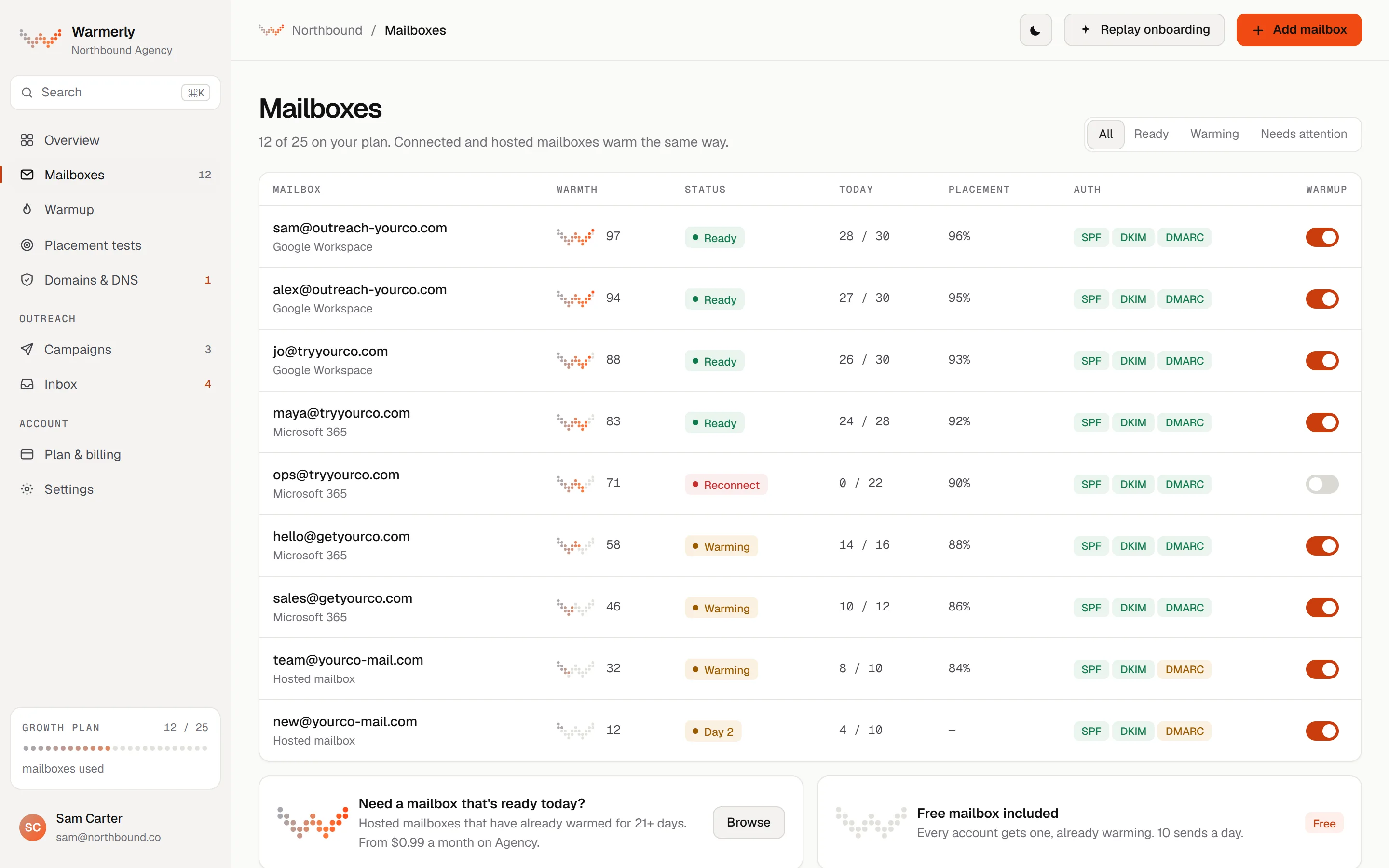
Warmerly mailboxes screen: every mailbox with its warmth, sends so far today against its daily limit and its DNS status, sample dataWarmerly mailboxes screen: every mailbox with its warmth, sends so far today against its daily limit and its DNS status, sample data
Mailboxes. Every mailbox with its warmth, sends so far today against its daily limit, and its DNS statusWarmerly app, sample data.
Limits

What each one counts.

Warmerly counts mailboxes. Meet Alfred counts seats, and each seat is one person's LinkedIn profile. Pick the one whose limit you will not hit.

Warmerly counts

Warmerly

  • Mailboxes: 1 on Free, 5 on Starter, 25 on Growth, 100 on Agency
  • Sends: not metered on paid plans; each mailbox keeps a daily limit, 30 by default
  • Free plan: 100 campaign sends a month
  • LinkedIn: $19 a month per connected account, on top of any plan
Meet Alfred counts

Meet Alfred

  • Seats: one on Individual and Business, three or more on Teams, a quote on Unlimited
  • Lead Finder results: 1,000, 5,000 or 10,000 depending on the plan
  • Email: one email integration at a time, and a help article puts Gmail at up to 400 a day and Google Workspace at up to 800
  • Sequences and steps: no cap on active sequences or steps, per its Business card

Meet Alfred figures read on meetalfred.com/pricing and help.meetalfred.com on . Warmerly figures come from the product as it runs.

Running both

What the stack costs.

Set how many people automate LinkedIn and how many mailboxes you send from. Three stacks, one scale, monthly list prices. Meet Alfred charges per seat and its pages do not say how many mailboxes a seat can connect, so the mailboxes slider only moves the Warmerly bars.

Warmerly: the Free plan covers 1 mailbox, Starter 5 ($19), Growth 25 ($49), Agency 100 ($179); a LinkedIn account is $19 a month on top, with no trial (3 accounts are $49 and 5 are $75, which this scale does not apply). Meet Alfred, monthly billing: Individual $59 a seat, LinkedIn only; Business $99 a seat with email; Teams $79 a seat from 3 seats. Annual billing is 40% off. We assume one seat per LinkedIn account, which its pages do not state. More than 100 mailboxes? Email us.

Warmerly, both channels$57

Meet Alfred, LinkedIn and email$198

Meet Alfred for LinkedIn, Warmerly for email$217

Warmerly email planWarmerly LinkedIn accountsMeet Alfred seats

Features

Line by line, losses included.

An orange dot marks where Warmerly is ahead. A blue dot marks where Meet Alfred is. Where Meet Alfred's own pages do not say, the cell says so rather than guess, and it may exist elsewhere.

Warmerly and Meet Alfred compared on price, channels, email sending, warmup, LinkedIn, integrations and teams
FeatureWarmerlyMeet Alfred
Main jobEmail warmup, then cold email from the warmed mailboxes. LinkedIn is a paid add-on.LinkedIn automation first, with email and X as extra channels in the same sequence.
Starting price (per month)$19 a month on Starter (5 mailboxes), or a free plan with no card.$59 a seat a month on Individual, LinkedIn only; $35 a seat on annual billing.
Cheapest plan with emailFree for 1 mailbox, then Starter at $19 a month for 5 mailboxes.Business, $99 a seat a month; $59 on annual billing. Teams is $79 a seat from 3 seats.
Free trialA free plan with no card, or a 7-day trial on paid email plans. LinkedIn accounts have no trial.7-day free trial with no card, per its home page; its pricing page states no length. No refunds once upgraded.
LinkedIn automationAn add-on from $19 a month per account: connection requests, messages and AI-written messages in a sequence.The core product on every plan, with InMail and campaigns from groups, events, posts and company pages from Business.
Channels in one sequenceEmail and LinkedIn steps, with branches on opened, clicked, replied or timeout. No X step.LinkedIn, email and X from Business; its X help article says the feature is currently under maintenance.
Mailboxes you can send from5 on Starter, 25 on Growth, 100 on Agency, and more on request.One email integration at a time, per its help article; no larger number is stated on the pages we read.
Daily email limits and ramp30 a day a mailbox by default, with a ramp from 3 to 15 a day for young mailboxes.Up to 400 a day from Gmail and 800 from Google Workspace, with advice to start below 100 a day.
Email warmup and deliverabilityOn every mailbox: threaded conversations with quoted replies, and spam rescue.Not listed on its pricing page or in its email help articles.
SPF, DKIM and DMARC checksChecked every six hours per domain, with the exact record to add when one is missing.Not listed on its pricing page or in its email help articles.
LinkedIn safety and limitsA written budget: 10 connection requests a day and 50 a week on a standard account, ramped over two weeks.Smart limits and human-like delays, with limits you can adjust; no daily numbers are stated. A custom proxy is possible.
Reply inboxOne queue of everyone who replied, across email and LinkedIn, with suggested replies.A Smart LinkedIn Inbox on every plan, tags and notes, and a collaborative team inbox on Teams.
Lead finding and verificationA company database, an email finder and email verification, plus LinkedIn people search as an add-on.A Lead Finder over LinkedIn and Sales Navigator, with 1,000 to 10,000 results by plan. Email verification is not listed.
IntegrationsThe API and 16 mailbox-health webhooks on every plan, and an MCP server on every plan. No CRM sync.Zapier and webhooks from Business, and native Salesforce and HubSpot on Teams.
Teams, roles and white labelAgency, $179 a month: 100 mailboxes shared across client workspaces, three roles. No white label.Teams, from 3 seats at $79 a seat: roles and permissions, a team inbox, team analytics and white label.
Where data is heldCustomer data is hosted in the EU, per its trust page.Amazon data centres in the US, per its security page.
Warmerly is aheadMeet Alfred is ahead

Meet Alfred details read on meetalfred.com/pricing (its price script gives monthly list prices of $59, $99 and $79 a seat, and the page's static text shows lower figures that we report on the detail pages), its home page, security page and help centre on . Warmerly details come from our own product. Prices and features change, so check the vendor's site before you decide. A marked cell is where one side is ahead on what is published; unmarked rows are even, a different job, or not comparable.

Honest ledger

Where each one is ahead.

On LinkedIn, X, integrations and teams, Meet Alfred goes further. On the email half, Warmerly does what Meet Alfred's pages do not list. Neither list is a ranking.

WarmerlyWhere it leads
  1. Mailbox warmup and spam rescueThreaded conversations on every mailbox. Meet Alfred's pages list no mailbox warmup.
  2. Domain checks every six hoursSPF, DKIM and DMARC per domain, with the record to add when one is missing.
  3. More than one mailbox5 on Starter at $19. Meet Alfred's help article says one email integration at a time.
  4. Email from $19, not $99 a seatStarter against Business. A free plan with no card sits below that.
Meet AlfredWhere it leads
  1. LinkedIn as the whole productInMail and campaigns from groups, events, posts and company pages, not an add-on.
  2. X in the sequenceAn X step from Business, though its own help article says it is under maintenance.
  3. IntegrationsZapier and webhooks from Business, native Salesforce and HubSpot on Teams.
  4. Teams and white labelRoles, a team inbox and your own domain and sending address, from 3 seats.
  5. A trial for LinkedIn7 days with no card, per its home page. Ours has none for LinkedIn accounts.
Emails a day from one mailbox

The numbers each one gives

Not a target
Warmerly, young mailbox ramp top15
Warmerly, default daily limit30
Meet Alfred advice for the first weeks<100
Meet Alfred, Gmail400
Meet Alfred, Google Workspace800

Warmerly's figures are defaults in its code: a daily campaign limit of 30 a mailbox, and a ramp that starts at 3 and tops out at 15 for young mailboxes. Meet Alfred's are from its email campaigns help article: Gmail accounts "up to 400 emails a day", Google Workspace "up to 800", and "start with daily limits below 100 emails for the first few weeks". A ceiling is not a safe volume, and neither side's number promises inbox placement. Warmerly spreads volume over several warmed mailboxes. Read 21 October 2026 on help.meetalfred.com.

Your mix

Where does your outreach live?

Slide to the share of your outreach that goes through LinkedIn and X. It is a rough guide, not a verdict: your buyers, your list and your own limits matter more than any slider.

EmailLinkedIn and X
Both channels carry weight

Run each tool for its own job.

Inside Warmerly

What stands behind the send.

If your sequence ends in an email, this is the half Meet Alfred's pages do not list. The LinkedIn card shows the daily budget Warmerly gives a LinkedIn account, so you can judge that half too.

Email warmup

Threaded warmup emails

Your mailbox writes to a network of other mailboxes, and Warmerly's warmup engine writes back with the earlier message quoted, so each exchange is a thread, not a one-line ping.

sam@outreach-yourco.com09:14
Quick one before Thursday: are we still on for the Q3 planning notes?
priya@northlane.studio09:52
Yes, send the draft over. Thursday afternoon works.
> are we still on for the Q3 planning notes?
Thread, sample
Authentication

SPF, DKIM and DMARC, per domain

Each domain is checked every six hours, with a plain explanation when something is missing.

SPFVerified
DKIMVerified
DMARCMissing on yourco-mail.com
MXVerified
DNS check, sample
LinkedIn add-on

A daily budget per account

At full ramp on a standard account. Connection requests are also capped at 50 a week.

Connection requests10
Messages50
Profile views40
Reactions20
Comments5
Posts2
From the product's safety limits
warmerly · warmup
Warmerly warmup screen showing the warmup status of connected mailboxes, sample dataWarmerly warmup screen showing the warmup status of connected mailboxes, sample data
Sample data
The warmup screen: the mailbox you send cold email from, warming before the first campaign goes out.

Meet Alfred lists no mailbox warmup, and we have no X step. Plenty of teams run

both.
Together

Nothing to migrate. Add a lane.

There is no switching step. Keep Meet Alfred on LinkedIn and X, and connect the mailboxes you send cold email from to Warmerly. Here is a sample fortnight for one prospect, with the two lanes taking turns.

One prospect, 14 daysA sample, not a recommended cadence
Meet AlfredLinkedIn lane
  1. Day 0Connection request
  2. Day 3First message, after they accept
  3. Day 10Follow-up message
WarmerlyEmail lane
  1. Day 1Email 1, from a warmed mailbox
  2. Day 6Email 2, if no reply
  3. Day 13Last note
01Meet Alfred

Keep LinkedIn and X where they are

Your profiles, sequences and limits stay in Meet Alfred. Nothing changes there.

02Warmerly

Connect the sending mailboxes

Gmail or Microsoft 365, on the free plan with no card. Warmup starts at once and the DNS checks run.

03Warmerly

Send once they are warm

Launch cold email from the same mailboxes. If you later want LinkedIn steps in the same sequence, the add-on is $19 an account.

Verdict

Our verdict.

Meet Alfred is the LinkedIn and social specialist: InMail, group and event campaigns, an X step, Zapier and native CRM integrations, a team inbox and white label, all of which Warmerly lacks or has in a smaller form. Warmerly is the email specialist: it warms the mailboxes and sends cold email from them, from $19 a month with no cap on sends. They overlap on sequences and basic LinkedIn steps. Pick by the channel that brings you meetings, or run both.

Pick

Warmerly if

  • Cold email is your main channel
  • You need the mailboxes warmed and their DNS watched
  • You send from several mailboxes and want a flat price
  • You want LinkedIn steps as a light add-on to email
Pick

Meet Alfred if

  • LinkedIn and X are your main channels
  • You want InMail and group, event or post campaigns
  • You rely on Zapier, webhooks or native Salesforce and HubSpot
  • You run an agency and want white label and a team inbox
Or

Both, side by side

  • You run LinkedIn and email as two channels
  • You want each tool to do the job it is built for
  • Warmerly warms the mailboxes whichever tool sends the email
  • You would rather add than migrate
Switching

Add Warmerly, or move email across.

There is no Meet Alfred import in Warmerly, and its LinkedIn campaigns have no equivalent of the same size here. The lighter route is to keep Meet Alfred for LinkedIn and let Warmerly handle the mailboxes and cold email.

01

Decide what stays in Meet Alfred

LinkedIn campaigns, InMail, X steps and the team inbox have no direct match in Warmerly, so most teams keep them where they are. Email sequences are the part that moves.

Email sequencesRebuilt by hand in Warmerly
ContactsExported as a file, then imported as CSV
02

Connect the mailbox to Warmerly

Connect Gmail or Google Workspace with an app password, or sign in with Microsoft 365. The Free plan has 1 mailbox and needs no card. Connecting needs no DNS change.

Google Workspacesam@outreach-yourco.com
Microsoft 365Outlook and Exchange Online
03

Let the mailbox warm before it sends

Warmup starts at 4 a day and rises to 50 by day 30. Meet Alfred's pages list no mailbox warmup, so a new mailbox is best warmed here first, then used for cold email.

Day 04 a day
Day 1425 a day
Day 3050 a day
Not moved across

What you do by hand

  • Email steps and templates, rebuilt in Warmerly's editor
  • Conversation history, which stays in Meet Alfred
  • Any Zapier, webhook or CRM link, because we found no CRM sync in Warmerly
Check with Meet Alfred

What its pages do not say

  • Which export formats it offers for contacts and campaign data
  • What happens to a seat's data when you stop paying
  • Whether its 7-day trial covers Business features such as email
Questions

Warmerly vs Meet Alfred, answered.

Is Warmerly a Meet Alfred alternative?

Only in part. Meet Alfred is a LinkedIn automation tool that adds email and X as channels from its Business plan. Warmerly is email-first: it warms Gmail and Microsoft 365 mailboxes, checks their DNS, then sends cold email from them, and it offers LinkedIn as a paid add-on at $19 a month per account. If LinkedIn or X is your main channel, Meet Alfred is built for it. If cold email is, Warmerly is. Plenty of teams need both.

How much does Meet Alfred cost?

Its pricing page script sets monthly list prices of $59 a seat for Individual (LinkedIn only), $99 for Business (adds email, X and integrations) and $79 for Teams, which needs 3 seats or more. Annual billing is 40% off and quarterly 20%. Unlimited is a quote. The page's static text shows lower figures, which we report in the detail pages (meetalfred.com/pricing, read 21 October 2026).

Does Meet Alfred warm up email mailboxes?

We found no mailbox warmup, SPF, DKIM or DMARC checks on its pricing page, home page, email feature page or email help articles. Its email help article advises starting below 100 emails a day for the first few weeks and says Gmail can send up to 400 a day and Google Workspace up to 800. Meet Alfred may cover warmup elsewhere, so check with it before you rely on either reading.

Does Warmerly do LinkedIn and X?

LinkedIn, yes, as a separate paid add-on: $19 a month per account, or $49 for 3 and $75 for 5, with no trial. It sends connection requests and messages in the same sequence as email and warms the profile, and a standard account is held to 10 connection requests a day and 50 a week. X, no: we found no X step. Meet Alfred goes further on LinkedIn, with InMail and group, event and post campaigns, and has an X step, though its help article says X campaigns are under maintenance.

Can I use Warmerly and Meet Alfred together?

Yes. They do different jobs, so many teams will not need to switch at all. Keep Meet Alfred for LinkedIn and X, and connect the mailboxes you send cold email from to Warmerly so they are warmed and monitored whichever tool sends.

Can I try Warmerly before paying?

Yes. There is a free plan with one mailbox, capped sends and no card, and paid email plans have a 7-day trial. LinkedIn accounts have no trial. Meet Alfred's home page offers a 7-day free trial with no card, and its refund policy says there are no refunds once you upgrade.

Keep your LinkedIn tool. Warm the mailbox.

Connect a mailbox. Warmerly runs alongside Meet Alfred, so you can see your email placement before you change anything.

Free plan, no card. Paid email plans: 7-day trial, first charge on day 8. LinkedIn accounts are $19 a month each, with no trial.