Warmerly
One queue of everyone who replied, across email and LinkedIn, with suggested replies.
One row, in depth: what each tool does, the verified numbers, and who each suits.
Meet Alfred details read from its pricing page, home page, security page and help centre on 21 October 2026.
One queue of everyone who replied, across email and LinkedIn, with suggested replies.
A Smart LinkedIn Inbox on every plan, tags and notes, and a collaborative team inbox on Teams.
Warmerly has one queue for everyone who replied, across email and LinkedIn, with a Needs reply view and suggested replies. Meet Alfred has a Smart LinkedIn Inbox on every plan, an InMail and Sales Navigator inbox from Business, and a collaborative team inbox on Teams. Meet Alfred's inbox is the richer one for LinkedIn conversations and teams. Last checked 22 October 2026.
One queue of everyone who replied, across email and LinkedIn, with suggested replies.
A Smart LinkedIn Inbox on every plan, tags and notes, and a collaborative team inbox on Teams.
What each inbox lists
Warmerly's inbox has no notes or tags, and its suggested replies are under 120 words. Meet Alfred's team inbox needs the Teams plan.
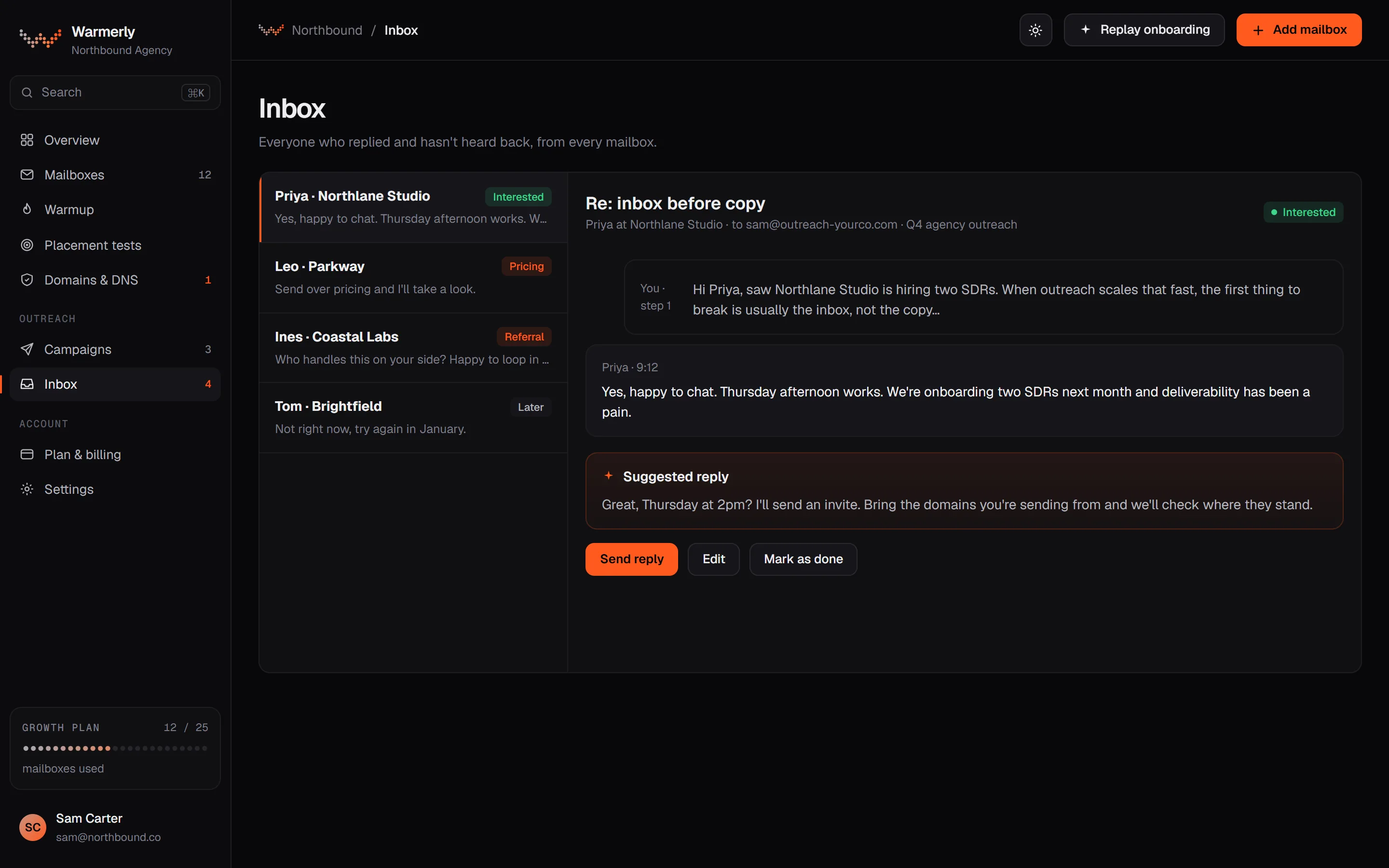
Warmerly's inbox is about answering the people who replied, whichever channel they used.
The default view is conversations where the newest message is theirs and it is labelled a lead or not labelled. Other views are All and Archived, and the list is searchable.
Warmerly product, checked 21 October 2026
LinkedIn replies land in the same inbox as email replies, labelled interested, question, referral, not interested, stop or out of office.
Warmerly product, checked 21 October 2026
Warmerly can draft a reply to the latest inbound email: under 120 words, plain text, signed with the sender's first name. The draft is saved for you to edit and send.
Warmerly product, checked 21 October 2026
Connected mailboxes are synced every five minutes, and the Refresh button syncs within a 60-second budget.
Warmerly product, checked 21 October 2026
The inbox has no snooze, star or notes, no tags on a conversation, no scheduled reply, and no single inbox that spans many LinkedIn accounts with role-based access.
Warmerly product, checked 21 October 2026
The inbox lists every email a connected mailbox receives. The one thing hidden is warmup network traffic, which would otherwise bury real mail, so your own conversations are not mixed with the mail Warmerly exchanges to warm a mailbox.
Warmerly product, checked 21 October 2026
Bounce senders, no-reply addresses and LinkedIn notification emails show under All, filed as not relevant, so they do not sit in the Needs reply queue. Phone push notifications skip them too.
Warmerly product, checked 21 October 2026
Each incoming email is classified when it is synced, and the label decides which view it belongs in. A message that has no label yet still appears in All and in Needs reply, so nothing is hidden by the classifier.
Warmerly product, checked 21 October 2026
The inbox list polls the server about every 30 seconds while it is open. Mailbox sync itself runs every five minutes, as above, so a reply can take a few minutes to appear after the sender presses send.
Warmerly product, checked 21 October 2026
Anyone in a workspace can use its inbox, and Owner, Admin and Member all see the same conversations. There is no per-conversation assignment, so two people can answer the same thread unless you agree who does what.
Warmerly product, checked 21 October 2026
Search and view filters are applied in the database before the list is cut into pages, so a match is not lost because it sits outside the newest page. That is why the Archived view and search return full results.
Warmerly product, checked 21 October 2026
Meet Alfred centres its inbox on LinkedIn conversations and adds team features higher up.
The pricing page lists a Smart LinkedIn Inbox with every conversation in one place, with templates and bulk actions, and an advanced CRM with tags, notes and pipeline stages.
meetalfred.com/pricing · read 21 October 2026
Business adds an InMail and Sales Navigator inbox.
meetalfred.com/pricing · read 21 October 2026
Teams lists a collaborative inbox where you can assign threads, leave internal notes and avoid double-replying, plus team campaign and inbox management.
meetalfred.com/pricing · read 21 October 2026
All plans list reply management and reply and activity tracking. The help article on follow-ups does not say whether a reply stops them.
help.meetalfred.com/en/articles/3334730-how-do-the-auto-follow-up-messages-work · read 21 October 2026
One view of incoming and outgoing messages from LinkedIn, InMail and Sales Navigator, under Inbox. You can search, filter by type, reply in real time, use saved templates and attach documents. Email replies are not listed in that article.
help.meetalfred.com/en/articles/4178778-meet-alfred-s-all-in-one-smart-inbox · read 22 October 2026
Each contact can carry notes and tags, and a lead can be returned to its campaign from the inbox. The article also shows some LinkedIn profile data for the contact beside the thread.
help.meetalfred.com/en/articles/4178778-meet-alfred-s-all-in-one-smart-inbox · read 22 October 2026
Inbox, then Replies, lists detected replies. You can export them, open the conversation on LinkedIn, reply directly, and return prospects to a campaign one at a time or in bulk.
help.meetalfred.com/en/articles/5615170-tracking-replies-and-managing-conversations-in-meet-alfred · read 22 October 2026
The help article says Meet Alfred detects a reply and promptly pauses the campaign for that contact, and you then choose to take over by hand or continue the sequence. It does not say whether this covers email replies.
help.meetalfred.com/en/articles/5615170-tracking-replies-and-managing-conversations-in-meet-alfred · read 22 October 2026
Campaign analytics show Reply and Reply Rate columns, and a click opens the Leads tab with the replies under Messages.
help.meetalfred.com/en/articles/5615170-tracking-replies-and-managing-conversations-in-meet-alfred · read 22 October 2026
The pricing table lists the Smart LinkedIn Inbox on every plan, the InMail and Sales Navigator inbox from Business, and team inbox management from Teams. Attachments are listed from Business.
meetalfred.com/pricing · read 22 October 2026
We looked, and found no statement on these. That is about its published pages only, not about the product.
We report each version rather than pick one.
| Measure | Warmerly | Meet Alfred |
|---|---|---|
| Reply inbox | One queue of everyone who replied, across email and LinkedIn, with suggested replies. | A Smart LinkedIn Inbox on every plan, tags and notes, and a collaborative team inbox on Teams. |
| Inbox on the entry plan | One queue, email and LinkedIn | Smart LinkedIn Inbox |
| Tags and notes | Not found | Yes, tags, notes and pipeline stages |
| Team inbox | Client workspaces on Agency | Collaborative inbox on Teams |
| Suggested replies | Yes, under 120 words | Not listed |
| Reply stops sequence | Yes, by default | Not stated in the article we read |
| Inbox sync interval | Every 5 minutes | Not stated |
| Warmup mail in the inbox | Hidden | Not applicable |
| Roles that can use the inbox | Owner, Admin, Member | Teams adds roles and permissions |
| Export of replies | Not found | Yes, on the Replies page |
Our reading of the facts above. Not a promise, and not the only reasonable reading.
If most replies come by email, Warmerly's Needs reply view is the shorter path to an answer.
If you run many LinkedIn conversations and want tags, notes and templates on each, Meet Alfred's inbox is built for it.
If two people should never answer the same lead, Meet Alfred's Teams inbox covers it. Warmerly separates work by client workspace instead.
Count your last 20 replies. If most arrived by email, the inbox that matters is the one that reads your mailboxes. If most arrived on LinkedIn, the inbox that matters is the one that reads LinkedIn conversations. Either tool can serve both on paper, but the pages we read show each doing one side in depth.
A single person answering everything can live with either inbox. Once two people share the work, the question is who owns each thread. Meet Alfred's Teams plan lists assignment and internal notes. Warmerly has neither, so you would agree it by hand.
If you want to note why a lead went cold, Meet Alfred lets you write a note and a tag on the contact. In Warmerly you would keep that in your own CRM or sheet.
Teams lists a collaborative inbox with thread assignment and internal notes.
Each client workspace on Agency has its own inbox. There are no notes, tags or assignment.
Its help article on replies says it pauses the campaign for that contact and lets you choose to continue. We did not find a statement about email replies.
No. We found no tags or notes on a conversation. Replies are labelled automatically, for example interested or out of office.
Meet Alfred pages were read on 21 October 2026. Plans and wording change, so check the vendor's own page before you decide. Warmerly details come from the product as it runs today.
Connect a mailbox. Warmerly runs alongside whatever you send from now, so you can compare before you move anything.
Free plan, no card. Paid plans: 7-day trial, first charge on day 8.