Warmerly
One Needs reply queue across email and LinkedIn; no snooze or star
One row, in depth: what each tool does, the verified numbers, and who each suits.
lemlist details read from its pricing page, home page and help centre on 21 October 2026.
One Needs reply queue across email and LinkedIn; no snooze or star
Unified inbox with snooze, favourites and tasks; only threads started in lemlist
Both have one inbox for replies. lemlist's is richer: snooze, favourites, tasks, owner filters, and replies by email, LinkedIn, WhatsApp or SMS, but it shows only conversations that started in lemlist. Warmerly's default view is Needs reply, across email and LinkedIn, with labels and a suggested reply. It has no snooze, star or notes. Last checked 21 October 2026.
One Needs reply queue across email and LinkedIn; no snooze or star
Unified inbox with snooze, favourites and tasks; only threads started in lemlist
From the prospect to your answer
lemlist's inbox only shows conversations started in lemlist. Warmerly has no snooze, star or notes.
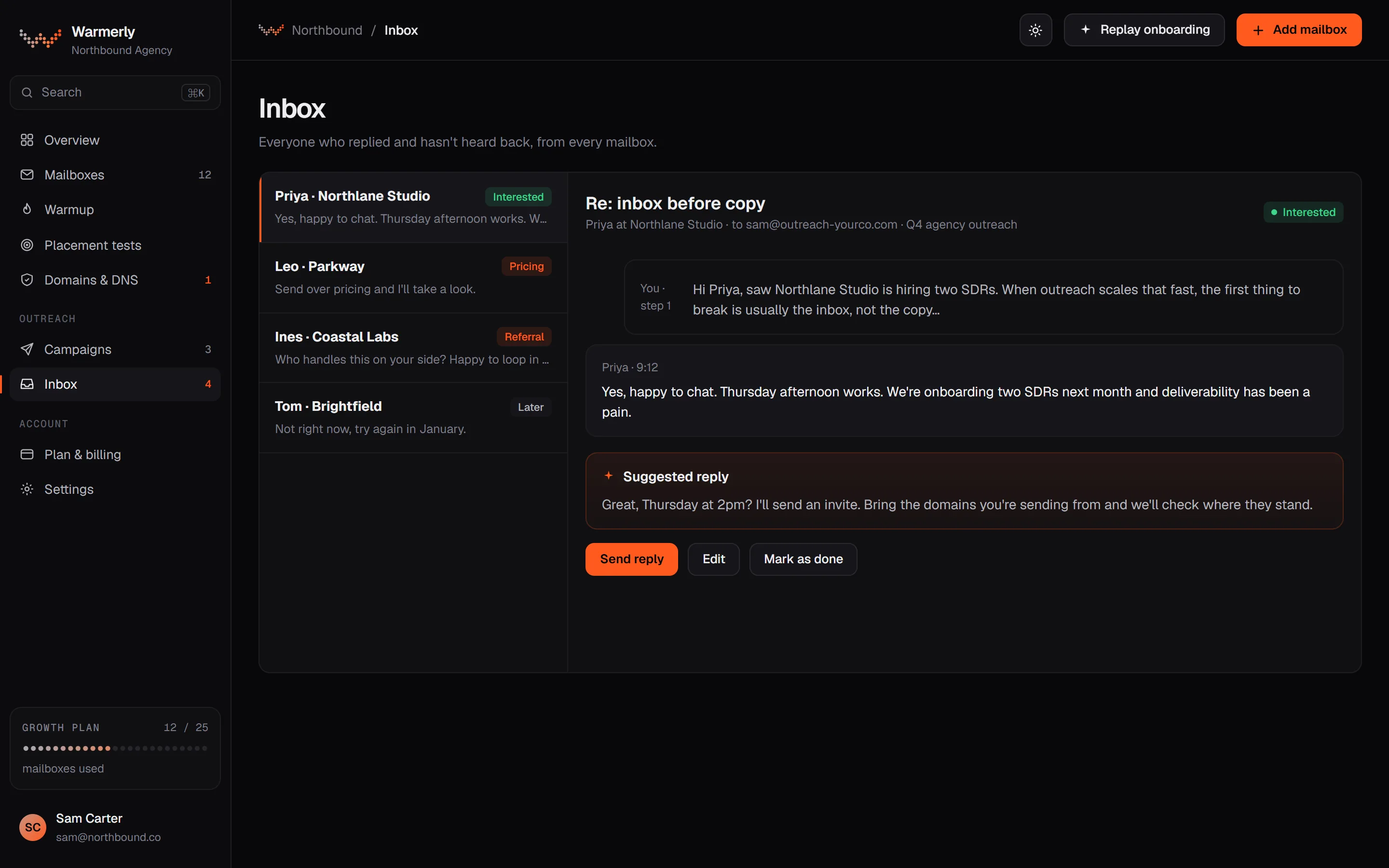
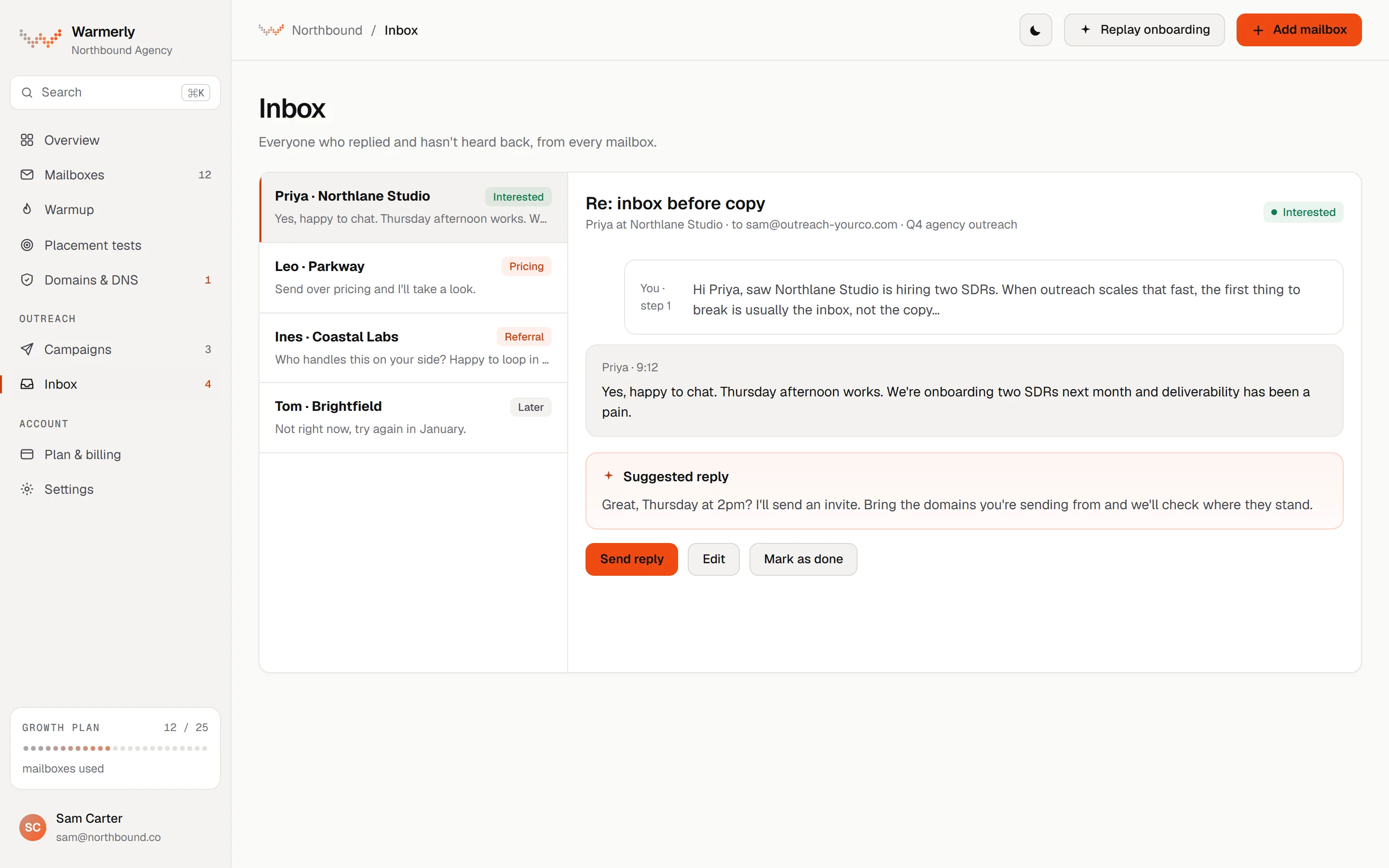
A Needs reply queue across email and LinkedIn, with labels and suggested replies. It syncs every connected mailbox, so mail that did not start in a campaign shows too.
The default view is conversations where the newest message is theirs and is a lead or unlabelled. Other views are All and Archived.
Warmerly product, checked 21 October 2026
LinkedIn replies land in the same inbox. Mail is labelled lead, not relevant or spam, and your own override sticks.
Warmerly product, checked 21 October 2026
Warmerly can draft a reply under 120 words for you to edit and send. The draft is written only for a lead in one of your campaigns. Mail the model files as a lead from anyone else still shows under Lead but gets no draft.
Warmerly product, checked 21 October 2026
Every email a connected mailbox receives shows in the inbox. The one exclusion is warmup network traffic. Bounce senders, no-reply addresses and LinkedIn notifications show in All, filed as not relevant, which keeps them out of Needs reply.
Warmerly product, checked 21 October 2026
Free rules handle spam folders, robot senders, auto replies and bulk headers without a model call. A campaign lead's reply is graded by a model. Other new mail, received within 3 days of the sync, is graded too. Older mail stays unclassified and still appears in All.
Warmerly product, checked 21 October 2026
A sweep reads each connected mailbox's INBOX and Sent folders every 5 minutes, up to 50 new messages per mailbox per run, oldest first, and a manual Refresh is available. A mailbox is paused after 3 failed logins and the owner is asked to reconnect.
Warmerly product, checked 21 October 2026
A message composed in Warmerly's inbox is sent over the mailbox's own SMTP and stored as outbound. Mail Warmerly sends for campaigns is not written to the mailbox's Sent folder, so it does not appear in other mail clients.
Warmerly product, checked 21 October 2026
The inbox has no snooze, star or notes, no tags on a conversation and no scheduled reply.
Warmerly product, checked 21 October 2026
A unified inbox for conversations that began in lemlist, with lists, owner filters, tasks and a choice of channel when you reply.
A help article says the inbox shows only conversations that were initially started in lemlist. Alongside messages it shows campaign events such as a step sent, opened, accepted or replied to, plus tasks and status updates for the contact.
help.lemlist.com/en/articles/10035229-use-the-lemlist-inbox · read 21 October 2026
Conversation lists include Unread, Favorites, Snoozed, Archived, Sent only and Untracked, with filters and an owner filter. A filter can narrow by contact, company, campaign or other criteria that the article does not list.
help.lemlist.com/en/articles/10035229-use-the-lemlist-inbox · read 21 October 2026
The reply composer lets you choose email, LinkedIn, WhatsApp or SMS.
help.lemlist.com/en/articles/10035229-use-the-lemlist-inbox · read 21 October 2026
A tasks icon in a conversation shows that contact's outstanding and completed tasks. A status dropdown in the conversation view shows the lead's stage, with Contacted as the example, and the contact card can mark a lead interested or not interested.
help.lemlist.com/en/articles/10035229-use-the-lemlist-inbox · read 21 October 2026
Clicking a contact's name opens a panel with contact information, activities, campaigns and tasks. Its Campaigns tab shows where the contact appears and lets you manage follow up, and the article's introduction says you can move a contact into another campaign from there.
help.lemlist.com/en/articles/10035229-use-the-lemlist-inbox · read 21 October 2026
The pricing page lists AI reply intent detection, AI out-of-office detection and AI-generated replies.
lemlist.com/pricing · read 21 October 2026
The pricing page lists LinkedIn automation, SMS automation and a call dialer on Multichannel, at $109 a month ($87 yearly), and none of them on Email at $69 ($55 yearly). WhatsApp automation is an add-on whose price the page does not show.
lemlist.com/pricing · read 21 October 2026
We looked, and found no statement on these. That is about its published pages only, not about the product.
| Measure | Warmerly | lemlist |
|---|---|---|
| Shared inbox | One Needs reply queue across email and LinkedIn; no snooze or star | Unified inbox with snooze, favourites and tasks; only threads started in lemlist |
| Snooze and favourites | Not offered | Listed |
| Mailbox sync interval | Every 5 minutes | Not stated |
| Reply channels | Email and LinkedIn | Email, LinkedIn, WhatsApp, SMS |
| Mail shown | Everything a connected mailbox receives, bar warmup | Only conversations started in lemlist |
| Suggested reply length | Under 120 words | Not stated |
| New messages read per mailbox per run | Up to 50 | Not stated |
| LinkedIn replies, 3 people, monthly list price | $106 (Growth plus 3 accounts) | $327 (Multichannel, 3 users) |
Our reading of the facts above. Not a promise, and not the only reasonable reading.
lemlist's inbox only shows threads it started. Warmerly syncs the connected mailbox every five minutes.
lemlist's tasks and owner filter suit a team that triages together. Warmerly's queue suits one person working a list.
Warmerly reads up to 50 new messages per mailbox per run, every 5 minutes, oldest first. A mailbox with 2,000 old messages therefore takes 40 runs, about 3 hours 20 minutes, to catch up at best. That assumes every sweep reaches the mailbox, and a slow provider can cost it a turn. Mail older than 3 days is not graded by the model, so a backlog does not run up classification work.
To have LinkedIn replies in one inbox for 3 senders, lemlist needs Multichannel at $109 each, $327 a month at list price. On Warmerly the Growth plan is $49 and the LinkedIn add-on is $19 per account, 3 accounts being $57, so $106. The lemlist price also includes SMS, a dialer and its data tools, and the sum is a monthly list price, not a quote.
Someone writes to a connected mailbox out of the blue. In Warmerly it shows in the inbox, is graded if it arrived in the last 3 days, and can sit in Needs reply. lemlist's article says its inbox shows only conversations first started in lemlist, so that thread would live in your own mail client.
No snooze, no favourites, no notes and no tasks on a conversation. If your day is built on follow up reminders, lemlist's tasks and Snoozed list matter more than a suggested reply. If you only need to see who replied and answer quickly, they matter less.
One inbox for email and LinkedIn replies with a Needs reply view, labels and suggested replies. It has no snooze, star or notes. lemlist's inbox has those, but only shows conversations started in lemlist.
No. Warmup network traffic is the one thing hidden. Everything else the mailbox receives is shown, including bounces and LinkedIn notifications under All.
No. The inbox covers email and LinkedIn. lemlist's reply box lets you choose email, LinkedIn, WhatsApp or SMS.
No. It is written for a lead in one of your campaigns, under 120 words. Other mail the model files as a lead is shown under Lead without a draft.
Each connected mailbox is read every 5 minutes, and Refresh syncs on demand. lemlist's inbox article does not state a sync interval.
lemlist pages were read on 21 October 2026. Plans and wording change, so check the vendor's own page before you decide. Warmerly details come from the product as it runs today.
Connect a mailbox. Warmerly runs alongside whatever you send from now, so you can compare before you move anything.
Free plan, no card. Paid plans: 7-day trial, first charge on day 8.