Warmerly
On every mailbox: a fixed 30-day ramp to 50 a day, with spam rescue
One row, in depth: what each tool does, the verified numbers, and who each suits.
lemlist details read from its pricing page, home page and help centre on 21 October 2026.
On every mailbox: a fixed 30-day ramp to 50 a day, with spam rescue
lemwarm, listed in all plans; you set the target and the step
Both warm mailboxes with real mail between inboxes. Warmerly's ramp is fixed: 4 a day on day 0 to 50 a day by day 30, capped at 40 for Gmail and 30 for Outlook. lemlist's lemwarm is set by you: its help article advises about 40 days at +1 a day, then 14 days of stabilisation, before campaigns. lemlist's pricing page says lemwarm is included in all plans, but its help centre also describes separate lemwarm plans. Last checked 21 October 2026.
On every mailbox: a fixed 30-day ramp to 50 a day, with spam rescue
lemwarm, listed in all plans; you set the target and the step
Warmerly's ramp, and lemlist's guide example
The lemlist line is an example from its help article, drawn from 0 because no starting volume is stated. You set the target and the step yourself.
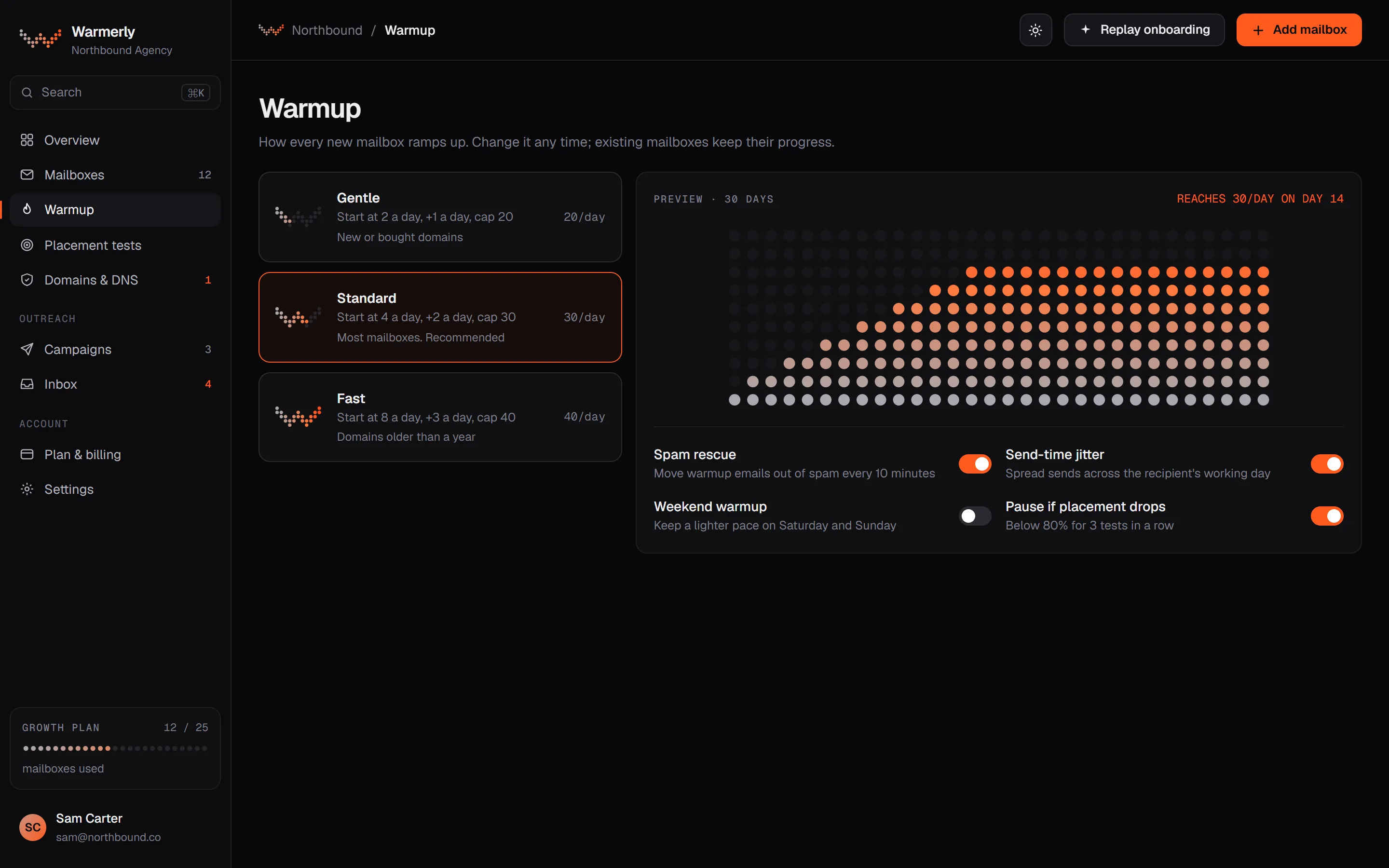
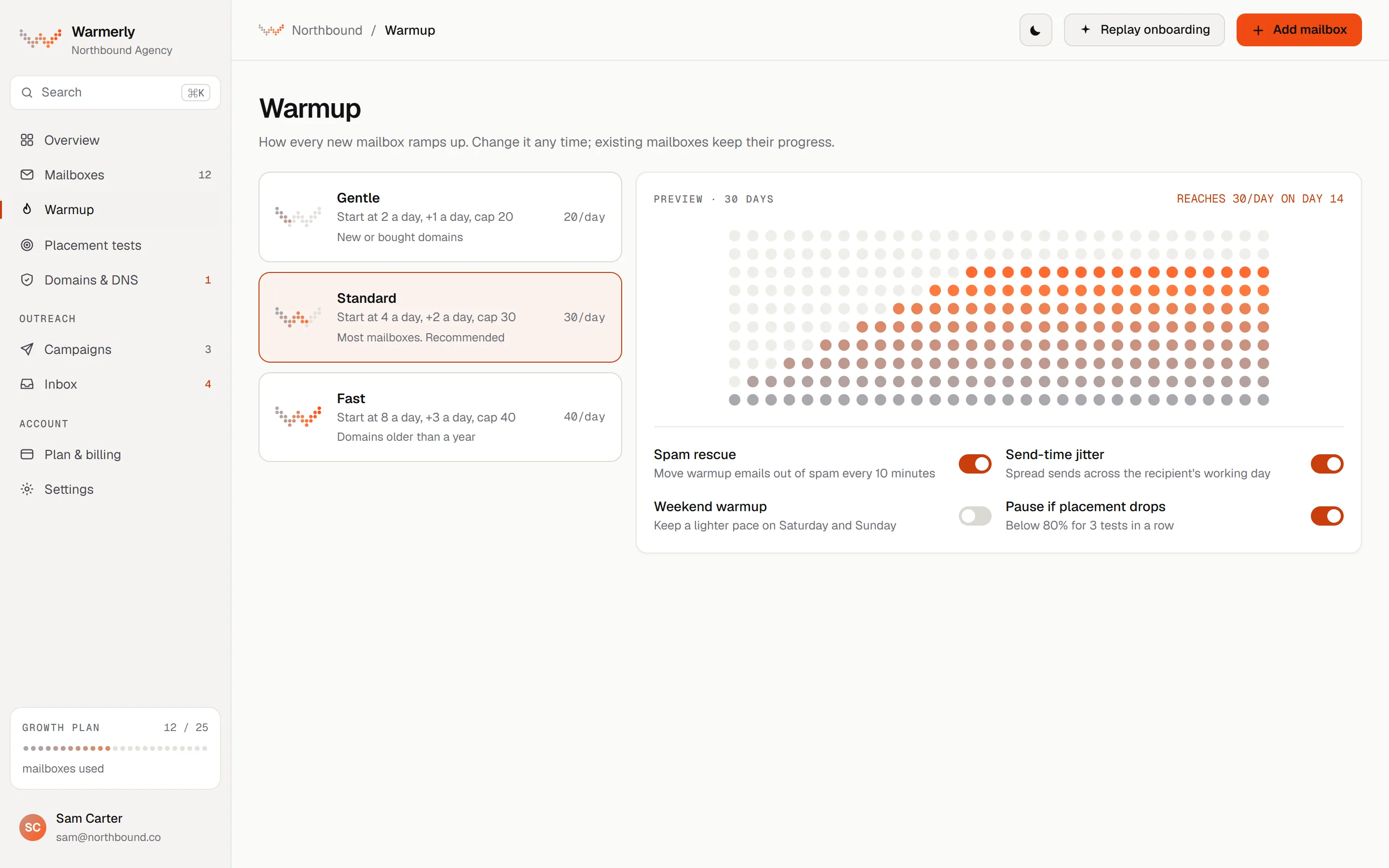
Warmup runs on every connected mailbox, on a ramp Warmerly sets and adjusts from the mailbox's own health, with spam rescue on the receiving side. You choose whether warmup is on, not the pace.
Daily quota is interpolated between anchors: 4 a day at day 0, 8 at day 3, 15 at day 7, 25 at day 14, 35 at day 21 and 50 at day 30. Between anchors the number moves a little each day instead of in steps, because a sudden jump is itself a pattern a mailbox provider can notice.
Warmerly product, checked 21 October 2026
The quota is the lowest of the age ramp, a provider cap (Gmail 40, Outlook 30, Zoho 25) and a hard ceiling of 50 a day. A Gmail mailbox therefore stops climbing at 40 even though the ramp goes on to 50.
Warmerly product, checked 21 October 2026
The ramp follows the days on which the mailbox really sent a warmup mail, not the calendar. A mailbox that was paused for a fortnight, or an old mailbox that only just switched warmup on, does not skip to late-ramp volume.
Warmerly product, checked 21 October 2026
A health score below 70 multiplies the quota by 0.75 and below 50 by 0.4. A high spam placement score does the same: 10 or more gives 0.7 and 20 or more gives 0.4. Weekends, in the mailbox's own time zone, count at 0.6.
Warmerly product, checked 21 October 2026
A mailbox whose last sends were refused is held to 1 send a day, which either clears the fault or reaches the third refusal. At the third it is paused and the owner is asked to reconnect.
Warmerly product, checked 21 October 2026
A warmup mail that lands in spam is marked not junk, starred, moved to the inbox and answered. The rescue applies to every spam-placed message, not a sample, and the reply is queued whatever the mailbox's usual reply probability, up to thread depth 3.
Warmerly product, checked 21 October 2026
Warmup mail is real mail between mailboxes in one pool that includes other customers' mailboxes, under published participation terms. Only warmup mail between Warmerly mailboxes is rescued; campaign mail to real prospects is never touched.
Warmerly product, checked 21 October 2026
There is no setting for the target or the daily step. You can lower a mailbox's warmup limit, and an admin override can change the ceiling for a workspace, but a customer cannot raise the pace above the ramp.
Warmerly product, checked 21 October 2026
lemwarm exchanges mail with a network of inboxes. You pick the daily target and the step, and the help centre gives a schedule for a new, an older and a recovering mailbox.
The lemwarm page says it automatically exchanges real emails with real inboxes to build your sender reputation, and you set the pace.
lemlist.com/lemwarm · read 21 October 2026
A setup article describes about 40 days of ramp-up at an increment of 1, then 14 days of stabilisation, with lemlist at 0 during both. A new mailbox target is 30 to 40 a day.
help.lemlist.com/en/articles/8178427-set-up-lemwarm-and-start-warming-your-inbox · read 21 October 2026
The article gives an increment of 1 a day for a new mailbox, 2 for an older mailbox with traffic and 3 when rebuilding after an incident. Setup is described as about 5 to 10 minutes.
help.lemlist.com/en/articles/8178427-set-up-lemwarm-and-start-warming-your-inbox · read 21 October 2026
Before outreach the article wants a Warmup Score of 90 or more, an inbox rate above 90% for 14 days in a row and no spam in lemwarm. At launch it advises lemlist at 30 a day, lemwarm dropped to 10, and total output under 70 a day per provider.
help.lemlist.com/en/articles/8178427-set-up-lemwarm-and-start-warming-your-inbox · read 21 October 2026
A 100-point score from email setup and DNS (40), warm-up spam rate (30), blacklists (20) and domain age (10). The help centre says it is not a placement percentage. Below 65 is red, 65 to 90 orange, 90 and above green, and once campaigns are live a score under 80 suggests a reputation problem.
help.lemlist.com/en/articles/8178526-discovering-lemwarm-plans · read 21 October 2026
The pricing FAQ says lemwarm is included in all plans. A help article describes lemwarm plans, Essential and Smart. Smart adds a Smart cluster and content emails shaped by a questionnaire. The trial article says the trial has no lemwarm.
help.lemlist.com/en/articles/8178526-discovering-lemwarm-plans · read 21 October 2026
The help centre says the Email plan has unlimited senders per account, while Multichannel Expert and Enterprise allow up to 5 email addresses per user. A lemwarm-only subscription is one email address per subscription. The pricing page lists 5 senders per user on Multichannel.
help.lemlist.com/en/articles/8178526-discovering-lemwarm-plans · read 21 October 2026
The pause guide lists error codes for invalid DMARC, no MX record, blacklists, low reputation, a full mailbox and a mailbox that does not exist. lemwarm pauses after 3 occurrences of an unknown bounce, and the reason is shown in the lemwarm notifications.
help.lemlist.com/en/articles/12918125-why-was-lemwarm-paused-full-guide-to-all-pause-reasons-and-how-to-fix-them · read 21 October 2026
For Gmail and Outlook the article suggests a filter or rule on the subject lemwarmup, so warmup mail skips the inbox and is never sent to spam. That only works if the lemwarm identifier in the mail title is switched on.
help.lemlist.com/en/articles/8178427-set-up-lemwarm-and-start-warming-your-inbox · read 21 October 2026
We looked, and found no statement on these. That is about its published pages only, not about the product.
We report each version rather than pick one.
| Measure | Warmerly | lemlist |
|---|---|---|
| Email warmup | On every mailbox: a fixed 30-day ramp to 50 a day, with spam rescue | lemwarm, listed in all plans; you set the target and the step |
| Warmup ramp length | 30 days to 50 a day | About 40 days at +1, then 14 days of stabilisation |
| Gmail cap | 40 a day | Not stated |
| You can change the step | No, only lower the limit | Yes: increment of 1, 2 or 3 |
| Outlook cap | 30 a day | Not stated |
| Score published | A health score per mailbox | Warmup Score out of 100 |
| Advised total output at launch | Set by the mailbox's quota | Under 70 a day per provider |
| Days to first cold send | Ramp is 30 days | About 54 (40 plus 14) |
Our reading of the facts above. Not a promise, and not the only reasonable reading.
Warmerly starts at 4 warmup emails a day and reaches 50 by day 30. lemlist's guidance is slower and asks for 14 more days before cold email.
lemlist lets you pick the target and the step, with advice for a new, older or recovering mailbox. Warmerly decides for you.
lemlist's advised schedule is about 40 days of ramp plus 14 of stabilisation, so 54 days. If you start warming on the day you subscribe to the Email plan at $69 a month, those 54 days span two monthly bills, $138 at list price, and the plan also covers sending and data. On Warmerly the ramp is 30 days; two months of Starter is $38 for 5 mailboxes. These are arithmetic on list prices, not a quote, and the lemlist figure includes more than warmup.
Working from the anchors, the ramp passes 35 a day at day 21 and 50 at day 30, so it crosses 40 at about day 24. A Gmail mailbox on Warmerly then stays at 40 a day. An Outlook mailbox crosses its cap of 30 at about day 18, between 25 at day 14 and 35 at day 21.
Suppose a mailbox's ramp says 25 a day. On a Saturday Warmerly applies 0.6, about 15. If its health score has also fallen below 50 the 0.4 factor applies instead of 0.75, about 10 a day, and the mailbox ramps back as the score recovers. lemlist's article lets you drop the step to 1 yourself, and for a recovery it suggests 3.
lemlist's advice at launch is 30 a day from lemlist and 10 from lemwarm, which is 40, leaving 30 a day of headroom under its 70 a day total per provider for manual replies. Because the ceiling applies per provider, six Google mailboxes share one Google reputation, as the help centre notes, so the headroom is shared as well.
lemwarm shows a coded reason in its notifications and waits for you to fix it and restart. Warmerly keeps a failing mailbox at one probe send a day and, at the third refusal, pauses it and sends the owner a Reconnect needed alert. In both cases a person has to fix the cause.
lemlist's pricing page says lemwarm is included in all plans and lists email warm-up on the Email plan. A help article says the free trial has no lemwarm, and describes separate lemwarm plans.
The ramp is 30 days, from 4 a day to 50 a day, capped at 40 for Gmail and 30 for Outlook. It counts days on which the mailbox really sent, so a paused mailbox does not skip ahead.
No. You can lower a mailbox's warmup limit, but you cannot raise the pace above the ramp. lemlist lets you pick the daily target and an increment of 1, 2 or 3.
Its setup article describes about 40 days of ramp-up at +1 a day, then 14 days of stabilisation, with a Warmup Score of 90 or more and an inbox rate above 90% for 14 days before outreach.
On Warmerly the receiving mailbox moves it to the inbox, marks it not junk and replies, for every such message. The lemwarm articles we read do not describe spam rescue, so we cannot say whether lemlist does it.
lemlist pages were read on 21 October 2026. Plans and wording change, so check the vendor's own page before you decide. Warmerly details come from the product as it runs today.
Connect a mailbox. Warmerly runs alongside whatever you send from now, so you can compare before you move anything.
Free plan, no card. Paid plans: 7-day trial, first charge on day 8.