WarmerlyWarmerly ahead on this row
Every mailbox on the plan, not metered
One row, in depth: what each tool does, the verified numbers, and who each suits.
Woodpecker details read from its pricing, home, features, integrations, agency and help centre pages on 21 October 2026.
Every mailbox on the plan, not metered
4 in the base price
Warmerly warms every mailbox on your plan and does not count warm-ups. Woodpecker includes 4 warm-ups in its base price on the page we read, and charges per account beyond that. Woodpecker's own help article gives a default ceiling of 50 warm-up emails a day in later stages, the same figure as Warmerly's day 30 volume, so the sharper difference is in how warm-ups are counted and who runs the network, not in the headline volume. Last checked 22 October 2026.
Every mailbox on the plan, not metered
4 in the base price
A 25 mailbox example. Each dot is one mailbox. Filled means warmed from the base price.
25 of 25 warmed. Growth covers 25 mailboxes, warmup is not metered.
4 of 25 in the base price. The rest need the per-account add-on, see the next row.
Emails a day on day 0, 3, 7, 14, 21 and 30. Warmerly publishes its ramp. Woodpecker's pages do not.
| Tool | Warm-ups in the base price | Ramp |
|---|---|---|
| Warmerly | Every mailbox on the plan, 25 on Growth | 4 a day on day 0, 8 on day 3, 15 on day 7, 25 on day 14, 35 on day 21, 50 on day 30 |
| Woodpecker | 4 | Not stated |
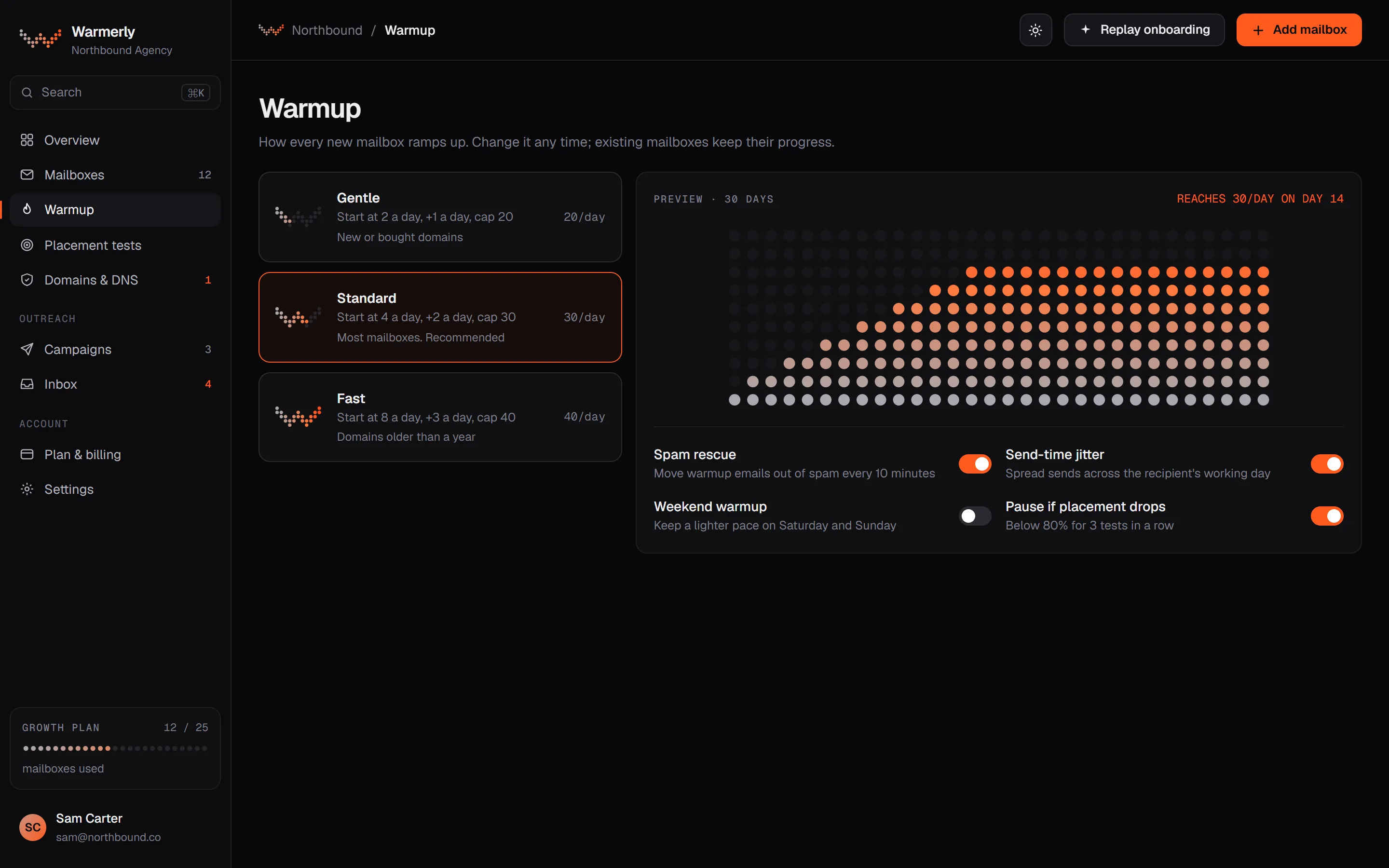
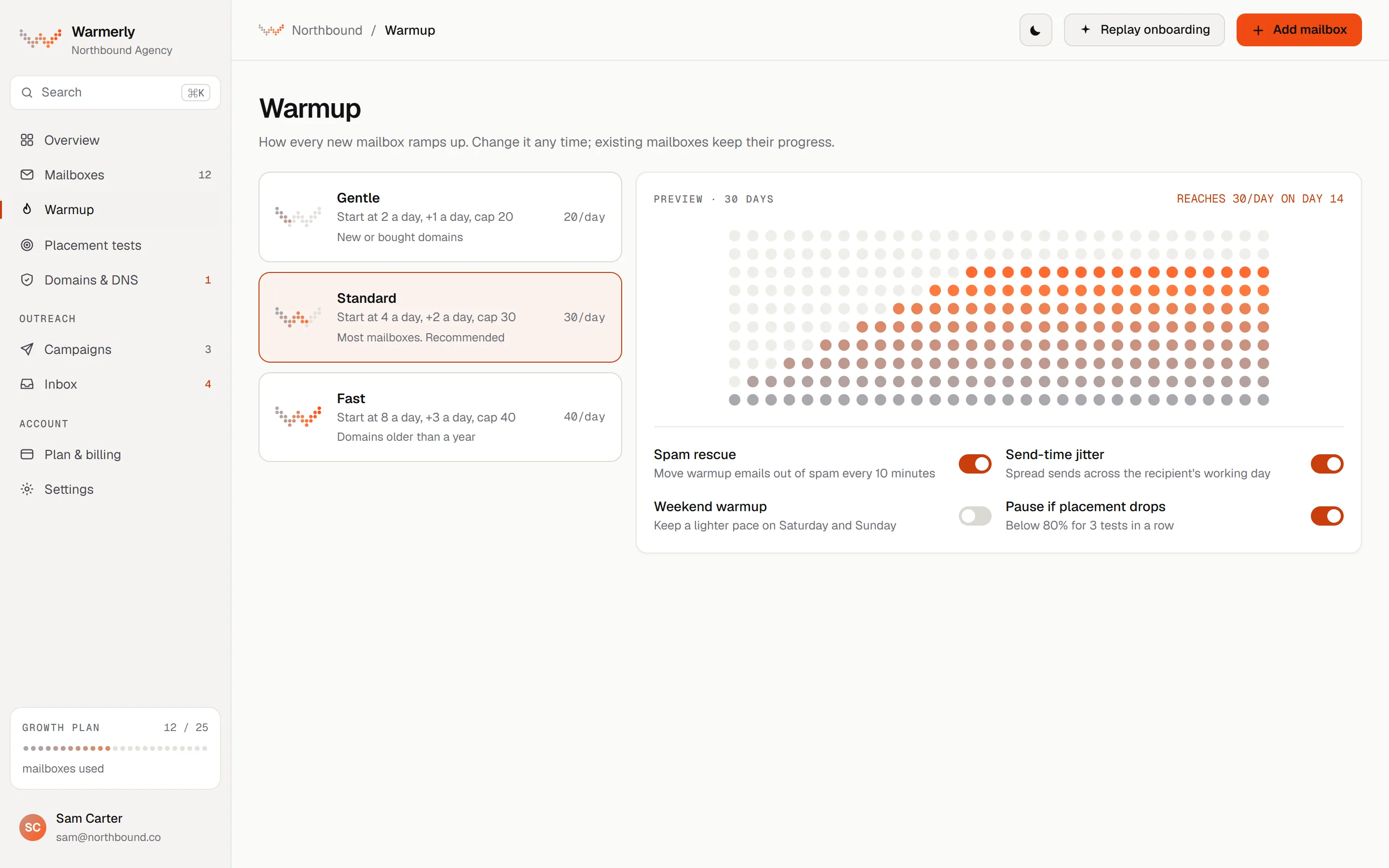
Warmup is not a billing meter: each mailbox on the plan follows the same ramp, from 4 emails a day on day 0 to 50 a day by day 30, inside Warmerly's own private warmup network, and it never emails your prospects.
Warmup is included and is not metered. Free covers 1 mailbox, Starter 5, Growth 25 and Agency 100, and each follows the ramp.
Warmerly product, checked 21 October 2026
The daily quota rises from 4 a day at day 0 to 8 at day 3, 15 at day 7, 25 at day 14, 35 at day 21 and 50 at day 30. It counts days the mailbox really sent.
Warmerly product, checked 21 October 2026
The quota is also limited by provider caps of Gmail 40, Outlook 30 and Zoho 25, weekends at 0.6 of the weekday quota, and health.
Warmerly product, checked 21 October 2026
The warmup page shows the factor that limits each mailbox today, and you can set a lower daily limit yourself.
Warmerly product, checked 21 October 2026
A mailbox in warmup exchanges ordinary-looking email with other mailboxes in Warmerly's private warmup network. Your mailbox sends to peers, peers send back, and both sides open and reply to a tuned share. Partners are other customers' mailboxes and mailboxes Warmerly runs itself.
Warmerly product, checked 21 October 2026
Warmerly picks partners by how busy they are, the mix of providers and each partner's own volume, and tries not to pick the same partner twice within 72 hours. Nothing excludes your own other mailboxes, so two of yours can be partners.
Warmerly product, checked 21 October 2026
The ramp day is the smaller of calendar age and the days on which a send succeeded. A paused mailbox, or an old one that only just enabled warmup, cannot skip to late-ramp volume.
Warmerly product, checked 21 October 2026
At weekends the quota is 0.6 of the weekday figure, judged in the mailbox's own timezone. A low health score or a high spam placement score cuts the quota, to 0.75 or 0.4 for health and 0.7 or 0.4 for spam placement.
Warmerly product, checked 21 October 2026
Each mailbox has a warmup daily limit setting from 1 to 500, or none. Raising a daily limit does not skip the ramp.
Warmerly product, checked 21 October 2026
Warmup is not a setup step you finish. The docs say to keep it enabled after campaigns start, as the background activity that keeps the mailbox healthy. A campaign on a mailbox with under 14 days of warmup starts at 3 emails a day per mailbox.
Warmerly product, checked 21 October 2026
The Positive engagement check on a mailbox's Overview tab measures replies inside the warmup network only. It says nothing about your prospects, and a campaign's reply rate measures real leads.
Warmerly product, checked 21 October 2026
Warmerly's warmup is part of the plan, so you cannot buy more warm-up capacity without buying a bigger plan. Woodpecker lets you add warm-ups one account at a time.
Warmerly product, checked 21 October 2026
Free warm-up is listed as a key feature, with 4 warm-ups in the base price and more as a $5 add-on per account. Help articles name two outside providers, Mailivery and Warmy, and give a default of 50 emails a day in later stages.
The pricing page lists 'Warm-ups: 4' in the base price, shown as free, and a paid add-on for 'Additional warm-ups'.
woodpecker.co/pricing · read 21 October 2026
The home page and features page list 'Free warm-up' as a key feature, described as 'Automatically builds your sender reputation'. The email deliverability page lists it without a description.
woodpecker.co · read 21 October 2026
The help centre has 10 articles on warm-up, including how to warm up a domain and an email account, what domain age is, connecting Google Workspace, Office 365, Mailgun and Yahoo accounts, and why the initial sending volume is low. We read titles only.
woodpecker.co/help-center/en/collections/3370900-email-domain-warm-up · read 21 October 2026
Help article titles mention Mailivery and Warmy in connection with the warm-up process. We did not read the articles, so we do not say who runs the warm-up network.
woodpecker.co/help-center/en/collections/3370900-email-domain-warm-up · read 21 October 2026
The help article on using warm-up says warm-up runs through Mailivery or Warmy, and that 'Both providers perform similarly'. You choose one when you click Add warm-up.
woodpecker.co/help-center/en/articles/5789584-how-to-use-the-warm-up-process-in-woodpecker · read 22 October 2026
Warm-up emails go out Monday to Friday with Mailivery and Monday to Sunday with Warmy, matched to the account's time zone.
woodpecker.co/help-center/en/articles/5789584-how-to-use-the-warm-up-process-in-woodpecker · read 22 October 2026
By default sending reaches 50 emails a day in later stages. The article says the reply rate for warm-up emails 'should be up to 55%'. That is Woodpecker's expectation, not a result we checked.
woodpecker.co/help-center/en/articles/5789584-how-to-use-the-warm-up-process-in-woodpecker · read 22 October 2026
The FAQ says a proper domain warm-up 'should last up to 3 months', and recommends not running campaigns and warm-ups at the same time: warm up first, then send campaigns.
woodpecker.co/help-center/en/articles/5789584-how-to-use-the-warm-up-process-in-woodpecker · read 22 October 2026
A second article says sending volume starts very low, especially in the first week, and that even with a higher daily limit set, 'the system will intentionally limit the number of emails sent during the early stages'. For new domains it advises avoiding sending, warm-up emails included, or keeping volume minimal for the first 1 to 2 weeks.
woodpecker.co/help-center/en/articles/14285800-what-should-i-expect-during-the-email-warm-up-process-and-why-is-the-initial-sending-volume-low · read 22 October 2026
Each plan includes a number of free warm-up slots, which the article does not state. Extra slots are $5 a month each. Pausing does not stop charges; you stop paying only once warm-up is removed from the account. Downgrading a plan can reduce free slots, and the article's example is 13 free slots becoming 10, so 3 in use get billed.
woodpecker.co/help-center/en/articles/5789584-how-to-use-the-warm-up-process-in-woodpecker · read 22 October 2026
Do not mark warm-up emails as spam, because the article says this 'will negatively impact the entire network'. Aliases cannot be added to warm-up. The snippets UNSUBSCRIBE and AI_VIDEO are unsupported, and with spintax or fallbacks only the first value is used.
woodpecker.co/help-center/en/articles/5789584-how-to-use-the-warm-up-process-in-woodpecker · read 22 October 2026
The Warm-up tab shows the provider, emails sent today, replies, total sent and start date, with statuses In progress, Inactive or Stopped. Bulk activation, pausing and removal are supported for some providers.
woodpecker.co/help-center/en/articles/5789584-how-to-use-the-warm-up-process-in-woodpecker · read 22 October 2026
We looked, and found no statement on these. That is about its published pages only, not about the product.
We report each version rather than pick one.
| Measure | Warmerly | Woodpecker |
|---|---|---|
| Warm-ups included | Every mailbox on the plan, not metered | 4 in the base price |
| Warm-ups in the base price | Every mailbox on the plan (5, 25 or 100) | 4 |
| First-day warmup volume | 4 a day, per mailbox | Not stated |
| Day 30 warmup volume | 50 a day, per mailbox | Not stated |
| Provider caps | Gmail 40, Outlook 30, Zoho 25 a day | Not stated |
| Default ceiling in later stages | 50 a day per mailbox, by day 30 | 50 emails a day (help article) |
| Suggested warm-up length | Ramp reaches 50 a day at day 30; keep it on after launch | Up to 3 months for a domain |
| Weekend sending | 0.6 of the weekday quota | Monday to Friday with Mailivery, every day with Warmy |
| Who runs the network | Warmerly's own private network | Mailivery or Warmy, per the help article |
| Stated warm-up reply rate | Tuned internally; not a prediction of campaign replies | Up to 55% (stated expectation) |
| Pausing | Mailbox can be paused; the ramp counts only days sent | Pausing does not stop the $5 charge |
Our reading of the facts above. Not a promise, and not the only reasonable reading.
If you run four or fewer mailboxes, the included warm-ups may be all you need on Woodpecker. Beyond that, see the next row for the per-account charge.
Woodpecker's pages do not say how a warm-up is counted or how fast it ramps. Ask before you plan volume around it.
A mailbox that has really sent on 14 days is at 25 warmup emails a day, before provider caps (Gmail 40, Outlook 30, Zoho 25) and the weekend factor. On a Saturday that is 0.6 of 25, which is 15.
If you pause a mailbox for a fortnight on Warmerly, the ramp does not advance for those days, because it counts days with a successful send. On Woodpecker, pausing does not stop the $5 charge for a bought slot; you must remove warm-up first.
Woodpecker's help article says to avoid sending, warm-up emails included, or keep it minimal for the first 1 to 2 weeks on a newly registered domain. Warmerly's docs say a brand-new domain can take longer to earn trust. Both say a new domain needs patience; neither publishes a guaranteed date.
The article's own example is 13 free slots dropping to 10 on a lower plan. If you were warming 13 accounts, the 3 beyond the free slots would be billed at $5 each, which is $15 a month.
Adding warm-up to an account asks you to pick Mailivery or Warmy. The two have different sending days, so a Saturday on Mailivery has no warm-up mail while on Warmy it does. Ask which suits your sending schedule.
Yes. Its pricing page lists 4 warm-ups in the base price, with additional warm-ups as an add-on. Its pages do not describe how the warm-up works.
Every mailbox on the plan: 1 on Free, 5 on Starter, 25 on Growth and 100 on Agency.
Its help article says Mailivery or Warmy. Warmerly uses its own private network.
Warmerly runs 4 a day on day 1 to 50 a day by day 30. Woodpecker's help article gives a default ceiling of 50 a day in later stages.
Woodpecker pages were read on 21 October 2026. Plans and wording change, so check the vendor's own page before you decide. Warmerly details come from the product as it runs today.
Connect a mailbox. Warmerly runs alongside whatever you send from now, so you can compare before you move anything.
Free plan, no card. Paid plans: 7-day trial, first charge on day 8.