Warmerly
Needs reply view, email and LinkedIn in one list, suggested reply
One row, in depth: what each tool does, the verified numbers, and who each suits.
Woodpecker details read from its pricing, home, features, integrations, agency and help centre pages on 21 October 2026.
Needs reply view, email and LinkedIn in one list, suggested reply
Centralised inbox in folders; AI interest detection for English replies
Both tools gather replies from every connected mailbox in one place. Warmerly opens on a Needs reply view, puts email and LinkedIn in one list and can draft a short reply. Woodpecker sorts into folders such as interested, auto-replied and bounced, and reads interest in English replies with AI. Last checked 22 October 2026.
Needs reply view, email and LinkedIn in one list, suggested reply
Centralised inbox in folders; AI interest detection for English replies
Sample replies arrive. Warmerly builds a queue of who needs an answer, across email and LinkedIn. Woodpecker files each reply into a status folder.
Not relevant and spam stay in All, out of the queue.
AI interest detection for English replies. LinkedIn replies in the same inbox: not stated.
| Sample reply | Warmerly | Woodpecker |
|---|---|---|
| Interested in a call | In Needs reply | Interested |
| Question about a LinkedIn message | In Needs reply | Not stated |
| Out of office until Monday | In All, labelled Not relevant | Out of office |
| Automatic reply | In All, labelled Not relevant | Auto-replied |
| Address no longer exists | In All, labelled Not relevant | Bounced |
The replies are invented examples, not data. Warmerly rows come from its inbox code (Needs reply, labels, suggested reply). Woodpecker's folders and AI interest detection come from its features page, read 21 October 2026. It does not say whether a LinkedIn reply lands in its inbox, so that sample has no folder.
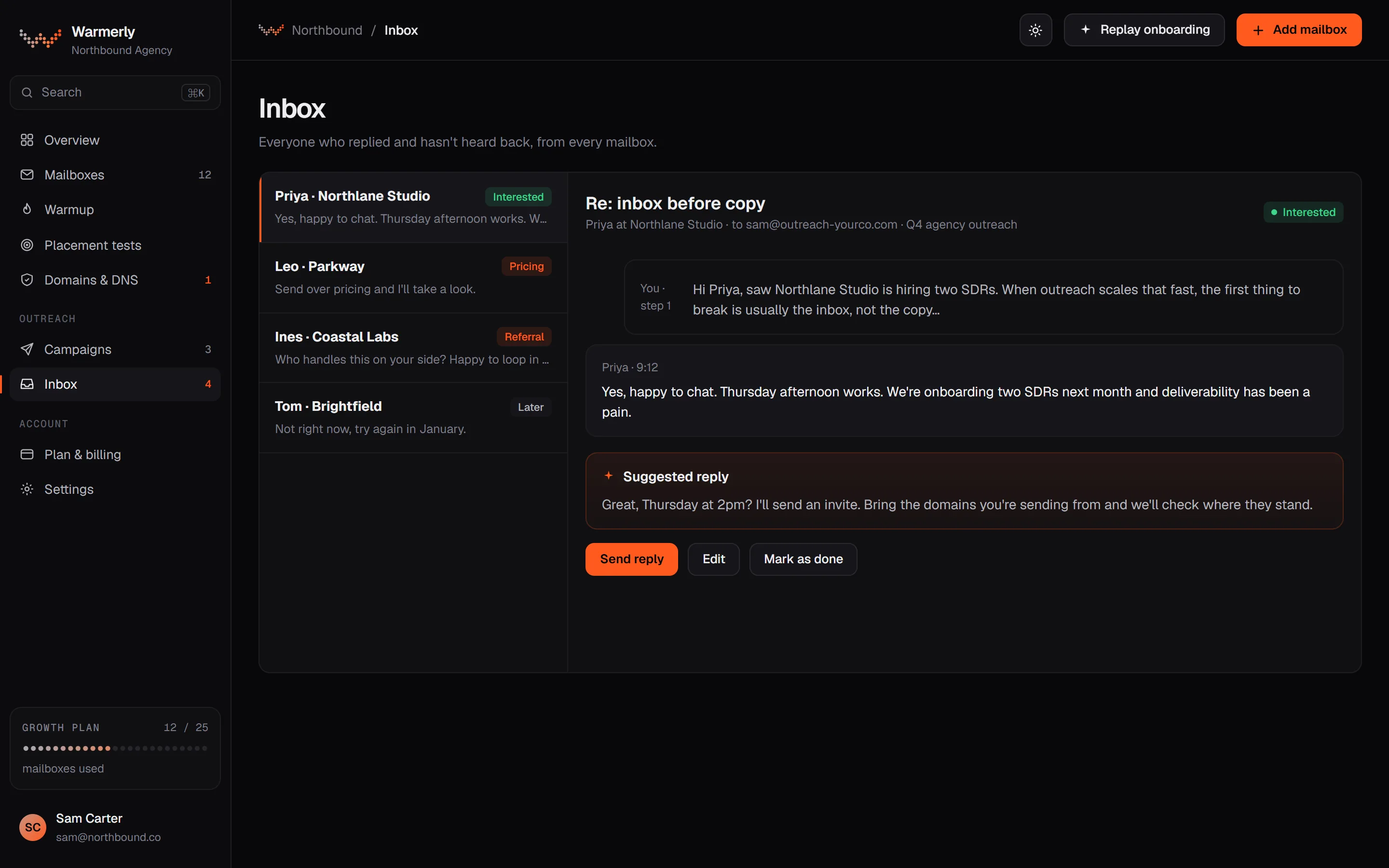
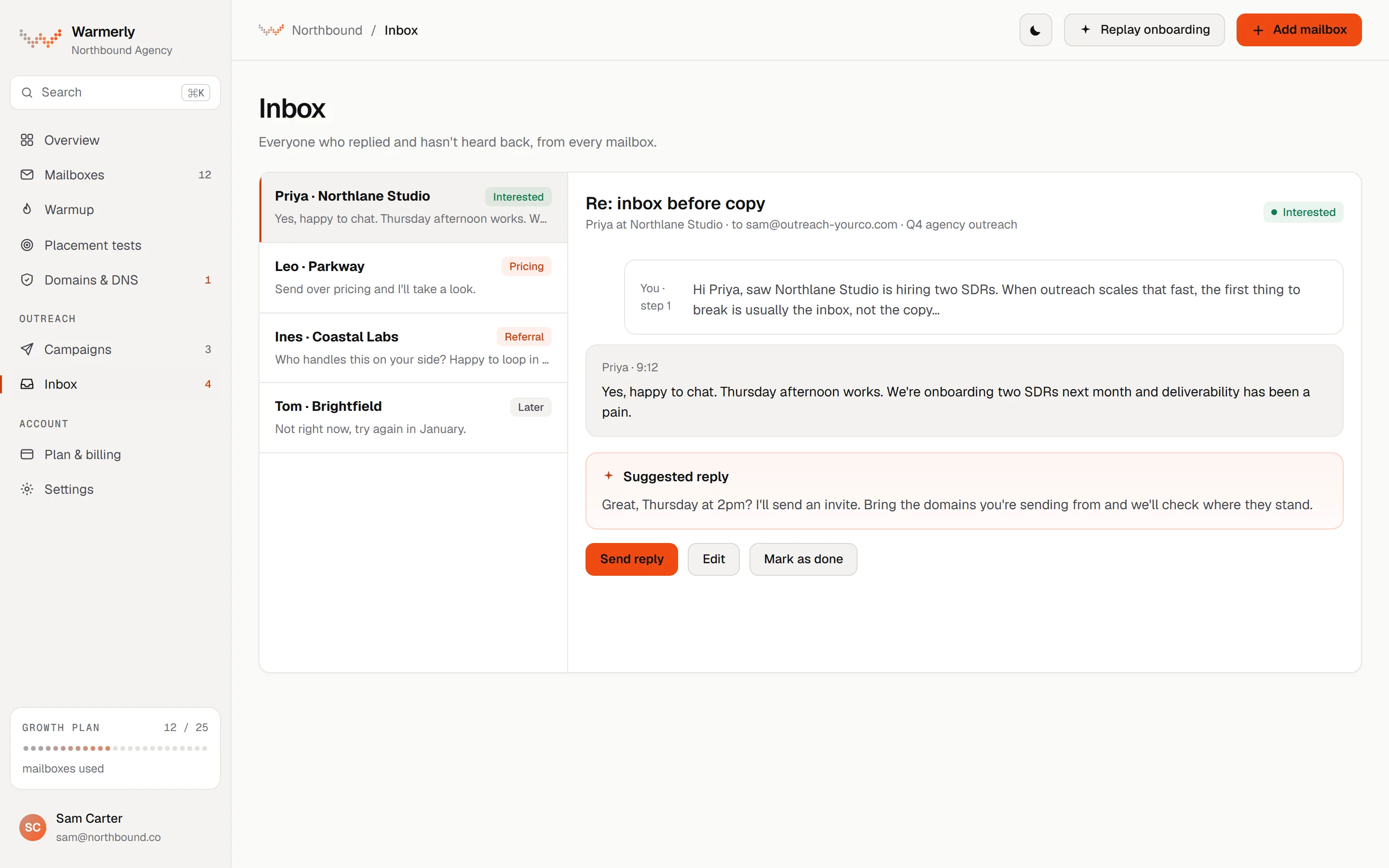
A reply queue first: Needs reply, three categories, email, LinkedIn and WhatsApp in one list, and a suggested reply. New mail is read from each mailbox about every five minutes. It is built to show who needs an answer next, and it has no snooze, star, notes or tags.
The default view is conversations where the newest message is theirs and is a lead or unlabelled. Other views are All and Archived, and search covers name, email, company and text.
Warmerly product, checked 21 October 2026
Free rules catch own-domain mail, no-reply senders, bulk and auto-reply headers and unsubscribes. An AI step labels campaign replies only.
Warmerly product, checked 21 October 2026
LinkedIn replies land in the same inbox as email replies.
Warmerly product, checked 21 October 2026
Warmerly can draft a reply to the latest inbound email: under 120 words, plain text, saved for you to edit and send.
Warmerly product, checked 21 October 2026
The inbox has no snooze, star or notes, and no conversation tags.
Warmerly product, checked 21 October 2026
Filters are Project, Account, Channel (All, Email, LinkedIn, WhatsApp), Category (All, Interested, Not relevant, Spam) and Unread only. Search matches name, email, phone, company and the words in messages, and partial words work.
Warmerly product, checked 21 October 2026
Warmup mail is never shown. Mailer-daemon, postmaster, no-reply and notification senders are filed Not relevant at ingest and show under All, which keeps them out of Needs reply.
Warmerly product, checked 21 October 2026
A sweep runs every 5 minutes and reads up to 50 of the oldest unseen messages per mailbox folder per run. The worst case for a sweep is about 7 minutes. A Refresh button fetches new mail now.
Warmerly product, checked 21 October 2026
Stop on reply and Stop on auto-reply are two campaign switches, both on by default. With the second off, an out-of-office is noted on the email but the lead keeps getting steps.
Warmerly product, checked 21 October 2026
Over MCP an assistant can list conversations, read one with its draft, draft a reply, change a category and send a reply to an existing thread, after an explicit confirm.
Warmerly product, checked 21 October 2026
A centralised inbox sorted into folders, a reply button in the inbox, automatic stop of follow-ups when someone replies, out-of-office handling with a reschedule option, and AI interest detection that works on English replies only. It is the more developed reply workflow of the two, and its tracking list is longer.
The features page says the centralised inbox shows incoming messages from all mailboxes, sorted into folders such as interested, auto-replied and bounced, with out-of-office replies in their own folder.
woodpecker.co/features · read 21 October 2026
The features page lists built-in AI interest detection for English replies, with sorting by interest level.
woodpecker.co/features · read 21 October 2026
The features page lists tracking for opens, clicks, replies, soft and hard bounces and opt-outs.
woodpecker.co/features · read 21 October 2026
The features page says that when a prospect replies, Woodpecker detects it and stops further follow-ups.
woodpecker.co/features · read 22 October 2026
You can reply from the built-in inbox with the reply button beside a message.
woodpecker.co/features · read 22 October 2026
In each campaign you can filter replies by interest level. The page says detection works in English only.
woodpecker.co/features · read 22 October 2026
Automated out-of-office messages go to their own folder. An autoreply detection and reschedule option can send a follow-up when the prospect returns to work.
woodpecker.co/features · read 22 October 2026
The features page says the Deliverability Monitor is free for all users.
woodpecker.co/features · read 22 October 2026
Manual tasks are reminders to act. LinkedIn manual tasks are semi-automated, call tasks exist, and a campaign can have up to 16 steps mixing emails, LinkedIn tasks and phone calls.
woodpecker.co/features · read 22 October 2026
We looked, and found no statement on these. That is about its published pages only, not about the product.
We report each version rather than pick one.
| Measure | Warmerly | Woodpecker |
|---|---|---|
| Reply inbox | Needs reply view, email and LinkedIn in one list, suggested reply | Centralised inbox in folders; AI interest detection for English replies |
| Default view | Needs reply | Folders by status |
| Email and LinkedIn together | Yes, one list | Not stated |
| Reply interest labels | Lead, not relevant, spam | Interested, auto-replied, bounced |
| Suggested reply | Under 120 words, saved as a draft | Not found |
| Sync interval | Every 5 minutes | Not stated |
| Channels in one inbox | Email, LinkedIn and WhatsApp | Email; LinkedIn and WhatsApp not stated |
| Filters | Project, Account, Channel, Category, Unread only | Interest level within a campaign |
| Out-of-office | Stop on auto-reply switch, on by default | Own folder and a reschedule option |
| Language limit | Not published | English only for interest detection |
| Sync runs a day (our arithmetic) | 24 x 60 / 5 = 288 | Not stated |
Our reading of the facts above. Not a promise, and not the only reasonable reading.
Warmerly's inbox is built to show who needs an answer next. Woodpecker's is built to sort replies by outcome. Which suits you is a matter of how you work through replies.
Woodpecker states its interest detection is for English replies. Warmerly does not publish a language limit for its labelling.
On Warmerly you open Needs reply and the list is the conversations where the newest message is theirs and is classed as a lead. Reply, archive, and the row drops out. On Woodpecker you open the folders and work through Interested first. One is a to-do list and the other is a filing system.
After a holiday week many leads send automatic replies. Woodpecker puts them in their own folder and can reschedule a follow-up for their return. On Warmerly, Stop on auto-reply is on by default, so those leads stop; switching it off keeps them in the sequence, with no reschedule date.
Warmerly reads new mail about every 5 minutes, so a reply can take that long to show, up to roughly 7 minutes in the worst case. The Refresh button fetches now. We could not read how often Woodpecker syncs.
If a prospect answers on LinkedIn or WhatsApp, Warmerly shows it in the same list with the email replies. Woodpecker's pages describe LinkedIn tasks and calls inside sequences, and we could not read whether replies from those channels land in its inbox.
Yes. Its features page describes a centralised inbox showing messages from all mailboxes, sorted into folders such as interested, auto-replied and bounced.
Yes. It can draft a reply to the latest inbound email, under 120 words, for you to edit and send.
Warmerly puts email, LinkedIn and WhatsApp in one list. Woodpecker does not state LinkedIn or WhatsApp in its inbox.
Every 5 minutes, which is 288 syncs a day by our arithmetic.
Woodpecker pages were read on 21 October 2026. Plans and wording change, so check the vendor's own page before you decide. Warmerly details come from the product as it runs today.
Connect a mailbox. Warmerly runs alongside whatever you send from now, so you can compare before you move anything.
Free plan, no card. Paid plans: 7-day trial, first charge on day 8.