Warmerly
One queue of everyone who replied, across email and LinkedIn, on every plan.
One row, in depth: what each tool does, the verified numbers, and who each suits.
Waalaxy details read from its pricing page, home page, feature pages, docs and help centre on 21 October 2026.
One queue of everyone who replied, across email and LinkedIn, on every plan.
A LinkedIn Inbox with saved replies, reminders, scheduling and tags, as a €20 a month add-on.
Warmerly puts email and LinkedIn replies in one inbox on every plan. Waalaxy sells its LinkedIn Inbox as a €20 a month add-on, with saved replies, reminders, scheduling and tags. Waalaxy is ahead on LinkedIn conversation tools. Last checked 22 October 2026.
One queue of everyone who replied, across email and LinkedIn, on every plan.
A LinkedIn Inbox with saved replies, reminders, scheduling and tags, as a €20 a month add-on.
Included on every Warmerly plan, a €20 a month add-on at Waalaxy
The default view is conversations where the newest message is theirs. Other views are All and Archived, and the list can be searched.
A solid dot means the page or the code states it. A dashed outline means we found no statement. Press a chip to read the rule.
Waalaxy details are from its pricing page, messaging page and Inbox help collection, read 21 October 2026.
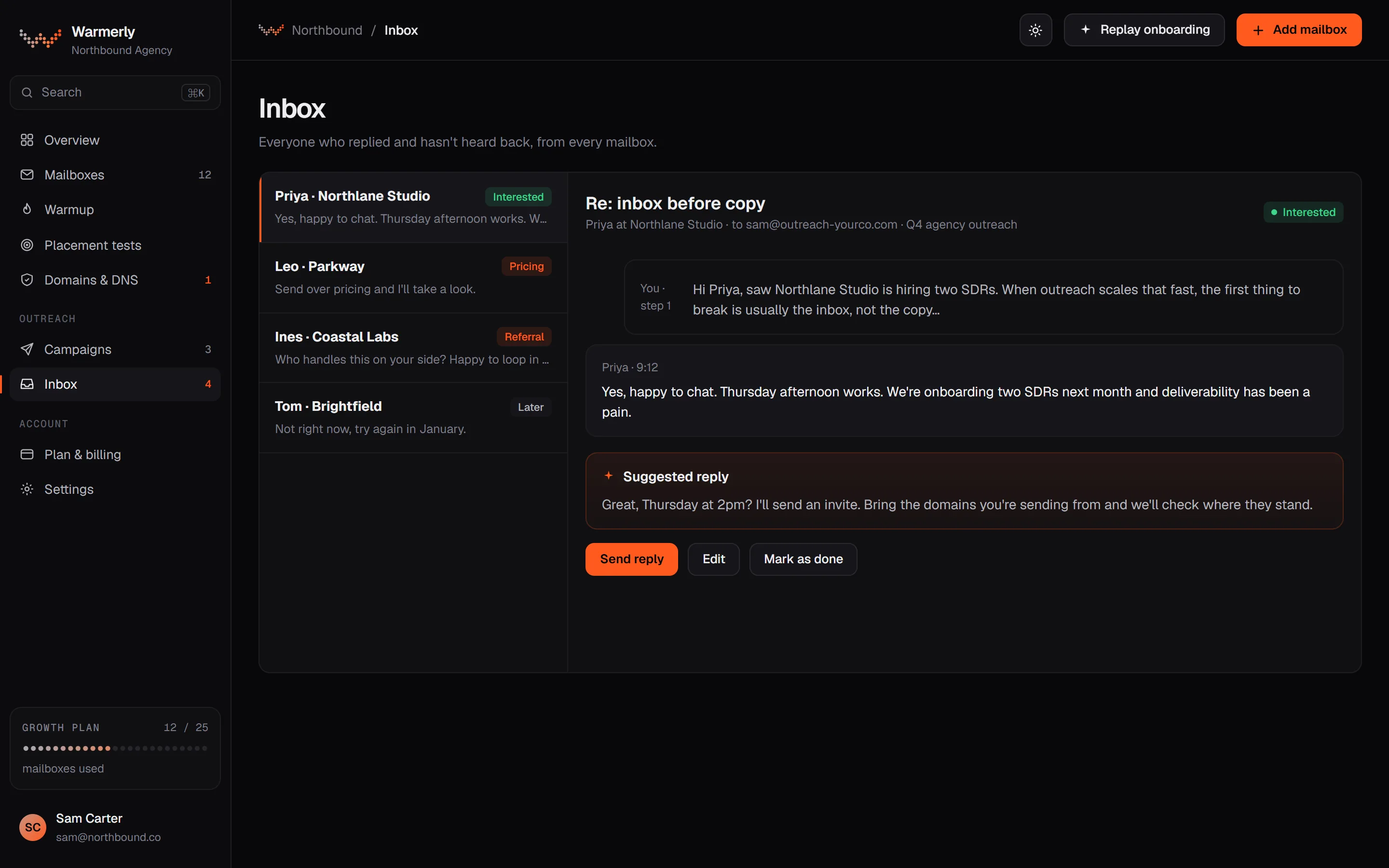
Warmerly's inbox is a plain 'needs reply' queue across channels, with a suggested reply and fewer tools.
The default view is conversations where the newest message is theirs. Other views are All and Archived, and the list can be searched.
Warmerly product, checked 21 October 2026
LinkedIn replies land in the same inbox as email replies, labelled interested, question, referral, not interested, stop or out of office.
Warmerly product, checked 21 October 2026
Warmerly can draft a reply to the latest inbound email: under 120 words, plain text. The draft is saved for you to edit and send.
Warmerly product, checked 21 October 2026
The inbox has no snooze, star or notes. We found no tags on a conversation, no scheduled reply and no reminders.
Warmerly product, checked 21 October 2026
The inbox lists only non-warmup messages, so warmup traffic does not bury real replies.
Warmerly product, checked 21 October 2026
Every filter runs before the list is cut into pages, so search and the Archived view return all matches, not only recent ones. An earlier version missed most of them.
Warmerly product, checked 21 October 2026
A LinkedIn reply marks the lead replied and stops its sequence when the campaign has stop on reply, so a follow-up does not go to someone who has already answered.
Warmerly product, checked 21 October 2026
The assistant files each LinkedIn reply from its label: interested, question and referral count as leads, not interested, stop and out of office as not relevant, and anything unclear stays in Needs reply. It never overrides a person's own choice.
Warmerly product, checked 21 October 2026
Waalaxy's inbox is a paid add-on built for LinkedIn replies.
Its pricing page lists the LinkedIn Inbox as an optional add-on at €20 a month. Its messaging page says the Inbox is not included in a standard subscription.
waalaxy.com/en/pricing · read 21 October 2026
The Inbox page names saved replies, scheduled messages, reminders and tags, and an analysis that flags high-intent conversations.
waalaxy.com/feature/linkedin-messaging · read 21 October 2026
The pricing page says 500 free conversations with no time limit. Its messaging page says a free trial covers up to 500 managed conversations.
waalaxy.com/en/pricing · read 21 October 2026
Its messaging page says you cannot access a team member's inbox.
waalaxy.com/feature/linkedin-messaging · read 21 October 2026
Its Inbox collection lists articles on what the Inbox is, reminders, filtering by reminder, scheduling a message, creating, editing and deleting saved replies, tagging a prospect, an FAQ and keyboard shortcuts.
intercom.help/waalaxy/en/collections/10285506-inbox · read 22 October 2026
A reply to any note, message or email removes the prospect from the sequence and marks them Has replied, with a status of Interested or Not interested. A manual LinkedIn message does not remove them.
intercom.help/waalaxy/en/articles/9566079-faq-waalaxy-campaign · read 22 October 2026
Replied prospects remain visible in the campaign for history.
intercom.help/waalaxy/en/articles/9566079-faq-waalaxy-campaign · read 22 October 2026
One article in its Inbox collection covers keyboard shortcuts, and another is an Inbox FAQ.
intercom.help/waalaxy/en/collections/10285506-inbox · read 22 October 2026
We looked, and found no statement on these. That is about its published pages only, not about the product.
We report each version rather than pick one.
| Measure | Warmerly | Waalaxy |
|---|---|---|
| Reply inbox | One queue of everyone who replied, across email and LinkedIn, on every plan. | A LinkedIn Inbox with saved replies, reminders, scheduling and tags, as a €20 a month add-on. |
| Inbox price | Included on every plan | €20 a month add-on |
| Free conversations | No separate limit | 500 |
| Tags on a conversation | None found | Yes |
| Inbox help articles | A docs page | 10 in its collection |
| Reply labels | Interested, question, referral, not interested, stop, out of office | Interested or Not interested on the prospect |
Our reading of the facts above. Not a promise, and not the only reasonable reading.
If you manage many LinkedIn conversations, saved replies, reminders and tags will matter, and Waalaxy has them. Warmerly's inbox is simpler.
If you want email and LinkedIn replies in one place at no extra charge, Warmerly does that.
Saved replies, reminders and tags matter when you handle many threads a day. Waalaxy's Inbox is built for that, and Warmerly's is simpler.
If one person handles both channels, one list with labels saves switching tools. Warmerly puts both in one inbox on every plan.
On Waalaxy, send a manual LinkedIn message and the prospect stays in the sequence, so remove them first to avoid a double follow-up.
Whoever answers replies needs to see the thread and the history. On Warmerly the thread and a suggested reply sit together. On Waalaxy, a team member cannot open a colleague's inbox, so plan who answers what.
No, it is a €20 a month add-on, with 500 free conversations.
Yes, one inbox for email and LinkedIn replies, included on every plan.
Waalaxy supports tags. We found none in Warmerly.
Warmerly uses interested, question, referral, not interested, stop and out of office. Waalaxy marks the prospect Interested or Not interested.
Waalaxy pages were read on 21 October 2026. Plans and wording change, so check the vendor's own page before you decide. Warmerly details come from the product as it runs today.
Connect a mailbox. Warmerly runs alongside whatever you send from now, so you can compare before you move anything.
Free plan, no card. Paid plans: 7-day trial, first charge on day 8.