Warmerly
Email, LinkedIn and WhatsApp in one list; checks every 5 minutes; drafted reply; no assignment or notes
One row, in depth: what each tool does, the verified numbers, and who each suits.
QuickMail details read from its pricing page, home page, product pages and help centre on 21 October 2026.
Email, LinkedIn and WhatsApp in one list; checks every 5 minutes; drafted reply; no assignment or notes
Email and LinkedIn replies, tasks, calls and drafts; assign, note and snooze; checks every 10 minutes
Warmerly's inbox holds email, LinkedIn and WhatsApp replies, syncs every five minutes, and has no snooze, notes or won and lost marks. QuickMail's Inbox holds email and LinkedIn replies, tasks, call tasks and drafts, with assignment to team members, notes, snooze and won or lost marks, and checks accounts every 10 minutes. Last checked 21 October 2026.
Email, LinkedIn and WhatsApp in one list; checks every 5 minutes; drafted reply; no assignment or notes
Email and LinkedIn replies, tasks, calls and drafts; assign, note and snooze; checks every 10 minutes
Warmerly checks every 5 minutes. QuickMail checks every 10 minutes and adds tasks and assignment.
Thirty minutes of checks
In the one inbox
Thirty minutes of checks
In the one inbox
| Tool | What it shows |
|---|---|
| Warmerly | One inbox for email, LinkedIn and WhatsApp replies, synced every 5 minutes, with a drafted reply under 120 words. We found no assignment, notes or snooze. |
| QuickMail | One inbox for email and LinkedIn replies, tasks, call tasks and drafts, checked every 10 minutes, with assignment, notes, snooze and won or lost marks. |
Each tick is one check for new replies. Reply times also depend on the mail provider.
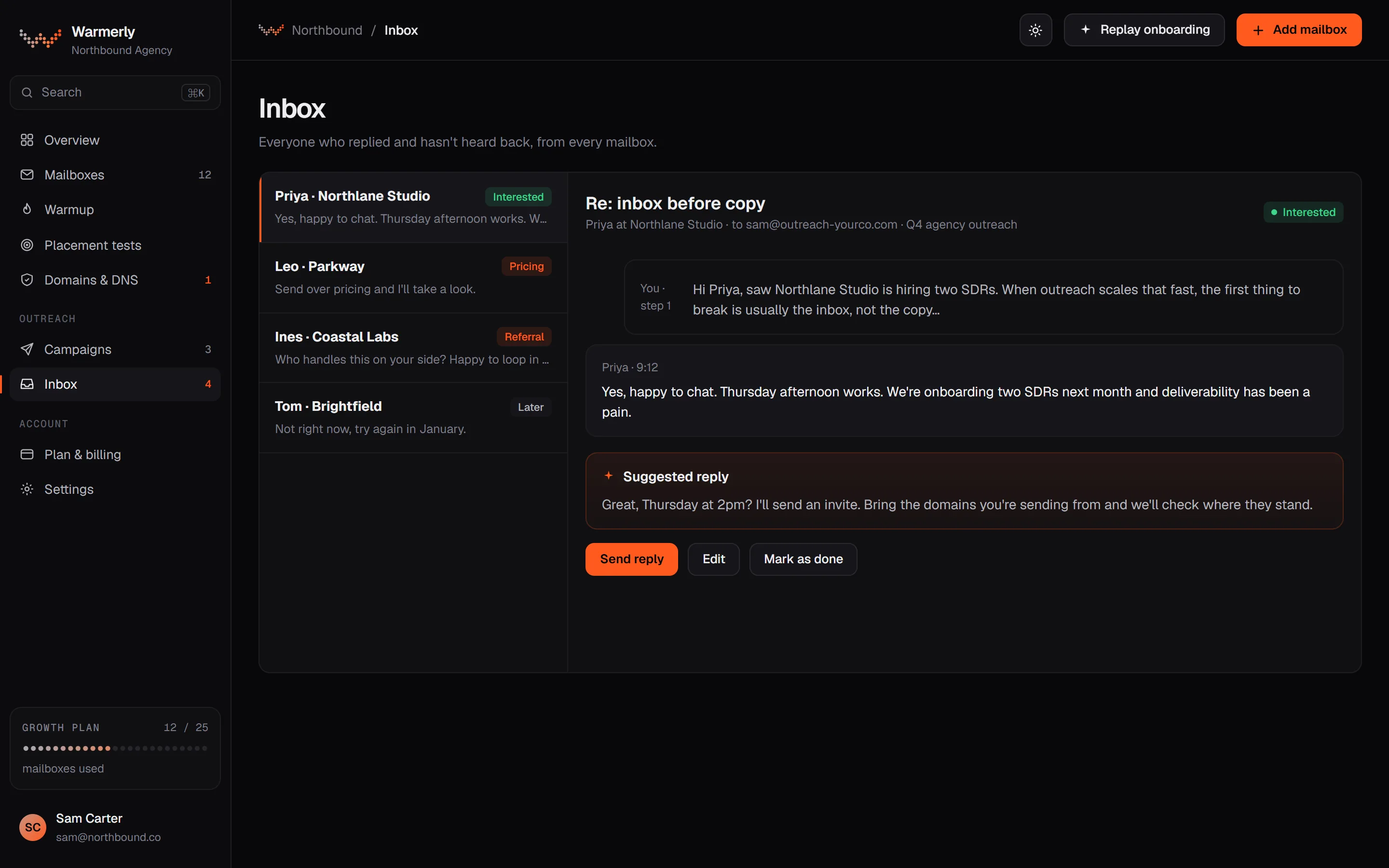
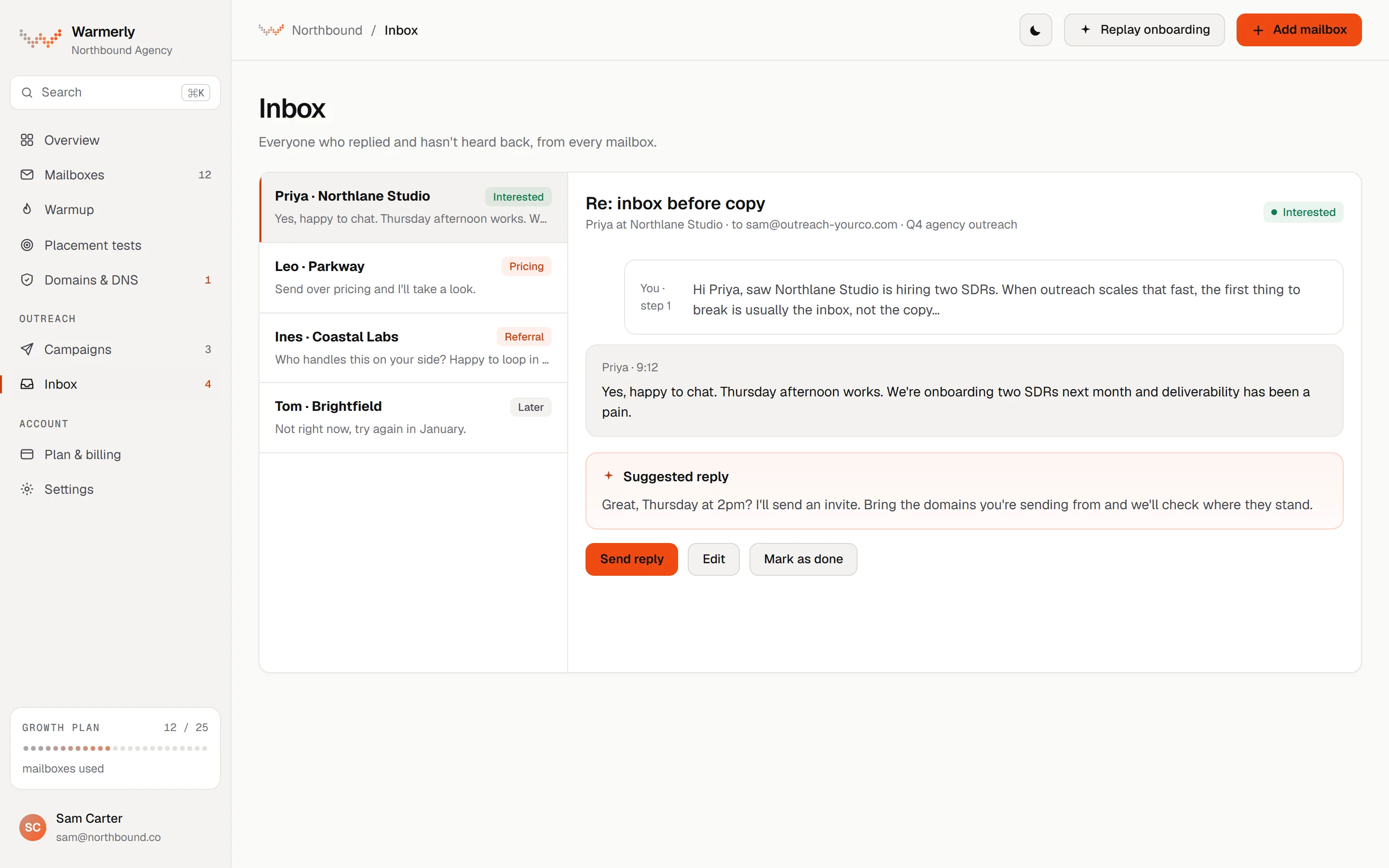
One inbox for three channels, with a drafted reply and simple sorting.
Connected mailboxes are synced for new mail every five minutes. A reply is matched to the campaign email through the mail's reply headers, and bounces and automatic replies are classified separately.
Warmerly product, checked 21 October 2026
By default a genuine reply stops the lead's sequence, and so does an automatic reply. Both settings can be turned off.
Warmerly product, checked 21 October 2026
Inbox mail is sorted into lead, not relevant or spam, and Warmerly can draft a reply for you to edit, under 120 words and plain text.
Warmerly product, checked 21 October 2026
The inbox has no snooze, star or notes and no conversation tags. We found no won or lost status and no assignment of a reply to a team member.
Warmerly product, checked 21 October 2026
A team inbox with tasks, assignment and AI help, with some AI features limited by plan.
Email replies, LinkedIn replies, accepted connection requests, tasks, call tasks, drafts and sent emails, in single threads.
help.quickmail.com/inbox-replies/handling-replies-with-the-inbox · read 21 October 2026
You can snooze, mark replies pending, won or lost, assign conversations to team members, add notes, filter, export and run bulk actions. It also summarises conversations with AI.
help.quickmail.com/inbox-replies/handling-replies-with-the-inbox · read 21 October 2026
AI reply categorisation is only on the Legacy Expert and Agency plans and works on English text. Draft with AI writes a reply from the thread using a prompt you set.
help.quickmail.com/inbox-replies/categorizing-replies-with-ai · read 21 October 2026
QuickMail checks email accounts every 10 minutes, and says replies deleted before that check are missed.
help.quickmail.com/inbox-replies/auto-forwarding-replies-to-a-different-email · read 21 October 2026
Replies go to the team member who added the account, accounts added through an invite link have no owner and show as Unassigned, and Change Inbox Owner sets a new owner.
help.quickmail.com/inbox-replies/handling-replies-with-the-inbox · read 21 October 2026
You can filter by state, status, snooze, assignee, campaign, email account and task type, and bulk snooze, assign, archive or delete.
help.quickmail.com/inbox-replies/handling-replies-with-the-inbox · read 21 October 2026
Task steps, call steps and manually sent email drafts all appear in the Inbox, and a call can go through a phone dialer app such as Aircall.
help.quickmail.com/inbox-replies/handling-replies-with-the-inbox · read 21 October 2026
A status bar logs changes to Active, Pending, Won, Lost and reassignment, and selected conversations can be exported as a CSV sent to your login email.
help.quickmail.com/inbox-replies/handling-replies-with-the-inbox · read 21 October 2026
We looked, and found no statement on these. That is about its published pages only, not about the product.
| Measure | Warmerly | QuickMail |
|---|---|---|
| Reply inbox | Email, LinkedIn and WhatsApp in one list; checks every 5 minutes; drafted reply; no assignment or notes | Email and LinkedIn replies, tasks, calls and drafts; assign, note and snooze; checks every 10 minutes |
| Channels in the inbox | Email, LinkedIn and WhatsApp | Email and LinkedIn, plus tasks and calls |
| How often it checks | Every 5 minutes | Every 10 minutes |
| Assign to a teammate | Not found | Yes |
| Won, lost, snooze, notes | Not found | Yes |
| Drafted reply | Yes, under 120 words | Yes, with a prompt you set |
| AI categories | Lead, not relevant, spam | Agency plan, English only |
Our reading of the facts above. Not a promise, and not the only reasonable reading.
If several people answer replies, QuickMail's assignment, notes and won or lost marks will matter. Warmerly's inbox is simpler.
Warmerly syncs every 5 minutes and QuickMail every 10. Either way, keep a copy of replies in the mailbox.
If WhatsApp is part of your outreach, Warmerly shows it in the same inbox.
For one person, Warmerly's single queue with a suggested reply is enough. For a team that hands replies between people, QuickMail's assignment, notes and won or lost marks matter.
Warmerly's inbox also takes WhatsApp replies, which the QuickMail inbox page does not mention.
Warmerly syncs every five minutes and QuickMail every 10, so a reply reaches either queue within minutes. The difference matters less than who picks it up.
Yes, for email and LinkedIn replies, plus tasks and call tasks.
Yes, to team members, with notes, snooze and won or lost marks. We found none of these in Warmerly.
It drafts a reply with a prompt you set, and its AI categories are on the Agency plan, English only. Warmerly drafts a reply under 120 words.
Every 5 minutes for Warmerly and every 10 minutes for QuickMail.
QuickMail pages were read on 21 October 2026. Plans and wording change, so check the vendor's own page before you decide. Warmerly details come from the product as it runs today.
Connect a mailbox. Warmerly runs alongside whatever you send from now, so you can compare before you move anything.
Free plan, no card. Paid plans: 7-day trial, first charge on day 8.