WarmerlyWarmerly ahead on this row
Every mailbox on the plan; a published ramp from 4 a day on day 0 to 50 a day by day 30
One row, in depth: what each tool does, the verified numbers, and who each suits.
QuickMail details read from its pricing page, home page, product pages and help centre on 21 October 2026.
Every mailbox on the plan; a published ramp from 4 a day on day 0 to 50 a day by day 30
Built-in warmer only on inboxes bought from it, 5 a day; other inboxes use MailFlow, 30 to 50 a day by plan
Warmerly warms every mailbox on a published ramp from 4 a day to 50 a day by day 30. QuickMail's pricing page lists a free AutoWarmer with MailFlow on every plan, but its help pages disagree on which inboxes the built-in AutoWarmer covers: one says all types of email account, three others say only inboxes bought through QuickMail. Both versions cap it at 5 emails a day, and its partner warmer MailFlow runs at 30, 40 or 50 a day by plan. Last checked 22 October 2026.
Every mailbox on the plan; a published ramp from 4 a day on day 0 to 50 a day by day 30
Built-in warmer only on inboxes bought from it, 5 a day; other inboxes use MailFlow, 30 to 50 a day by plan
Warmerly's ramp is a published curve. QuickMail states daily caps for each of its two warmers, and no curve.
| Tool | What it shows |
|---|---|
| Warmerly | 4 a day on day 0, 8 on day 3, 15 on day 7, 25 on day 14, 35 on day 21, 50 on day 30. |
| QuickMail | Built-in warmer: up to 5 a day, on inboxes bought from QuickMail only. MailFlow for other inboxes: 30 a day on Starter, 40 on Growth, 50 on Agency. No ramp curve published. |
QuickMail's caps are flat lines because it publishes no curve. Its figures are from help.quickmail.com, read 21 October 2026.
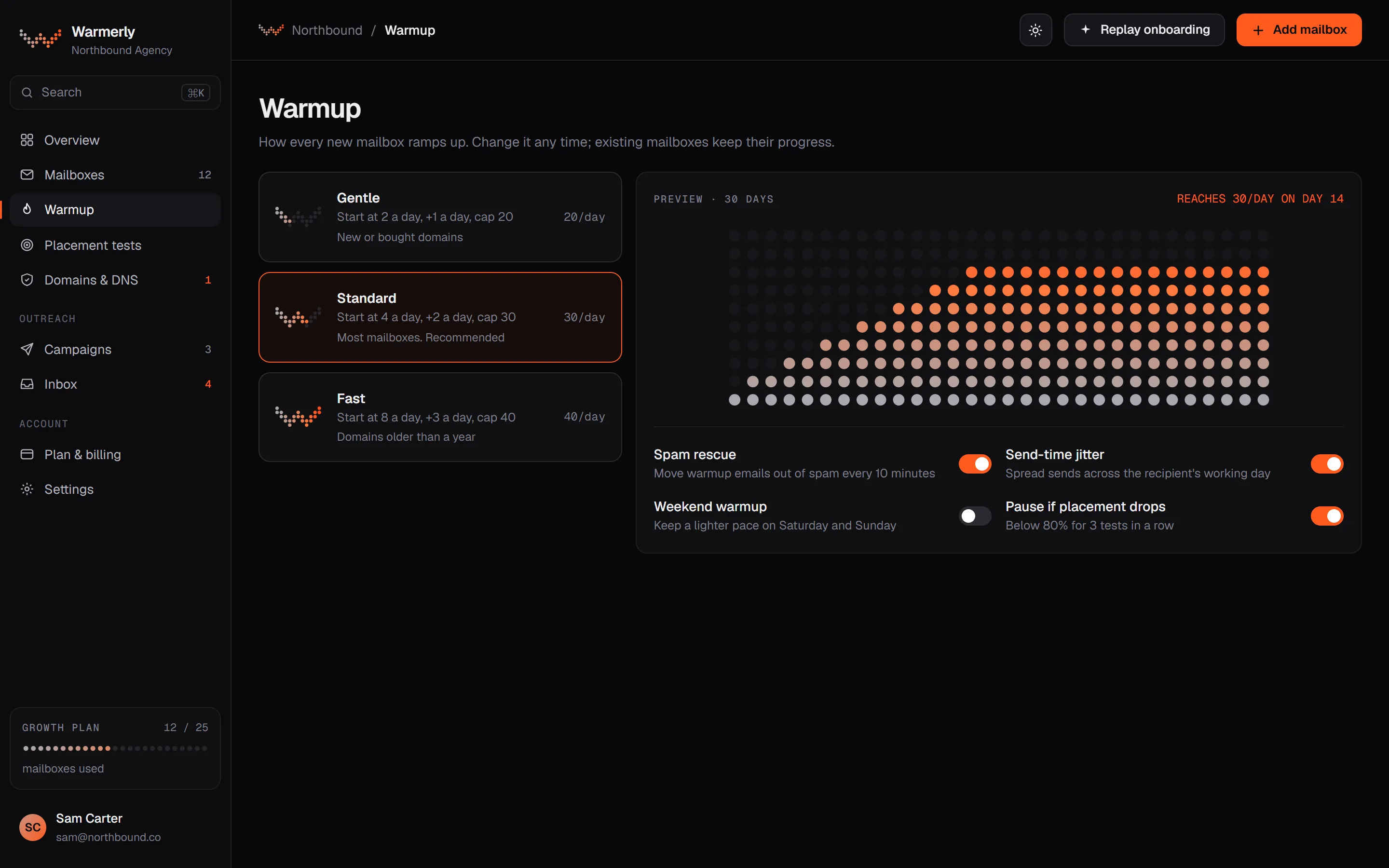
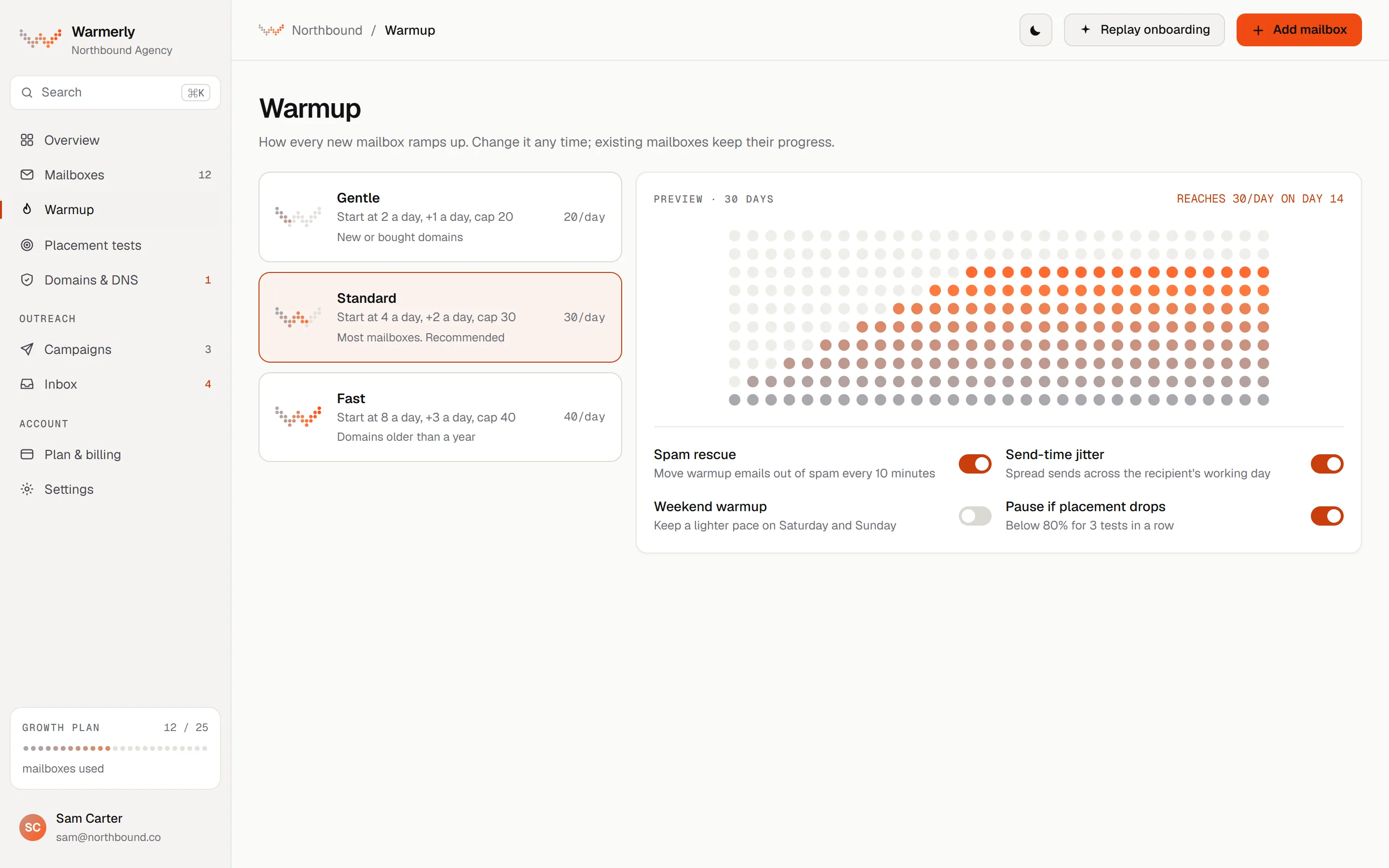
One warmup for every mailbox, on a ramp published as numbers, with the limiting factor named on screen.
The daily warmup quota is 4 at day 0, 8 at day 3, 15 at day 7, 25 at day 14, 35 at day 21 and 50 at day 30. It counts days the mailbox really sent, not calendar age.
Warmerly product, checked 21 October 2026
A warmup mail that lands in spam is read, moved to the inbox and answered. Only warmup mail between Warmerly mailboxes is rescued, never campaign mail to real prospects.
Warmerly product, checked 21 October 2026
Warmup is included on every mailbox the plan allows and is never metered.
Warmerly product, checked 21 October 2026
Warmerly's warmup is mail between Warmerly mailboxes. We cannot compare network size, because neither side publishes one.
Warmerly product, checked 21 October 2026
When the receiving mailbox finds a warmup message in spam it clears the junk flag, marks it not junk, stars it, moves it to the inbox and queues a reply. This happens to every spam-placed warmup message, after a read delay of 10 to 120 minutes, and never to campaign mail.
Warmerly product, checked 21 October 2026
A mailbox moves from warming up to warmed up once it has really sent on 30 days, not 30 calendar days. A mailbox connected three months ago that never sent has not warmed up and stays in the warming state.
Warmerly product, checked 21 October 2026
Warmup mail counts toward the mailbox's minimum wait between sends, so a campaign on a warming mailbox sends a little less than the plain arithmetic says. Warmup stays on while campaigns run.
Warmerly product, checked 21 October 2026
Two warmers, a built-in AutoWarmer and the MailFlow partner, with its own help pages disagreeing on which inboxes the built-in one covers.
Each plan lists a free AutoWarmer with MailFlow.
quickmail.com/pricing · read 21 October 2026
It ramps gradually to a daily maximum, archives warmup mail, moves spam hits out, starts within 24 hours and gets replies from real accounts in its network. The maximum is currently 5 a day per account. It says it does not guarantee inbox placement.
help.quickmail.com/deliverability/quickmail-auto-warmer · read 21 October 2026
The AutoWarmer page says it is now available for all types of email account, with no need for MailFlow. The FAQ, the buying guide and the MailFlow page say it is available only on accounts purchased with QuickMail, and that other accounts use MailFlow, free with the subscription. None of the pages is dated.
help.quickmail.com/deliverability/auto-warmer-for-non-quickmail-inboxes · read 21 October 2026
MailFlow's free plan allows 5 warmup emails a day per account. A QuickMail plan sets it to 30 on Starter, 40 on Growth and 50 on Agency, after asking support.
help.quickmail.com/deliverability/auto-warmer-for-non-quickmail-inboxes · read 21 October 2026
It says experts generally recommend at least two weeks, with no strict rule.
help.quickmail.com/deliverability/quickmail-auto-warmer · read 21 October 2026
It says warm-up emails are written to read like real people, with varied topics and natural phrasing, and that you can adjust the reply rate to control what share of them get a response.
help.quickmail.com/deliverability/quickmail-auto-warmer · read 22 October 2026
It says the first warm-up email is sent within 24 hours of an inbox joining the group, and further down the same page says sending and receiving start within 1 to 48 hours.
help.quickmail.com/deliverability/quickmail-auto-warmer · read 22 October 2026
It recommends leaving the AutoWarmer on once outreach starts, to stabilise reputation and cover slow days, and warns that outreach plus warm-up together count toward an inbox's total daily volume.
help.quickmail.com/deliverability/quickmail-auto-warmer · read 22 October 2026
You join the group from each inbox's fire icon tab and leave with Leave Group. It says there is no bulk option for leaving yet.
help.quickmail.com/deliverability/quickmail-auto-warmer · read 22 October 2026
MailFlow needs its own account. New accounts start with a 14-day trial, you subscribe to its Free Plan to keep warming, and higher limits are requested through support after you connect.
help.quickmail.com/deliverability/auto-warmer-for-non-quickmail-inboxes · read 22 October 2026
It says the AutoWarmer may not suit warming a new IP, which needs very high volume, and that Google's filters are stricter, so you may extend warm-up by a few weeks or start with non-Google recipients.
help.quickmail.com/deliverability/quickmail-auto-warmer · read 22 October 2026
We looked, and found no statement on these. That is about its published pages only, not about the product.
We report each version rather than pick one.
| Measure | Warmerly | QuickMail |
|---|---|---|
| Email warmup | Every mailbox on the plan; a published ramp from 4 a day on day 0 to 50 a day by day 30 | Built-in warmer only on inboxes bought from it, 5 a day; other inboxes use MailFlow, 30 to 50 a day by plan |
| Day 0 volume | 4 a day | Not published |
| Day 30 volume | 50 a day | Not published |
| Built-in warmer cap | Not applicable | 5 a day maximum, on the inboxes it covers |
| MailFlow cap by plan | Not applicable | 30, 40 or 50 a day |
| Warmup length advised | 30-day ramp | At least two weeks |
| Charged separately | No | No |
| Time to the first warmup email | Not stated as a number | Within 24 hours, or 1 to 48 hours on the same page |
| Spam rescue | Every spam-placed warmup mail moved to the inbox and answered | Moved out of spam automatically |
| Warmup beside campaigns | Shares the mailbox's minimum wait between sends | Recommended to keep on; both count toward daily volume |
| Leaving the warmer | Warmup is a per-mailbox setting | Leave Group on each inbox, no bulk option |
Our reading of the facts above. Not a promise, and not the only reasonable reading.
Open an inbox in QuickMail and look for the AutoWarmer tab, shown with a fire icon. Its FAQ says that if there is no tab, the inbox was not bought from QuickMail and you use MailFlow. Check the tab before you assume the built-in warmer is running on inboxes you brought.
Warmerly's quota climbs to 50 by day 30. QuickMail's built-in cap is 5, and MailFlow is 30 to 50 depending on plan.
QuickMail's own help page says an autowarmer does not guarantee inbox placement. Warmerly offers a 30-day inbox guarantee with conditions.
QuickMail says warm-up and outreach together count toward an inbox's volume. A MailFlow inbox on Starter at 30 warm-up emails a day plus 15 campaign emails sends 45 a day. A Warmerly mailbox at day 14 has a warmup quota of 25 on top of its campaign limit of 30 by default, so on a young mailbox the campaign ramp, which starts at 3 a day, is the number to watch.
MailFlow has its own account, trial and plan to keep track of, and raising its limit means writing to its support. If you would rather keep warmup, DNS checks and sending in one place, that is a point for Warmerly. If you already run MailFlow, QuickMail connects it.
Yes. Its pricing page lists a free AutoWarmer with MailFlow on every plan, with no separate charge.
A maximum of 5 a day on the inboxes it covers. MailFlow runs at 30, 40 or 50 a day by plan.
A 30-day ramp, from 4 a day on day 0 to 50 a day on day 30.
Yes. Every spam-placed warmup mail is moved to the inbox and answered. QuickMail also moves them out of spam automatically.
QuickMail pages were read on 21 October 2026. Plans and wording change, so check the vendor's own page before you decide. Warmerly details come from the product as it runs today.
Connect a mailbox. Warmerly runs alongside whatever you send from now, so you can compare before you move anything.
Free plan, no card. Paid plans: 7-day trial, first charge on day 8.