WarmerlyWarmerly ahead on this row
SPF, DKIM, DMARC and MX checked every 6 hours, with the fix written out
One row, in depth: what each tool does, the verified numbers, and who each suits.
Mailshake details read from its pricing page, home page, feature pages and help centre on 21 October 2026.
SPF, DKIM, DMARC and MX checked every 6 hours, with the fix written out
SPF, MX and DKIM set up on mailboxes it sells; no ongoing check described; DMARC only in a help article
Warmerly checks SPF, DKIM, DMARC and MX on every connected mailbox every 6 hours and writes out the fix. Mailshake's pages say SPF, MX and DKIM are set up on the mailboxes it sells, its deliverability page mentions SPF and DKIM and says it monitors blacklist status, and one help article advises configuring SPF, DKIM and ideally DMARC yourself. We found no description of a recurring check on your own records. Last checked 22 October 2026.
SPF, DKIM, DMARC and MX checked every 6 hours, with the fix written out
SPF, MX and DKIM set up on mailboxes it sells; no ongoing check described; DMARC only in a help article
Warmerly checks four record types on a schedule. Mailshake's pages name SPF, DKIM and MX for its own mailboxes, mention DMARC only in a help article and describe no schedule.
p means set up at purchase. q means not stated on the pages we read.
| Item | Warmerly | Mailshake |
|---|---|---|
| SPF | Every 6 hours | Set up on its mailboxes |
| DKIM | Every 6 hours | Set up on its mailboxes |
| DMARC | Every 6 hours | Help article only |
| MX | Every 6 hours | Set up on its mailboxes |
| How often | 6 hours | Not stated |
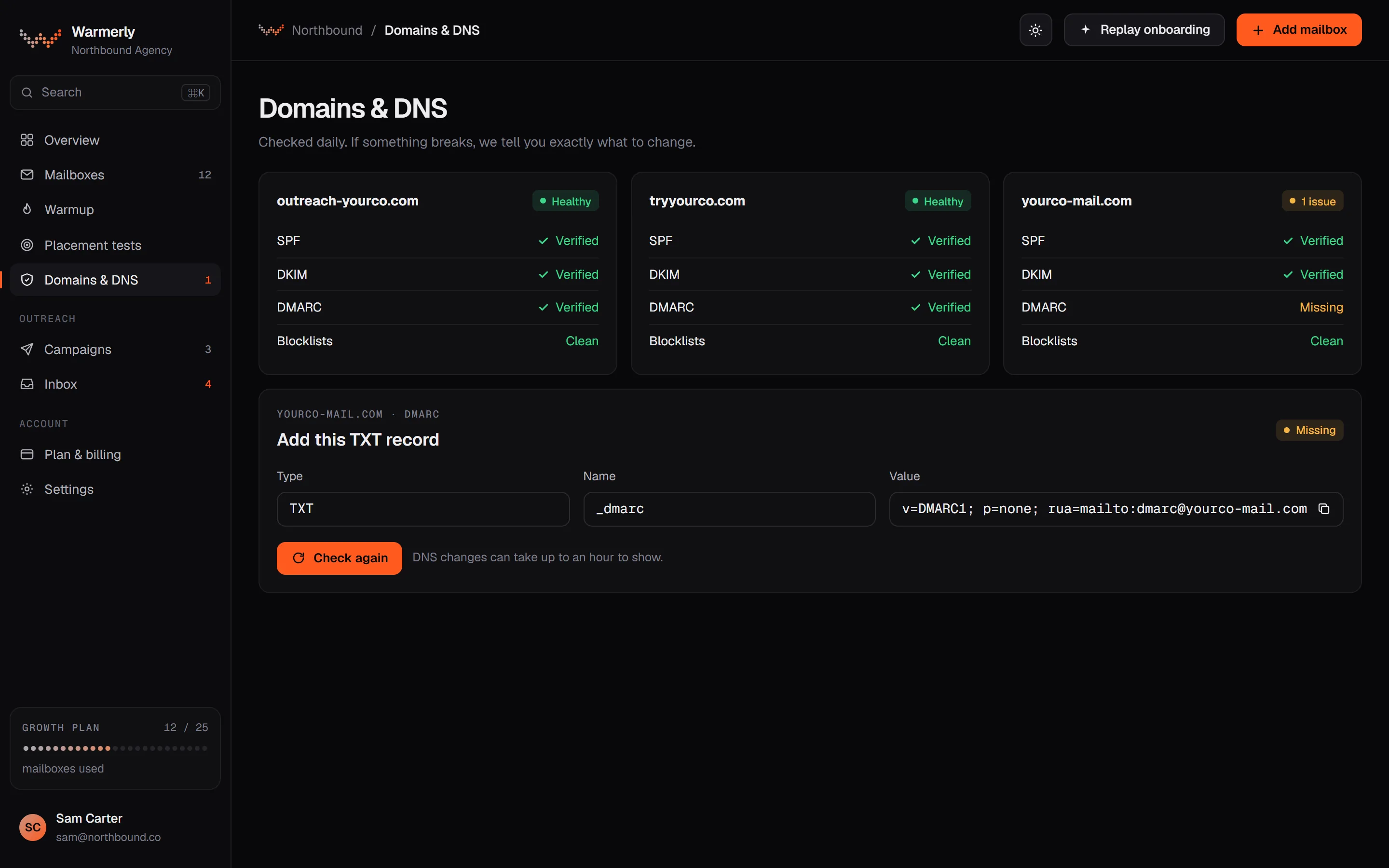
A recurring check on every connected mailbox that goes past whether a record exists, with a written finding, a record to paste in some cases, 16 blocklist zones and a free DMARC report reader.
SPF is checked for its ending, the limit of 10 DNS lookups and broken terms. DKIM is checked for key length and the t=y test flag. DMARC is checked for p=, sp=, pct= and rua=. MX is checked for presence.
Warmerly product, checked 21 October 2026
The DNS sweep runs every 6 hours across every mailbox that is not dead or paused, and the Health tab has a Re-check now option.
Warmerly product, checked 21 October 2026
Each finding has a title, an explanation and a fix. Where it can, the card shows the record to paste.
Warmerly product, checked 21 October 2026
Warmerly queries 6 domain and 10 IP blocklists. Free DMARC report monitoring covers up to 10 domains per workspace.
Warmerly product, checked 21 October 2026
When a lookup fails or times out, the card shows unknown rather than a pass, and advisories are never shown as failures. A blocklist refusal is not reported as a listing.
Warmerly product, checked 21 October 2026
Under a failing SPF or DMARC chip the card shows the exact record. SPF is suggested only for Google and Microsoft mailboxes and is merged into the record already published, because a domain may hold one SPF record. DMARC is suggested as a monitor-only p=none when none exists.
Warmerly product, checked 21 October 2026
Free DMARC monitoring reads the daily aggregate reports mailbox providers send, for up to 10 domains per workspace. A domain is verified when its published rua names Warmerly's address, and reports are kept for 90 days.
Warmerly product, checked 21 October 2026
gmail.com, outlook.fr and similar provider domains cannot be added for DMARC monitoring, because nobody using them can publish a DMARC record.
Warmerly product, checked 21 October 2026
SORBS is excluded because it shut down in 2024, UCEPROTECT because delisting is paid, and Invaluement because it is subscription only.
Warmerly product, checked 21 October 2026
Records are set up on mailboxes bought from Mailshake and monitoring is described in terms of blacklists, bounces and a spam score. A help article tells customers to set up authentication themselves.
The Ready to Use Mailboxes pages say SPF, MX and DKIM records are already set up for you.
mailshake.com/multiple-mailboxes · read 21 October 2026
The deliverability page mentions DKIM and SPF authentication in its FAQ. DMARC is not mentioned.
mailshake.com/features/email-deliverability · read 21 October 2026
The deliverability FAQ says the tool monitors open and click rates, blacklisting statuses and bounces.
mailshake.com/features/email-deliverability · read 21 October 2026
The deliverability page shows a domain setup assistant as an image, and gives no detail on how it works.
mailshake.com/features/email-deliverability · read 21 October 2026
The warm-up help article says to set up proper domain authentication, with SPF, DKIM and ideally DMARC correctly configured. It is dated July 2, 2025 and does not say the tool checks them.
docs.mailshake.com/article/303-how-does-warmupyour-email-work · read 22 October 2026
The same article suggests a clean, dedicated sending domain, or a subdomain for outreach if your main domain has a poor reputation.
docs.mailshake.com/article/303-how-does-warmupyour-email-work · read 22 October 2026
The mailboxes page says Mailshake handles the behind-the-scenes work from registration to DNS configuration. One domain gives 5 mailboxes, at $12 a month or $129 a year.
mailshake.com/multiple-mailboxes · read 22 October 2026
The mailboxes FAQ says that if one address runs into trouble, the system switches to another so sending continues.
mailshake.com/multiple-mailboxes · read 22 October 2026
The deliverability page lists a spam score analysis, and email validation credits that classify each address by bounce risk. Validation checks recipients, not your records.
mailshake.com/features/email-deliverability · read 22 October 2026
We looked, and found no statement on these. That is about its published pages only, not about the product.
We report each version rather than pick one.
| Measure | Warmerly | Mailshake |
|---|---|---|
| Authentication checks | SPF, DKIM, DMARC and MX checked every 6 hours, with the fix written out | SPF, MX and DKIM set up on mailboxes it sells; no ongoing check described; DMARC only in a help article |
| Records covered | SPF, DKIM, DMARC and MX | SPF, MX and DKIM on its own mailboxes; DMARC only in a help article |
| How often | Every 6 hours, or on demand | Not stated |
| Fix provided | A written finding, sometimes the record to paste | Not stated |
| Blocklists | 6 domain and 10 IP blocklists | Blacklisting status monitored, list not stated |
| Blocklist zones queried | 16 (6 domain, 10 IP) | Not stated |
| Free DMARC monitoring | Up to 10 domains per workspace | Not found |
| Report retention | 90 days | Not applicable |
| Ready mailbox pack | Not sold as a pack | 1 domain and 5 mailboxes, $12 a month or $129 a year |
Our reading of the facts above. Not a promise, and not the only reasonable reading.
If you connect your own domains, ask Mailshake whether its checks cover them. Warmerly checks every connected mailbox.
On a domain Mailshake sets up, the records start in place. Warmerly's checks matter most after that, when something drifts.
A sweep every 6 hours is 4 a day and 28 in a week, each covering SPF, DKIM, DMARC and MX on every active mailbox. A record broken on Monday morning is flagged by that evening rather than found when replies drop.
One check queries 6 domain zones and 10 IP zones, 16 lookups in all. A lookup that is refused or times out shows as unknown, so a quiet result is not read as all clear.
One domain with 5 mailboxes is $12 a month, which is $2.40 a mailbox, or $129 a year, $25.80 a mailbox. The records are in place at purchase. The warm-up guide still tells customers to set up authentication, so ask what is covered.
If you later add a domain you bought elsewhere, nothing in the pages we read says Mailshake re-checks its records. On Warmerly the mailbox card shows each record's state, and the 6-hour sweep catches drift.
Its pages mention SPF and DKIM and set them up on mailboxes it sells. Its warm-up help article says to configure DMARC ideally, but we found no DMARC check or recurring check on your own domains.
Every 6 hours, across every mailbox that is not dead or paused, and on demand from the Health tab.
We found no statement that it re-checks records after setup. Its deliverability FAQ mentions monitoring open and click rates, blacklisting status and bounces.
Not on the deliverability or mailboxes pages. A warm-up help article says SPF, DKIM and ideally DMARC should be correctly configured, which puts the task with the customer.
6 domain zones, including Spamhaus DBL and SURBL, and 10 IP zones, including Spamhaus ZEN and SpamCop. The full list is in the domain health document.
Mailshake pages were read on 21 October 2026. Plans and wording change, so check the vendor's own page before you decide. Warmerly details come from the product as it runs today.
Connect a mailbox. Warmerly runs alongside whatever you send from now, so you can compare before you move anything.
Free plan, no card. Paid plans: 7-day trial, first charge on day 8.