Warmerly
Yes, no cap on sends
One row, in depth: what each tool does, the verified numbers, and who each suits.
Instantly details read from its pricing and help pages on 15 and 17 October 2026.
Yes, no cap on sends
Yes
Yes to both: each product sends multi-step email sequences from your own connected mailboxes and has its own inbox for replies. Instantly publishes more settings and sells a monthly email allowance by plan (5,000 on Growth, $47 a month). Warmerly has no monthly send meter on paid plans, puts LinkedIn steps and branching in the same sequence, and runs a readiness check that blocks on errors and asks you to acknowledge warnings. Last checked 19 October 2026.
Yes, no cap on sends
Yes
The steps each product covers
Both products include a campaign sender. The details below cover limits, checks and reply handling.
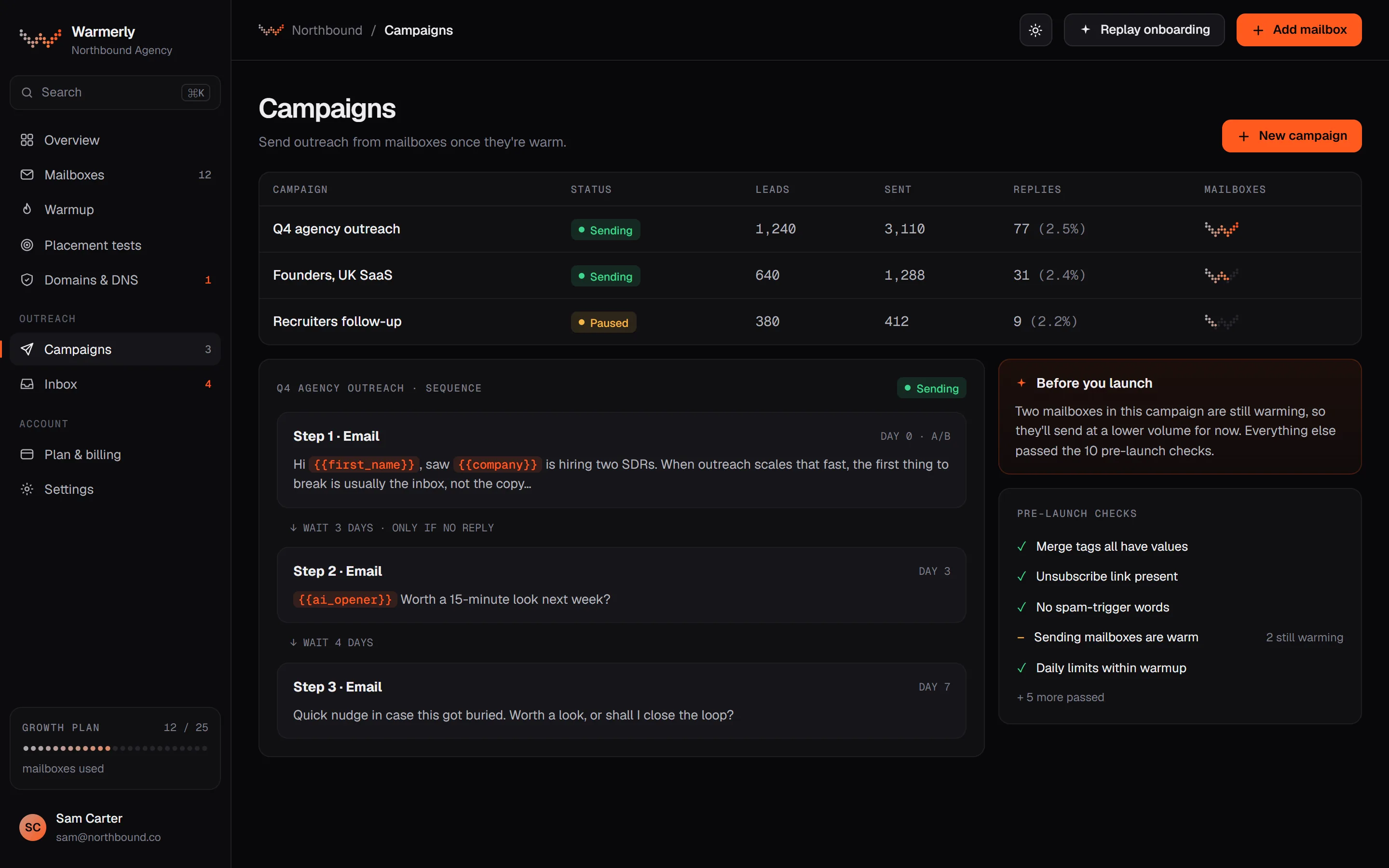
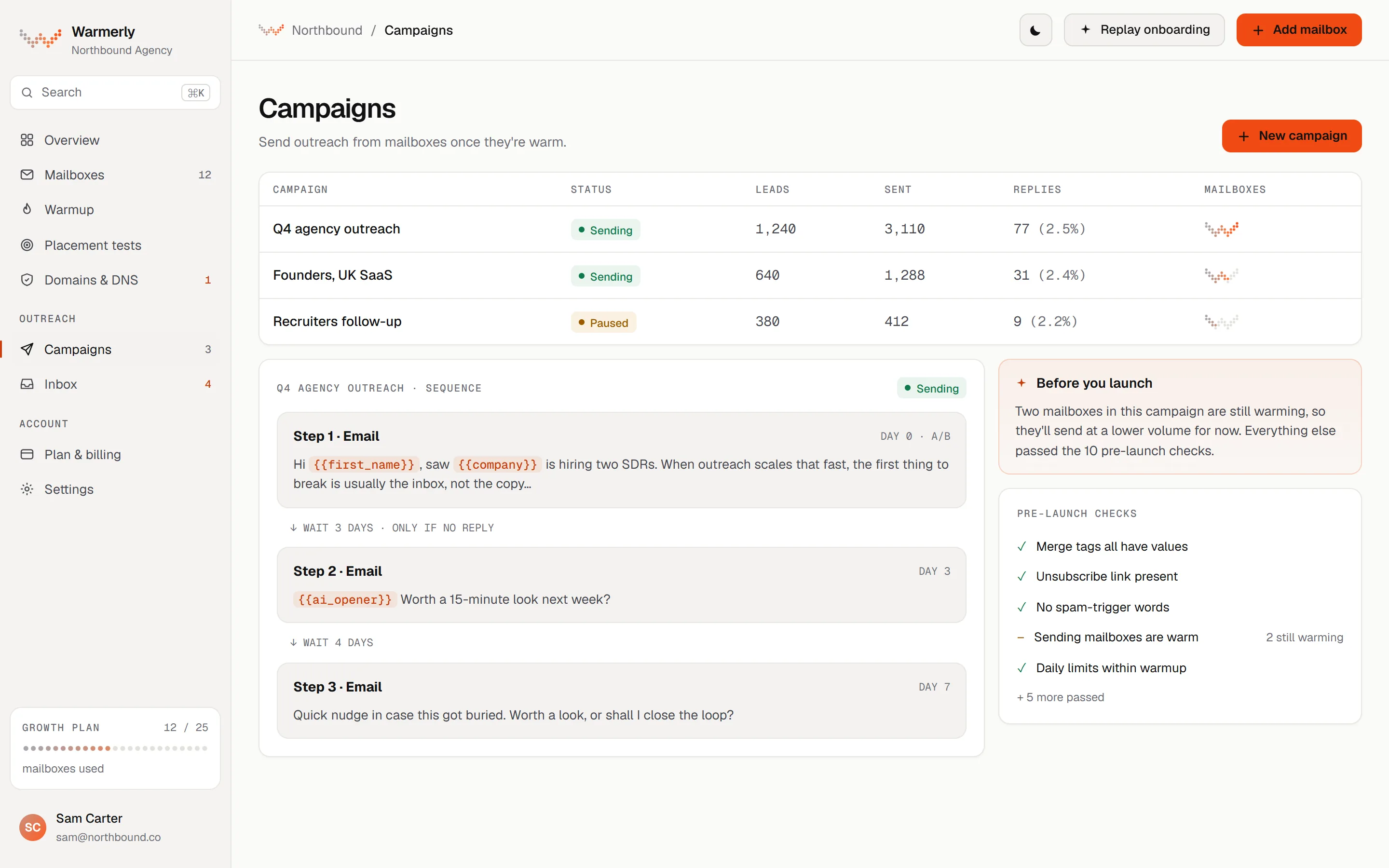
A campaign builder with email, wait, LinkedIn and branching steps, a pre-launch readiness check, per-mailbox pacing and a ramp, built-in A/B variants, automatic unsubscribe handling and reply detection feeding one inbox.
A sequence is made of email steps, wait steps, LinkedIn connection and message steps, and condition steps that branch on opened, clicked, replied or timeout, in either a list editor or a drag-and-drop canvas (only the canvas can build branches). Templates include a plain three-step intro, a three-step intro with an AI opener, a two-touch follow-up, a LinkedIn-then-email sequence and a single send. The AI opener needs a campaign brief before launch.
Warmerly product, checked 19 October 2026
Each campaign has sending days (Monday to Friday by default), an hour window (09:00 to 17:00 by default) and a timezone. There is also a recipient-local window, 08:00 to 17:00 by default, evaluated in the lead's own timezone when it can be worked out from their country and region; when it cannot, the sender window is used instead.
Warmerly product, checked 19 October 2026
A readiness check runs before Start. Errors block the launch: no usable step, no sending account, no queued leads, an unknown merge tag, a missing brief for the AI opener, or a plan that does not include a channel used. Warnings do not block, but Start refuses once until you acknowledge them: missing postal address, a sender whose DNS check is warn or fail (or more than five senders on one domain), spam-style copy, no tracking domain for the unsubscribe link. When the AI opener is used, Start also makes a real test call to the AI model, which spends a few tokens.
Warmerly product, checked 19 October 2026
Each mailbox has its own daily campaign limit, 30 by default. A campaign can add a volume ramp (3 emails per mailbox on day 1, rising by 1 a day to 15 by default, counting only sending days), which is switched on automatically for campaigns whose mailboxes are young. A reputation brake scales a mailbox down once its seven-day bounce rate passes 2%, and the campaign pauses at 7% bounces or 30% undeliverable leads, each after at least 25 sends. A minimum wait between sends (10 minutes by default) is stretched by a random 0 to 100%.
Warmerly product, checked 19 October 2026
Any email step can run versions side by side with a minimum number of sends per version. A winner is picked on reply rate as soon as any version has a genuine reply (auto-responders are not counted), and falls back to open rate otherwise. Open tracking is off by default, so a test with no opens and no replies cannot pick a winner; the editor says so. Once a winner is chosen the other versions stop being sent.
Warmerly product, checked 19 October 2026
By default, campaign emails get List-Unsubscribe and one-click headers and a footer with an unsubscribe link and the workspace's sender name and address, if set. Unsubscribes go on a workspace-wide suppression list, and the list is checked before every send. Hard bounces go on a platform-wide list, and email suppression also stops a lead's LinkedIn steps. The footer address is not enforced: without one, a warning appears and the campaign still sends. If a sender has no verified tracking domain and the deployment has no link base, the mail carries no unsubscribe link, which is why that case is a warning.
Warmerly product, checked 19 October 2026
Connected mailboxes are synced for new mail every five minutes. A reply is matched to the campaign email through the mail's reply headers, bounces and automatic replies are classified separately, and by default a genuine reply stops the lead's sequence (and so does an automatic reply, both settings can be turned off). Replies land in one Warmerly inbox, together with LinkedIn replies. Sending itself is unmetered on paid plans; the Free plan is capped at 100 campaign sends a month. Plan limits on the other side are mailboxes (5, 25, 100) and leads per campaign (2,500 on Starter).
Warmerly product, checked 19 October 2026
A mature campaign sender with schedules, per-account and per-campaign daily limits, A/Z testing, a pre-launch checklist, subsequences and the Unibox inbox, with monthly email allowances set by plan.
Each campaign has a schedule (any day any time, office hours, or custom days, times and timezone) and a daily limit across its accounts. Instantly recommends 30 campaign emails per day per account (20 for AirMail accounts). The minimum gap between emails defaults to 9 minutes with 5 minutes of random extra time, and a 'max new leads' setting caps how many leads get step 1 each day. 'Prioritize new leads' is limited to the Hyper Growth and Light Speed plans.
help.instantly.ai/en/articles/6222396-campaign-settings · read 19 October 2026
An account limit caps what one mailbox sends per day across all campaigns; a campaign limit caps what one campaign sends across its accounts. Warmup emails do not count towards either. An account's minimum wait time between campaigns defaults to 1 minute. With Campaign Slow Ramp on, an account grows by 2 campaign emails a day until it reaches its limit.
help.instantly.ai/en/articles/6248612-account-and-campaign-limits · read 19 October 2026
Instantly publishes a nine-step pre-launch checklist: verify DNS, finish warmup, set a custom tracking domain, add leads, assign sending accounts, set the schedule, configure campaign options, preview and send test emails, and check deliverability. The campaign will not send without leads or without at least one active sending account. The article presents these as steps for you to follow, and also points to a Deliverability AI Agent to audit the workspace.
help.instantly.ai/en/articles/6222212-pre-launch-campaign-checklist · read 19 October 2026
Each step can have up to 26 variants, labelled A, B, C and so on, each switched on or off. Auto-optimise deactivates lower-performing variants using a winning metric you choose: reply rate, click rate or open rate. By default variant use is balanced over the campaign's whole life, so a variant added later is sent alone until usage catches up, unless you turn on daily reset in Preferences.
help.instantly.ai/en/articles/6661549-a-z-testing-how-to-create-email-variants · read 19 October 2026
You add an unsubscribe link to a step yourself with the editor's 'Insert unsubscribe link' button, and clicking it sets the lead's status to Unsubscribed. A separate campaign setting, 'Insert unsubscribe link header', adds a List-Unsubscribe header for one-click opt-out. Instantly notes the link does not work in Preview test emails, only for real leads in the campaign.
help.instantly.ai/en/articles/6191077-how-to-add-unsubscribe-link and https://help.instantly.ai/en/articles/8860388-list-unsubscribe · read 19 October 2026
Unibox detects replies from connected accounts, which may take a few minutes, and sorts them into Primary (leads in your campaigns or lists) and Others (non-leads). Settings can stop sending on reply, stop a campaign for a whole company when any lead there replies, and stop on auto-reply. Unibox adds lead-status filters, search, reply macros, scheduled replies and reminders. Detection needs connected, active accounts; paused or disconnected accounts cannot detect replies.
Subsequences send targeted follow-ups when a lead changes status, takes an action (opens, clicks, or finishes the campaign without replying) or replies with chosen phrases; they are on Hyper Growth and Light Speed. Sending volume is set by plan: Growth ($47 a month) includes 1,000 uploaded contacts and 5,000 emails a month, Hyper Growth ($97) 25,000 contacts and 125,000 emails, Light Speed ($358) 100,000 contacts and 500,000 emails.
help.instantly.ai/en/articles/7251329-subsequences and https://help.instantly.ai/en/articles/10273259-instantly-plans-overview · read 19 October 2026
We looked, and found no statement on these. That is about its published pages only, not about the product.
| Measure | Warmerly | |
|---|---|---|
| Built-in campaign sender | Yes, no cap on sends | Yes |
| Plan allowance for sends | No monthly send meter on paid plans; Free plan capped at 100 campaign sends a month | Growth 5,000 a month; Hyper Growth 125,000 (pricing table on the same page says 100,000); Light Speed 500,000 (plans overview) |
| Mailbox daily limit | 30 campaign emails a day per mailbox by default, lowered by ramp and bounce brake | 30 a day per account recommended (20 for AirMail) |
| Gap between sends | 10 minutes minimum by default, stretched by 0 to 100% random | 9 minutes default plus up to 5 minutes random (campaign setting) |
| A/B winner metric | Reply rate, falling back to open rate | Reply rate, click rate or open rate, your choice |
| Pre-launch checks | Automatic readiness check; errors block, warnings need acknowledging | A published nine-step checklist you work through, plus a preview and test email |
| Unsubscribe link | Added by default to campaign emails, with one-click headers (a warning appears if there is no unsubscribe link) | You insert the link; the header is a campaign setting |
| Sequence steps | Email, wait, LinkedIn connection and message, and condition branches | Email steps with delays; subsequences on Hyper Growth and Light Speed |
Our reading of the facts above. Not a promise, and not the only reasonable reading.
Instantly sells a monthly email allowance by plan. Warmerly sells mailboxes, and each mailbox has a daily cap, so volume follows the number of mailboxes. If you send in large bursts from a few mailboxes, the allowance may be the tighter limit on Instantly. If you send little, neither will bind.
Warmerly's readiness check, the ramp that turns itself on for young mailboxes, and the bounce brake act without being asked. Instantly publishes more settings you control yourself (company-level stop, ESP matching, limits per company) and a checklist you follow.
By default a link and the one-click headers go on Warmerly campaign emails. On Instantly you insert the link in the copy yourself and tick the header setting. Either way you remain responsible for including your sender details and honouring opt-outs.
Instantly allows up to 26 variants and lets you choose the winning metric. Warmerly's test is simpler, and open tracking being off by default means most tests will be judged on replies.
A Warmerly sequence can hold LinkedIn steps and replies from both channels arrive in one inbox. On Instantly the campaign is email, and LinkedIn runs in another tool.
Yes. You build a sequence, add leads, pick sending mailboxes and start it. Mail goes out through your own connected mailboxes, replies are detected by syncing those mailboxes, and they appear in the Warmerly inbox.
Not with a monthly send meter on paid plans. Each mailbox has a daily limit (30 campaign emails by default), a ramp can lower it for young mailboxes, and a bounce brake can reduce it further. The Free plan is capped at 100 campaign sends a month.
Yes. Campaigns send from your connected accounts on a schedule with account and campaign daily limits, and replies land in Unibox. Monthly email volume depends on plan: 5,000 on Growth at $47 a month.
By default Warmerly adds an unsubscribe link, one-click headers and a sender identity footer to campaign emails and keeps a workspace-wide suppression list that is checked before each send. In Instantly you insert the unsubscribe link yourself and can tick a setting to add the List-Unsubscribe header.
Yes. Instantly supports up to 26 variants per step with auto-optimise on reply, click or open rate. Warmerly runs versions per email step with a minimum send count and picks a winner on replies, falling back to opens.
Instantly pages were read on 19 October 2026. Plans and wording change, so check the vendor's own page before you decide. Warmerly details come from the product as it runs today.
Connect a mailbox. Warmerly runs alongside whatever you send from now, so you can compare before you move anything.
Free plan, no card. Paid plans: 7-day trial, first charge on day 8.