Warmerly
One queue of everyone who replied and hasn't heard back
One row, in depth: what each tool does, the verified numbers, and who each suits.
Smartlead details read from its pricing page, home page and help centre on 17 and 19 October 2026.
One queue of everyone who replied and hasn't heard back
Master Inbox across campaigns and clients, with categories you set
Warmerly has one inbox for the workspace that lists who replied and has not heard back, shows email and LinkedIn replies together, labels mail as lead, not relevant or spam, and can draft a reply, but we found no per-conversation assignment, snooze or internal notes in the inbox code. Smartlead is ahead here. Its Master Inbox is built for teams and agencies: one inbox across campaigns and clients, with assignment, tasks, snooze, reminders, scheduled replies, eight saved-view filters and categories that can trigger sub-sequences, and a campaign setting for AI reply categorisation. Smartlead's pages disagree on how fast replies arrive. Last checked 19 October 2026.
One queue of everyone who replied and hasn't heard back
Master Inbox across campaigns and clients, with categories you set
Pick a situation and read both routes
Warmerly steps come from our inbox docs and code. Smartlead steps come from its help centre and Master Inbox page, read 19 October 2026. Marketing copy and help articles sometimes disagree, and we say so where they do.
Views, tabs and filters, counted from each product's own pages
3 views
Narrow by
8 tabs
Saved views filter by (8 view filters)
Views can be made public for your team. Base and Popular allow up to 3 views; Pro allows unlimited.
| Product | Views or tabs | Filters |
|---|---|---|
| Warmerly | Needs reply, All, Archived | Workspace, account, channel, category, Unread, search |
| Smartlead | Inbox, Assigned me, Sent, Important, Snoozed, Reminders, Scheduled, Archived | Lead Category, Email Campaign, Email Status, Sender Email Account, Campaign Tag Name, Select Client, Team Member, Reply Date Range |
Drag the arrival time and compare what each product says
3 min at most
until the next sync sweep picks the reply up. The Refresh button syncs the workspace's mailboxes within a 60 second budget.
Within a minute
says its instant replies article. Its sidebar article says to refresh the page to fetch new replies. We could not tell which describes the product today, so time it yourself on a trial.
Schematic: real sweeps run every 5 minutes at their own offset, so the wait from any moment is up to 5 minutes. Smartlead's own timing is its claim, not something we measured.
| Product | Stated timing |
|---|---|
| Warmerly | Connected mailboxes synced every 5 minutes; Refresh syncs within a 60 second budget |
| Smartlead | Within a minute (instant replies article); refresh the page to fetch new replies (sidebar article); un-snooze may be delayed by 5 to 10 minutes |
Smartlead is ahead on most steps; Warmerly is ahead on two
| Step | Warmerly | Smartlead |
|---|---|---|
| 1Find what needs an answer | Yes. Needs reply view | Yes. Inbox tab, filters and saved views |
| 2Label it | Yes. Lead, not relevant or spam; your override sticks | Yes. Category dropdown; AI categorisation is a campaign setting |
| 3Hand it to someoneSmartlead ahead | Not found. No assignment found in the inbox code | Yes. Assign to a teammate; it shows under Assigned me |
| 4Leave a note or a taskSmartlead ahead | Not found. No internal notes or tasks found | Yes. Internal comments (marketing page) and tasks with priority (help centre) |
| 5Put it offSmartlead ahead | Not found. No snooze, reminder or scheduled reply found | Yes. Snooze, reminders, scheduled replies |
| 6Start the replyWarmerly ahead | Yes. A saved draft of under 120 words | Not found. Not found in the pages read |
| 7Close it | Yes. Archive | Yes. Archive |
| 8Email and LinkedIn in one listWarmerly ahead | Yes. Both channels in one list | Not found. LinkedIn not mentioned |
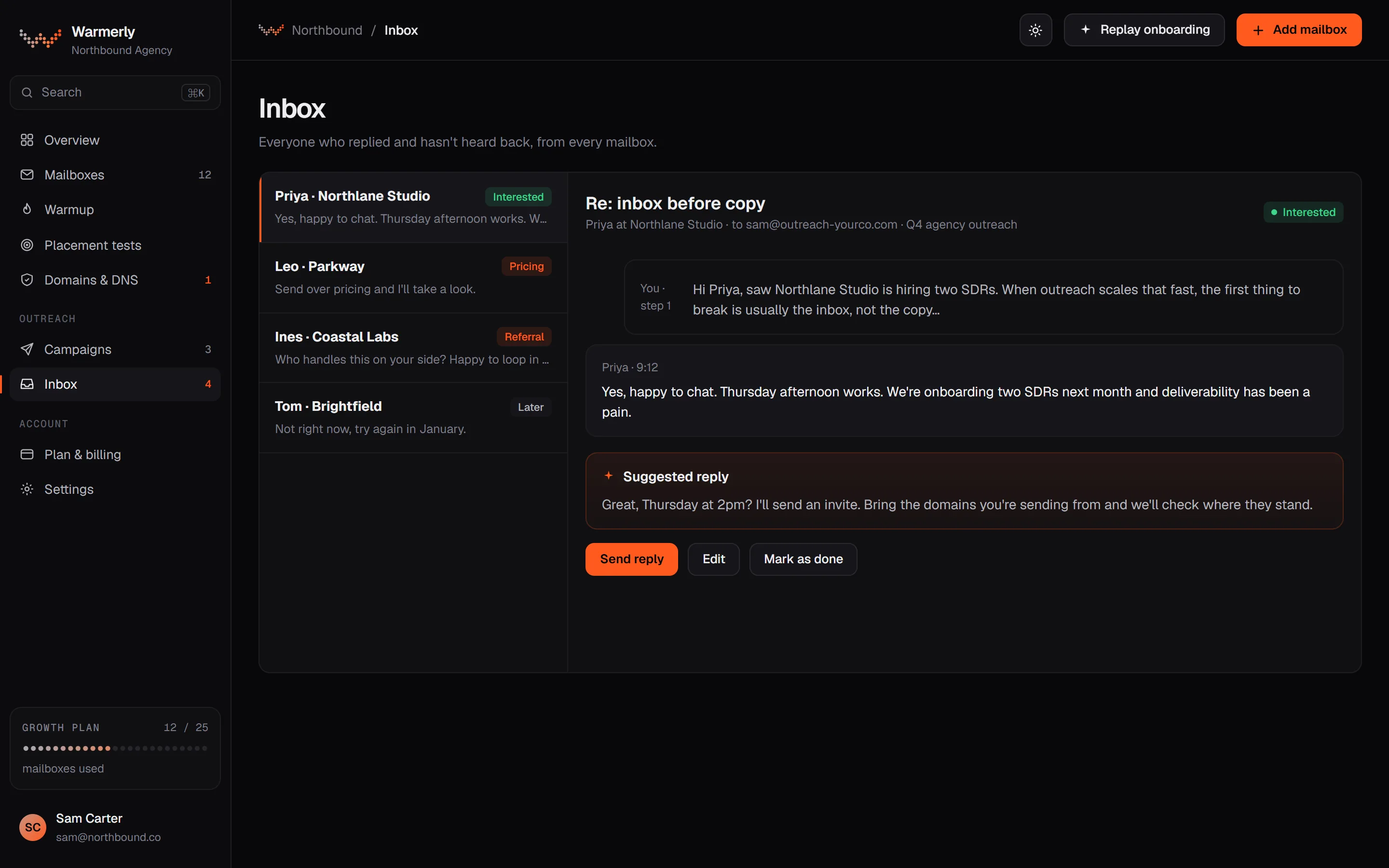
One inbox per workspace with a default 'Needs reply' view, email and LinkedIn replies in the same list, automatic labelling with a manual override, and suggested replies. Warmup traffic is kept out.
The default view is conversations where the newest message is theirs and it is either labelled a lead or not labelled at all. Unlabelled counts because the unlabelled mail is people nobody has graded, such as a customer's support reply or a partner. Other views include All and Archived, and the list supports search by name, email, company or message text.
Warmerly product, checked 19 October 2026
Mail is labelled lead, not relevant or spam. Free rules at ingest catch own-domain mail, no-reply and similar senders, bulk and auto-reply headers, unsubscribe mail and the spam folder. An AI step labels campaign replies only. You can override a label, which then reads from your choice. Warmerly does not list a set of reply intents such as 'interested' or 'meeting booked' for email.
Warmerly product, checked 19 October 2026
LinkedIn replies land in the same inbox as email replies. LinkedIn campaign replies are labelled from their reply label: interested, question and referral count as leads, and not interested, stop and out of office as not relevant.
Warmerly product, checked 19 October 2026
Warmerly can draft a short reply to the latest inbound email (under 120 words, plain text, signed with the sender's first name). The draft is saved for you to edit and send. The same draft function is available to AI assistants through the Warmerly MCP server.
Warmerly product, checked 19 October 2026
Connected mailboxes are synced every five minutes, and the Refresh button syncs the workspace's mailboxes within a 60-second budget. Warmup traffic is hidden. On the Agency plan each client workspace keeps its own mailboxes, campaigns and replies separate.
Warmerly product, checked 19 October 2026
Warmup traffic is excluded, every filter runs in SQL before paging, and the list is ordered by newest activity. The code names workspace, account, channel, category and Unread filters, plus search on names, addresses, company and message text, with a prefix match so 'invo' finds 'invoice'.
Warmerly product, checked 19 October 2026
At ingest free rules mark our own domains, robot senders (noreply, mailer-daemon, postmaster, notifications), DMARC and TLS reports, auto-replies, anything carrying List-Unsubscribe and the spam folder as not relevant or spam. An AI step is only used for campaign replies, and your own override sticks.
Warmerly product, checked 19 October 2026
A Master Inbox across all campaigns and clients, with eight sidebar tabs, assignment, tasks, saved views, comments and reminders. Its help centre describes choosing categories by hand and a campaign setting for AI reply categorisation; its marketing page describes automatic tagging.
The home page says you can view and manage responses from all campaigns and clients in one shared inbox. The Master Inbox page says you can view replies from multiple mailboxes in one place with no account switching, and that agencies can run white-labelled client dashboards.
smartlead.ai/ and https://smartlead.ai/unified-master-inbox · read 19 October 2026
The help centre sidebar article lists Inbox, Assigned me, Sent, Important, Snoozed, Reminder, Scheduled and Archived tabs. You can snooze a conversation, set a reminder on an email reply, schedule a reply with an 'if no reply' condition, and star important leads. Automatic un-snooze may be delayed by up to 5 to 10 minutes.
helpcenter.smartlead.ai/en/articles/172-side-bar-all-you-need-to-know · read 19 October 2026
The Master Inbox page says replies can be assigned to teammates, internal comments are available for hand-offs, and you can tag, assign, archive, reply or forward many conversations at once. It also lists filters by sender, tag, reply type, campaign or time. This is marketing copy; the help article we read explains the 'Assigned me' tab but not how assignment happens.
smartlead.ai/unified-master-inbox · read 19 October 2026
The help centre says categories are chosen from a dropdown on each conversation, examples are 'Requested info' and 'Out of Office', custom categories can be added in Settings, and a category can trigger a sub-sequence. The Master Inbox page says out-of-office, bounce and unsubscribe replies are detected and tagged automatically, and its FAQ says replies are tagged by intent.
helpcenter.smartlead.ai/en/articles/51-lead-categories and https://smartlead.ai/unified-master-inbox · read 19 October 2026
The pricing page mentions Master Inbox only in its description. SmartServices lists '24/7 inbox management' as a managed service. We could not read which plans include Master Inbox features from the pricing grid.
smartlead.ai/pricing · read 19 October 2026
Saved Views combine filters: Lead Category, Email Campaign, Email Status, Sender Email Account, Campaign Tag Name, Select Client, Team Member and Reply Date Range. A view can be made public for your team. The help article says Base and Popular allow up to 3 views and Pro allows unlimited.
helpcenter.smartlead.ai/en/articles/167-mastering-your-master-inbox-with-views · read 19 October 2026
The help article says to open a lead, click Assign to at the top right and pick a team member. The teammate sees it under Assigned me when they log in. It does not say who is allowed to assign, whether you can reassign, or whether the teammate is notified.
helpcenter.smartlead.ai/en/articles/171-team-member-assignment · read 19 October 2026
A task has a name, an optional description for the assignee, a due date, the lead's campaign filled in and a priority of High, Medium or Low. The article titled 'Task and Task reminders' does not explain reminders.
helpcenter.smartlead.ai/en/articles/173-task-and-task-reminders · read 19 October 2026
One help article says a reply appears in the Master Inbox instantly and that you will see responses within a minute. The sidebar article says to refresh the page to fetch new replies. The pages do not say which of these applies.
helpcenter.smartlead.ai/en/articles/168-accessing-instant-email-replies-in-smartlead-s-master-inbox · read 19 October 2026
The Master Inbox page lists pushing replies to a CRM with the full thread, real-time Slack alerts when a lead responds, syncing with Google Sheets, and reporting on reply volume, bounce rate, out-of-office trends and interest levels.
smartlead.ai/unified-master-inbox · read 19 October 2026
We looked, and found no statement on these. That is about its published pages only, not about the product.
Videos from Smartlead's own channel. They load from YouTube only when you press play.
| Measure | Warmerly | Smartlead |
|---|---|---|
| Shared reply inbox | One queue of everyone who replied and hasn't heard back | Master Inbox across campaigns and clients, with categories you set |
| Where replies land | One inbox per workspace; client workspaces stay separate on Agency | Master Inbox across all campaigns and clients |
| Default focus view | 'Needs reply': newest message is theirs and unanswered | Inbox tab of replied leads, plus Assigned me, Important and others |
| Sidebar views or tabs | 3 views: Needs reply, All, Archived | 8 tabs: Inbox, Assigned me, Sent, Important, Snoozed, Reminders, Scheduled, Archived |
| Filters | Workspace, account, channel, category, Unread and search | 8 view filters, including Team Member and Select Client |
| Reply labels | Lead, not relevant, spam (email); interested, question, referral and more (LinkedIn) | Categories you choose, custom ones addable; AI categorisation is a campaign setting |
| Assignment and internal notes | Not found in the inbox code | Assign to teammates; internal comments per its Master Inbox page |
| Snooze, reminders, scheduled replies | Not found in the inbox code | Yes, per the help centre sidebar article |
| Tasks | Not found in the inbox code | Yes, with due date and High, Medium or Low priority |
| LinkedIn replies in the same inbox | Yes | Not mentioned |
| Suggested reply | Yes, a short saved draft you edit (under 120 words) | Not found in the pages read |
| Mailbox sync | Every 5 minutes, plus Refresh | 'Within a minute' in one help article; 'refresh the page' in another |
| Snooze timing slack | Not applicable | Automatic un-snooze may be delayed by 5 to 10 minutes |
Our reading of the facts above. Not a promise, and not the only reasonable reading.
Assignment, internal comments, snooze, reminders and a single inbox across many clients are the features a reply team lives in. Warmerly's inbox is simpler and built around one person clearing a list of unanswered replies.
'Needs reply' puts conversations nobody has answered at the top and keeps warmup mail out, which suits a small team that wants an empty list at the end of the day.
Smartlead's help centre describes manual categories, and its marketing page describes automatic tagging. If automatic intent labels matter to you, test them with real replies before you decide.
If you reach people on both email and LinkedIn, one list for both is a real saving. Smartlead's pages do not mention LinkedIn.
Warmerly pulls mail in every 5 minutes and has a Refresh button. Smartlead's pages say both 'within a minute' and 'refresh the page'. If speed to reply matters to you, send yourself a test reply on a trial and time it.
Eight filters and shareable views, including Team Member and Select Client, are what keep a many-client inbox manageable. A small workspace may never need them.
In Smartlead, yes, with internal comments per its Master Inbox page. We found no per-conversation assignment in Warmerly's inbox code.
Warmerly has 3: Needs reply, All and Archived. Smartlead has 8 tabs: Inbox, Assigned me, Sent, Important, Snoozed, Reminders, Scheduled and Archived.
Warmerly uses lead, not relevant and spam for email, and interested, question, referral and more for LinkedIn. Smartlead uses categories you choose.
None found in the inbox code. Smartlead lists snooze, reminders and scheduled replies.
Smartlead pages were read on 19 October 2026. Plans and wording change, so check the vendor's own page before you decide. Warmerly details come from the product as it runs today.
Connect a mailbox. Warmerly runs alongside whatever you send from now, so you can compare before you move anything.
Free plan, no card. Paid plans: 7-day trial, first charge on day 8.