WarmerlyWarmerly ahead on this row
Scheduled checks every six hours, with remediation copy
One row, in depth: what each tool does, the verified numbers, and who each suits.
Smartlead details read from its pricing page, home page and help centre on 17 and 19 October 2026.
Scheduled checks every six hours, with remediation copy
Sets up DNS, SPF, DKIM and DMARC automatically for its done-for-you mailboxes; daily checks not stated
Warmerly checks SPF, DKIM, DMARC and MX for every active mailbox on a schedule (every six hours by default, not once a day), explains each problem in plain words with a fix, and alerts you when a hard failure appears or persists. Smartlead's strength is set-up: SmartSenders configures MX, SPF, DKIM, DMARC and the tracking domain when you buy a domain and mailboxes through it. For records you manage yourself, its help centre tells you to check them weekly or after changes and to run a SmartDelivery test, and its SmartDelivery report shows SPF and DKIM validity. Last checked 19 October 2026.
Scheduled checks every six hours, with remediation copy
Sets up DNS, SPF, DKIM and DMARC automatically for its done-for-you mailboxes; daily checks not stated
Worst case, if the record breaks just after a check. Move the slider along the week.
The 6 hours is Warmerly's default sweep interval for every mailbox that is not dead or paused. The 7 days is the weekly check in Smartlead's account health checklist, which is advice to you rather than a check Smartlead runs. If you check more often, the wait is shorter.
| Company | How it is checked | Longest wait |
|---|---|---|
| Warmerly | Scheduled sweep of SPF, DKIM, DMARC and MX, plus Re-check now | 6 hours by default |
| Smartlead | Weekly check advised by its account health checklist | 7 days, or 168 hours |
| Smartlead | SmartDelivery automated test (add-on) | Frequency not stated |
One row per check. Where we found nothing published for Smartlead, it says so.
| Check | Warmerly | Smartlead |
|---|---|---|
| SPF record present | Checked | In the SmartDelivery reportSmartAssistant checks it |
| SPF ending and broken terms | Checked: -all, ~all, ?all, +all | Not published |
| SPF 10-lookup limit | Counted through include and redirect | Checklist: fix lookup overflow |
| DKIM record present | Checked on common selectors and yours | In the SmartDelivery reportSmartAssistant checks it |
| DKIM key length and test mode | Checked | Not published. Its Google mailboxes from SmartSenders use 2048-bit keys |
| DMARC record present | Checked | SmartAssistant flags a missing oneSmartDelivery page |
| DMARC policy, pct and rua | Checked. p=none is an advisory, never red | Not published |
| MX record present | Checked | Checklist: keep MX valid |
| Blocklists | 16 lists, every 6 hours | 400+ blacklists, SmartDelivery add-on |
| A written fix for each problem | Every finding has one | Step-by-step guidance, SmartDelivery page |
| Alert when a record breaks | Hard failures, 24-hour cooldown | Not stated for DNS |
Not published does not mean not done. Smartlead's SmartDelivery add-on starts at $49 a month, and its report may check more than its help article says. Warmerly's DKIM lookup tries common selector names plus any you set, so a provider using another selector can read as no DKIM signature found until you enter it.
Smartlead leads on getting DNS right at the start. Warmerly leads on watching it afterwards.
No. The card can show the exact SPF record (Google and Microsoft mailboxes) and a monitor-only DMARC record to copy. DKIM it points to your provider.
Yes, for mailboxes bought through SmartSenders: MX, SPF, DKIM, DMARC and the tracking domain, ready in 24 to 48 hours.
Smartlead is aheadA scheduled sweep every 6 hours, and an alert on a hard failure.
Warmerly is aheadA weekly check you run, as its checklist advises. SmartDelivery automated tests, with no frequency stated.
16 lists, checked every 6 hours. SORBS, UCEPROTECT and Invaluement are left out on purpose.
'400+ blacklists' on the SmartDelivery page, as a separate add-on.
Smartlead claims moreIncluded for every connected mailbox.
DNS set-up comes with a SmartSenders purchase. SmartDelivery, with its tests and reports, is an add-on from $49 a month.
Count is not quality: Warmerly's 16 are lists it chose and tests, with refusals never reported as listings. Smartlead's 400+ is its own claim, and the list is not published on the pages we read. Neither tool edits your DNS at your registrar.
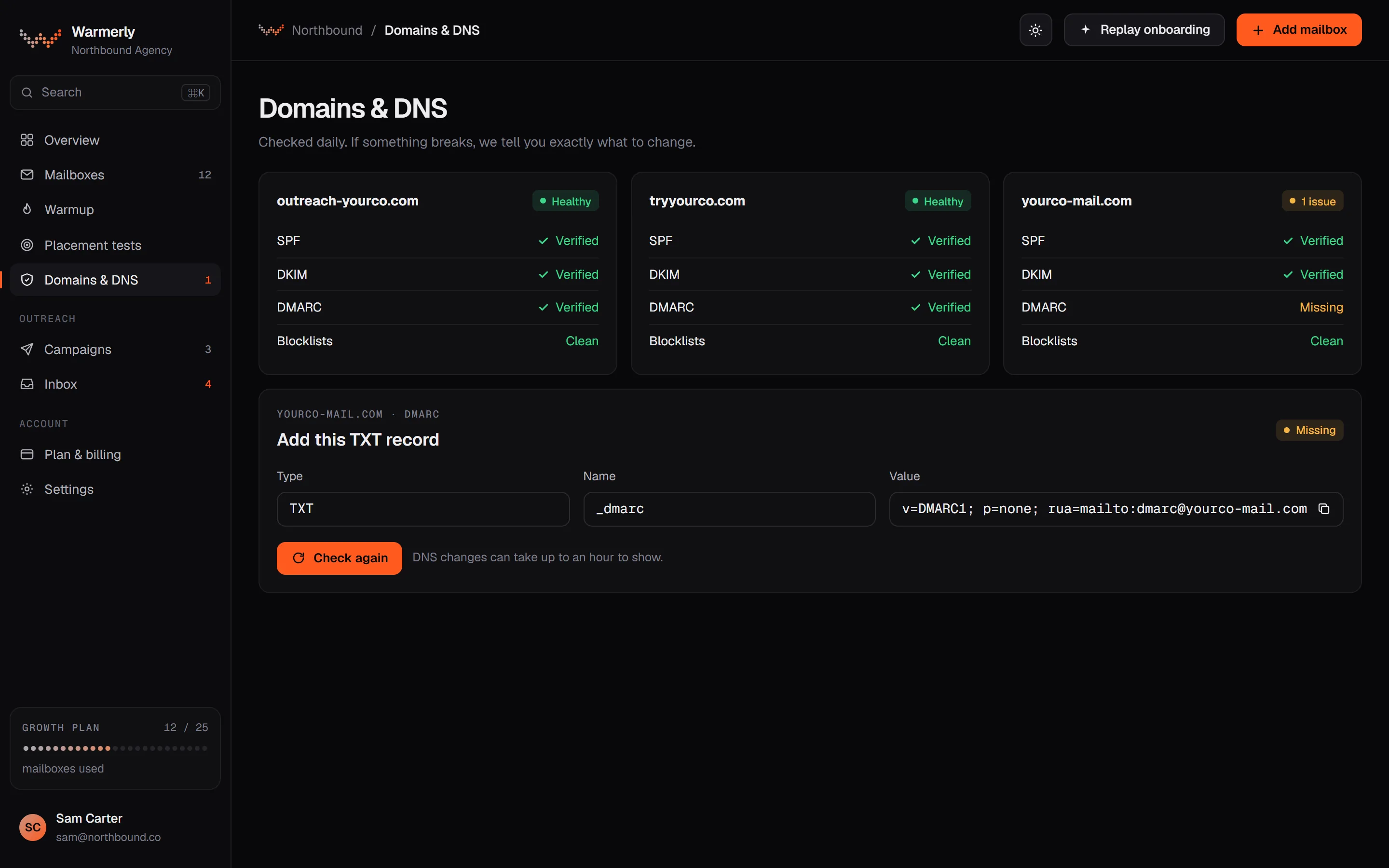
Scheduled checks of SPF, DKIM, DMARC and MX for each connected mailbox, with a written finding and fix for each problem, and an alert when a hard failure appears or persists.
SPF is checked for its ending (-all, ~all, ?all or +all), for the 10-lookup limit counted through include and redirect, and for broken terms. DKIM is checked for key length and the t=y test-mode flag. DMARC is checked for p=, sp=, pct= and whether rua= is set. MX is checked for presence, since a domain that cannot receive mail is a spam signal and warmup needs replies.
Warmerly product, checked 19 October 2026
The records sweep runs every six hours by default (the interval can be overridden by an environment setting) across every mailbox that is not dead or paused. The mailbox's Health tab has a 'Re-check now' option. Blocklist checks run on their own six-hourly sweep.
Warmerly product, checked 19 October 2026
Each finding has a title, an explanation and a fix. For example, 'No SPF record' says to add a TXT record starting v=spf1 that lists your email provider, and 'DKIM is still in test mode' says to remove t=y once signing is confirmed. Advisories such as p=none are shown but are never red.
Warmerly product, checked 19 October 2026
Under a failing SPF or DMARC chip the card can show the record itself, with a copy button. SPF is suggested only for Google and Microsoft mailboxes, merged into the record published now. DMARC is a monitor-only p=none record when none exists. For DKIM the fix text points you to your provider's record; Warmerly does not generate DKIM values for third-party mailboxes.
Warmerly product, checked 19 October 2026
A hard failure raises a 'DNS changed' alert with a 24-hour cooldown, keeps alerting while the failure persists, and is withdrawn when fixed. Quality advisories never alert. A check that could not run shows as unknown, never green. A known limit: DKIM is looked up by trying a list of common selector names plus any selector you set, so a provider using another selector can read as 'no DKIM signature found' until you enter it.
Warmerly product, checked 19 October 2026
The campaign pre-launch checklist warns when a sending mailbox's DNS check came back warn or fail, or when more than five senders share one domain. It is a warning you can acknowledge, not a block. Warmerly also collects DMARC reports for free if you point your rua address at a Warmerly address (up to 10 domains per workspace).
Warmerly product, checked 19 October 2026
Two registries are queried by plain DNS lookup with no API key: 6 domain lists (Spamhaus DBL, SURBL, URIBL, NordSpam DBL, Spam Eating Monkey URI, s5h) and 10 IP lists (Spamhaus ZEN, SpamCop, Barracuda, PSBL, Mailspike, NordSpam, Spam Eating Monkey, Lashback UBL, DroneBL, GBUdb Truncate). SORBS, UCEPROTECT and Invaluement are left out on purpose. A refused query is never reported as a listing, and a partial answer shows as amber with a count.
Warmerly product, checked 19 October 2026
On a shared consumer domain such as gmail.com the records belong to the provider and Warmerly cannot read them reliably, because Gmail signs with a rotating selector. The card says the mailbox is connected with nothing to set up, instead of stating that DKIM is missing.
Warmerly product, checked 19 October 2026
Done-for-you DNS when you buy domains and mailboxes through SmartSenders, a SmartDelivery report that shows SPF and DKIM validity, and a help-centre checklist that tells you to recheck records weekly. An automatic, alerting DNS monitor is not described in the pages we read.
The SmartSenders FAQ says it configures MX, SPF, DKIM, DMARC and your tracking domain automatically when you buy. The home page says 'We handle domains, DNS, SPF, DKIM and DMARC automatically'. Smartlead says accounts are ready within 24 to 48 hours, which it says covers DNS propagation.
smartlead.ai/email-account-setup-smartsenders · read 19 October 2026
The help centre checklist says to keep DNS clean (valid SPF, DKIM, DMARC and MX), fix SPF lookup overflow and make sure DKIM aligns with the From domain. It recommends a health check weekly or after DNS updates or new senders, and 'Smartdelivery auto or manual test' for periodic diagnostics. It does not describe a built-in DNS checker or alerts.
helpcenter.smartlead.ai/en/articles/415-how-can-i-do-an-account-health-check-checklist · read 19 October 2026
The report article describes a Domain Analytics section covering DKIM and SPF with a pass or fail status and a validity check. It also covers IP reputation, blocklists and reverse DNS. That article does not mention DMARC. Tests can be run manually or automatically.
helpcenter.smartlead.ai/en/articles/239-understanding-your-deliverability-report-in-smartdelivery · read 19 October 2026
The SmartDelivery page says it verifies SPF, DKIM and DMARC records with step-by-step fixing guidance, shows DMARC reports on who sends on your behalf, checks 400+ blacklists, and sends notifications if a sending account starts landing in spam. SmartDelivery is a separate add-on: Growth $49 a month, Pro $174 a month, Expert $599 a month.
smartlead.ai/smartdelivery · read 19 October 2026
SmartAssistant checks DKIM, SPF and DMARC records under its Deliverability category. In the article's example, SPF and DKIM show as correct while a missing DMARC record is flagged as likely contributing to spam placement, with 'add DMARC' as the action. It covers 28 diagnostic types across 14 categories. The article does not explain how to create or edit records.
helpcenter.smartlead.ai/en/articles/451-diagnosing-problems-with-smartassistant · read 19 October 2026
The SmartSenders FAQ article gives the Google Workspace (InboxAutomate) values: MX smtp.google.com, SPF v=spf1 include:_spf.google.com ~all, DMARC with p=quarantine and a reporting address, and a DKIM key of 2048 bits on google._domainkey. It says Cloudflare manages DNS for these domains and that users do not need to configure DNS themselves. The tracking CNAME points a host called smart at open.sleadtrack.com.
helpcenter.smartlead.ai/en/articles/256-smartsenders-faqs-and-troubleshooting-everything-you-need-to-know · read 19 October 2026
For a custom tracking domain you add a CNAME with host emailtracking and target open.sleadtrack.com, wait 30 minutes to 24 hours, paste the tracking URL into Smartlead and press Verify CNAME. This is the one in-app record check we found described for records you add yourself. It covers the tracking record, not SPF, DKIM, DMARC or MX.
helpcenter.smartlead.ai/en/articles/50-setting-up-smartlead-custom-tracking-domain-for-better-email-engagement · read 19 October 2026
The help article on DMARC, DKIM, SPF and MX setup explains what the four records do and links to Google, Zoho and Microsoft guides. It gives no record values and mentions no verify button or status indicator. Smartlead's DMARC report article explains that reports arrive daily from receiving servers once you add an rua tag. The home page FAQ lists a CNAME checker, an SPF checker and a DMARC checker, and no DKIM checker.
helpcenter.smartlead.ai/en/articles/8-dmarc-dkim-spf-and-mx-setup · read 19 October 2026
We looked, and found no statement on these. That is about its published pages only, not about the product.
| Measure | Warmerly | Smartlead |
|---|---|---|
| SPF, DKIM and DMARC monitoring | Scheduled checks every six hours, with remediation copy | Sets up DNS, SPF, DKIM and DMARC automatically for its done-for-you mailboxes; daily checks not stated |
| Records checked | SPF, DKIM, DMARC, MX | SPF and DKIM in the SmartDelivery report; DMARC claimed on the SmartDelivery page |
| How it is triggered | Scheduled sweep, every 6 hours by default, plus Re-check now | SmartDelivery manual or automated test; help centre advises a weekly check |
| Quality checks beyond presence | SPF ending and lookup count, DKIM key length and test mode, DMARC policy, pct and rua | Not published beyond checklist advice |
| DNS set up for you | No (suggested records for SPF and DMARC only) | Yes, for mailboxes bought through SmartSenders (MX, SPF, DKIM, DMARC, tracking domain) |
| Blocklists | 6 domain lists and 10 IP lists, every 6 hours | '400+ blacklists' on the SmartDelivery page |
| Alerts for a failing record | Yes, on hard failures, 24-hour cooldown, cleared when fixed | Not stated for DNS; SmartDelivery page mentions spam-landing notifications |
| Price of the DNS check | Included, runs for every connected mailbox | SmartDelivery add-on from $49 a month; DNS set-up included with SmartSenders purchases |
| Longest wait before a broken record is noticed | Up to 6 hours (the next sweep) | Up to 7 days, or 168 hours, if you follow the weekly check; SmartDelivery automated tests: no frequency stated |
| Check on demand | Re-check now on the mailbox Health tab | Manual SmartDelivery test; Verify CNAME for the tracking domain |
| DMARC reports | Free collection if you point rua at a Warmerly address, up to 10 domains per workspace | SmartDelivery page: DMARC reports on who sends for you; help article explains rua reports |
| Fix guidance | A written fix for every finding | SmartDelivery page: step-by-step fixing guidance; SmartAssistant gives an action but not how to edit records |
| Time until a bought mailbox is ready | Not applicable, Warmerly checks mailboxes you connect | 24 to 48 hours through SmartSenders |
Our reading of the facts above. Not a promise, and not the only reasonable reading.
Smartlead's strength is getting DNS right at the start, by buying through SmartSenders. Warmerly's strength is noticing when records you manage yourself change or break later.
A record can break after a domain move, a provider change or a DNS tidy-up. A check that runs by itself every six hours will notice. A weekly manual check, as Smartlead's checklist suggests, will notice later.
If you want DMARC reports, 400+ blocklists and alerts in one place, Smartlead points you to the SmartDelivery add-on. Warmerly's DNS check is included but it is not a placement test.
Passing SPF, DKIM and DMARC does not show where mail lands. Both tools can tell you a record is wrong; neither can edit your DNS at your registrar.
Warmerly's sweep runs every 6 hours, so a break is seen at the next one. Smartlead's checklist asks you to check weekly, so the wait is as long as your gap between checks. Smartlead's automated SmartDelivery tests could be faster, but no frequency is published.
Smartlead's pages say which records SmartSenders sets and to what value. Warmerly's pages say what each check looks for and when it alerts. Which matters more depends on whether your problem is starting out or noticing change.
Every 6 hours by default, plus a Re-check now button. It checks SPF, DKIM, DMARC and MX for every connected mailbox.
Through SmartDelivery, a manual or automated test from $49 a month, whose report shows SPF and DKIM validity. Its help centre advises a weekly check.
Smartlead does for mailboxes bought through SmartSenders: MX, SPF, DKIM, DMARC and the tracking domain. Warmerly suggests records for SPF and DMARC only.
Warmerly checks 6 domain lists and 10 IP lists every 6 hours. Smartlead's SmartDelivery page claims 400+ blacklists.
Smartlead pages were read on 19 October 2026. Plans and wording change, so check the vendor's own page before you decide. Warmerly details come from the product as it runs today.
Connect a mailbox. Warmerly runs alongside whatever you send from now, so you can compare before you move anything.
Free plan, no card. Paid plans: 7-day trial, first charge on day 8.