WarmerlyWarmerly ahead on this row
Sequences with email, wait, LinkedIn and branch steps, 13 pre-launch checks and one reply inbox; no cap on sends on paid plans.
One row, in depth: what each tool does, the verified numbers, and who each suits.
Warmup Inbox details read from its pricing page, home page, product pages, API page, integrations pages, help centre, legal pages and status page on 21 October 2026.
Sequences with email, wait, LinkedIn and branch steps, 13 pre-launch checks and one reply inbox; no cap on sends on paid plans.
Sequences with A/B tests, optional verification and a unified inbox, up to 10,000 contacts a campaign; no open tracking.
Both send campaigns from the mailboxes they warm, and the differences are in what a campaign can do. Warmerly sequences mix email, wait, LinkedIn and branching steps, run 13 kinds of pre-launch check, and are not metered on paid plans. Warmup Inbox sequences have A/B tests that pick winners on replies, optional EmailListVerify verification, a unified inbox and up to 10,000 contacts a campaign, and it deliberately has no open tracking. Warmup Inbox says a campaign can only send from an inbox that is already warming, which Warmerly does not require. Last checked 21 October 2026.
Sequences with email, wait, LinkedIn and branch steps, 13 pre-launch checks and one reply inbox; no cap on sends on paid plans.
Sequences with A/B tests, optional verification and a unified inbox, up to 10,000 contacts a campaign; no open tracking.
From mailbox to what happens next
Warmup Inbox sends campaigns only from inboxes that are warming and has no open tracking.
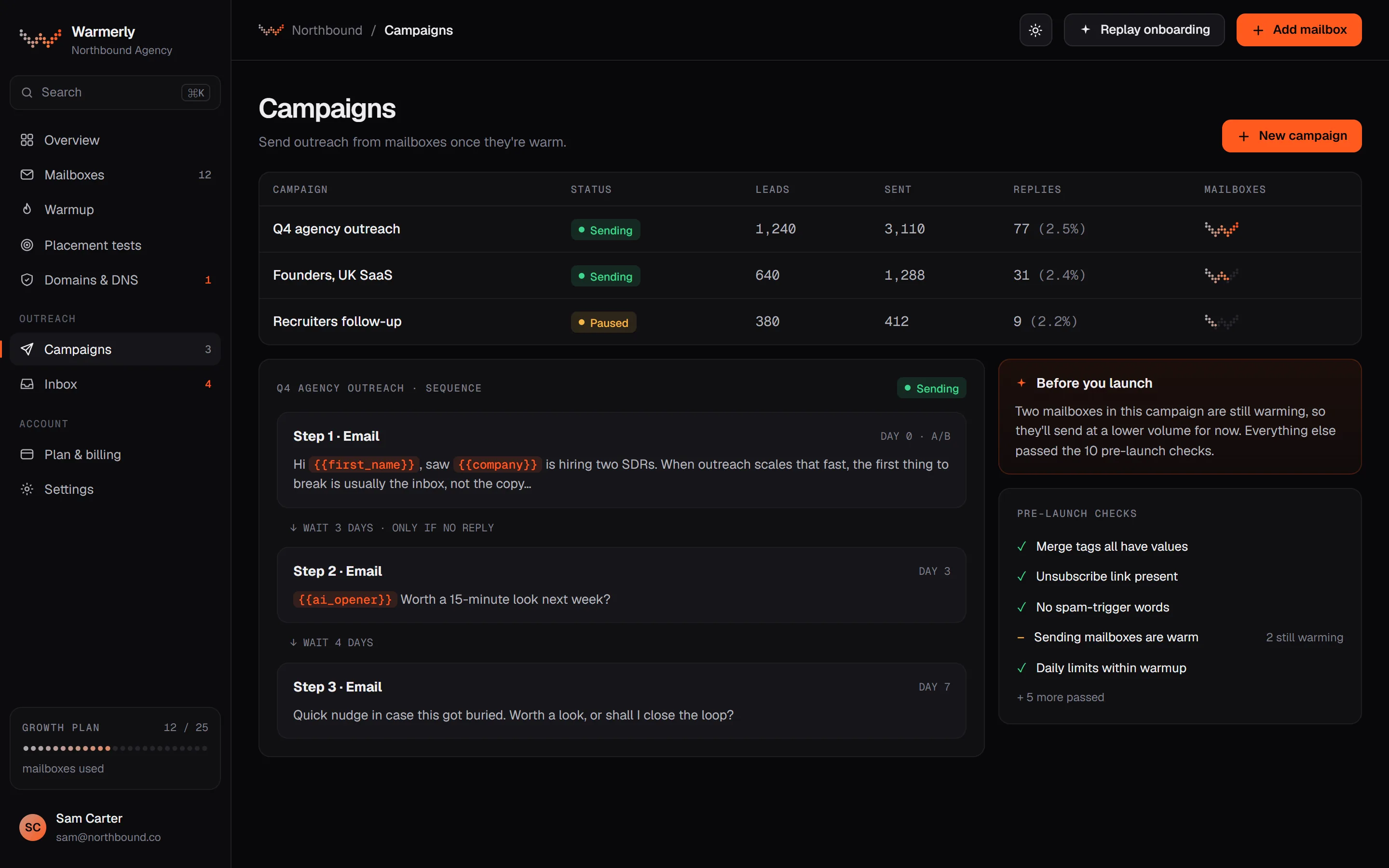
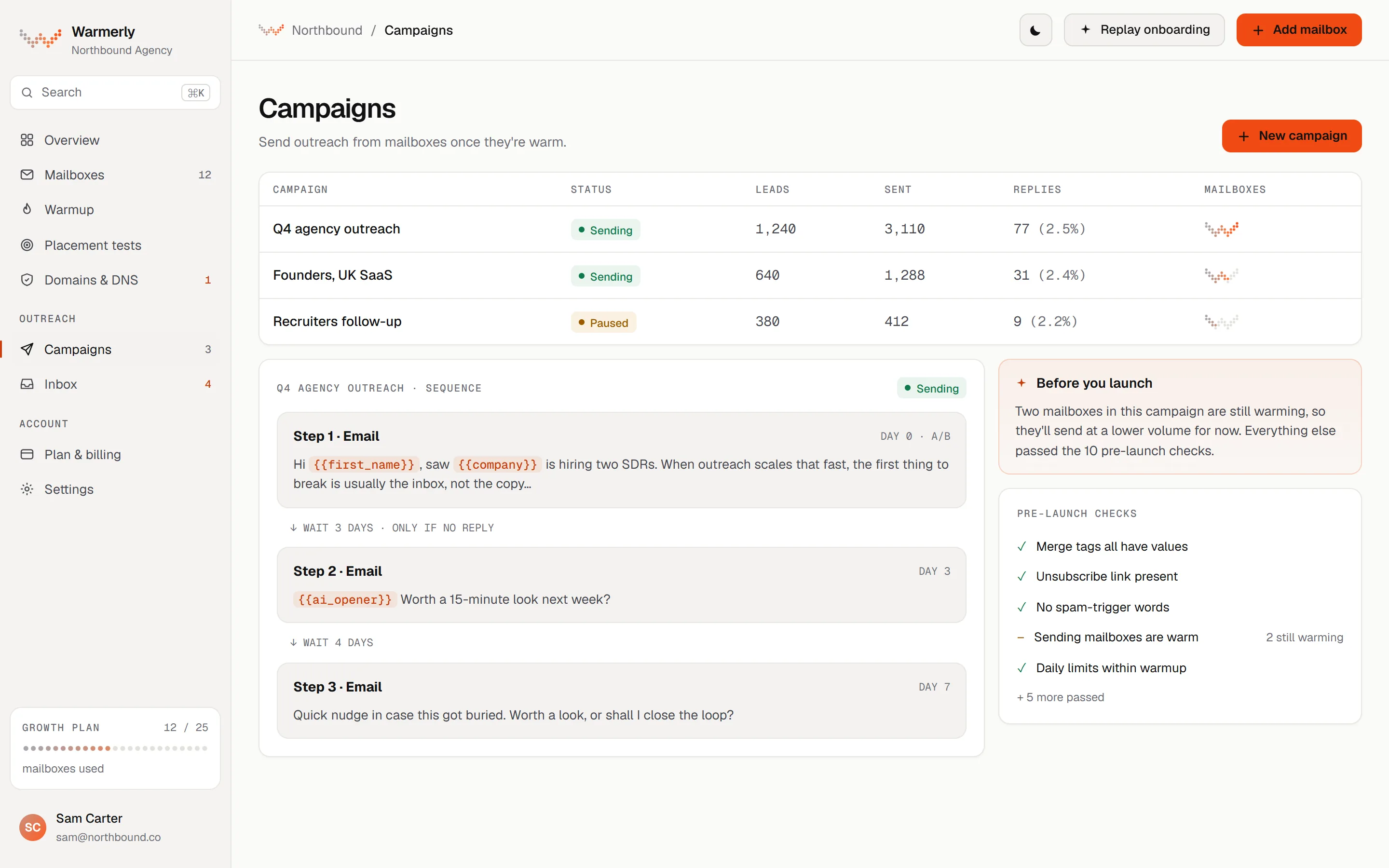
A sequence builder with email, wait, LinkedIn and branching steps, a readiness check before launch, per-mailbox pacing with a reputation brake, and one reply inbox for email and LinkedIn.
A sequence is made of email steps, wait steps, LinkedIn connection and message steps, and condition steps that branch on opened, clicked, replied or timeout. A list editor or a drag-and-drop canvas builds them, and only the canvas can build branches.
Warmerly product, checked 21 October 2026
The readiness table lists 13 kinds of check: 7 that block, such as no usable step, no sender, no queued leads or an unknown merge tag, and 6 that warn, such as no postal address, a sender whose DNS check is warn or fail, or spam-style copy. Warnings need one acknowledgement.
Warmerly product, checked 21 October 2026
Each mailbox has a daily campaign limit, 30 by default, and a minimum wait between sends of 10 minutes, stretched by a random 0 to 100%. From a 2 per cent seven-day bounce rate the cap is cut to 0.75, at 3 per cent to 0.5 and at 5 per cent to 0.25. At 7 per cent the mailbox is paused.
Warmerly product, checked 21 October 2026
The campaign ramp starts at 3 emails per mailbox on day 1 and adds 1 a day to 15 by default, counting only sending days. It is on by default for a campaign whose mailboxes have under 14 days of warmup.
Warmerly product, checked 21 October 2026
Campaign emails carry List-Unsubscribe and one-click headers and a footer link by default. Unsubscribes go on a workspace-wide suppression list checked before every send, and email suppression also stops a lead's LinkedIn steps. Open tracking is off by default.
Warmerly product, checked 21 October 2026
Connected mailboxes are synced for new mail every five minutes. A reply is matched through the mail's reply headers, bounces and automatic replies are classified separately, and a genuine reply stops the lead's sequence by default. Replies land in one inbox with LinkedIn replies.
Warmerly product, checked 21 October 2026
Sending is not metered on paid plans. Free is capped at 100 campaign sends a month. Leads per campaign are 500 on Free, 2,500 on Starter, 25,000 on Growth and 100,000 on Agency, and Starter runs 5 active campaigns.
Warmerly product, checked 21 October 2026
A campaign product described as sharing its plumbing with warmup: sequences, A/B testing, optional verification, four ways to import contacts and a unified inbox, with no open tracking.
The cold email sequence page says a campaign can only send from an inbox that is actively warming, and that the restriction is deliberate rather than technical. It also says warmup volume does not drop when a campaign runs, because they use the same inbox at the same time.
warmupinbox.com/product/cold-email-sequence · read 21 October 2026
The page describes emails, waits and conditions, with branching on whether someone replied, clicked or bounced, and actions to stop, move on, mark interested or notify the team. There are six templates, and every one stops sending to a contact when they reply.
warmupinbox.com/product/cold-email-sequence · read 21 October 2026
Any email can have two variants with a set split. Reply and bounce rates are reported per variant per step, each contact keeps one variant, and the winner is applied from the campaign list with pending sends switching without a restart. It picks winners on reply rate.
warmupinbox.com/product/cold-email-sequence · read 21 October 2026
Its FAQ says it does not track opens, and that this is deliberate: open tracking loads a remote pixel that filters use as a signal. Campaign analytics report sends, replies and bounces, and update every two hours.
warmupinbox.com/product/cold-email-sequence · read 21 October 2026
The FAQ says verification runs through EmailListVerify before the campaign starts sending, if you turn it on, and that invalid addresses are flagged rather than removed. The page also says invalid contacts are excluded for you automatically.
warmupinbox.com/product/cold-email-sequence · read 21 October 2026
A campaign holds up to 10,000 contacts. You can import a saved list, upload a CSV with column mapping, paste rows or add contacts by hand. At launch you choose senders, a send window and a daily limit; no default or maximum daily limit is stated.
warmupinbox.com/product/cold-email-sequence · read 21 October 2026
One inbox holds every reply, with filters for campaign, mailbox, tag, unread and bounced, and search by name or address. A reply goes out from the original mailbox in the same thread. Interested leads can trigger an email alert.
warmupinbox.com/product/cold-email-sequence · read 21 October 2026
We looked, and found no statement on these. That is about its published pages only, not about the product.
We report each version rather than pick one.
| Measure | Warmerly | Warmup Inbox |
|---|---|---|
| Campaign sending | Sequences with email, wait, LinkedIn and branch steps, 13 pre-launch checks and one reply inbox; no cap on sends on paid plans. | Sequences with A/B tests, optional verification and a unified inbox, up to 10,000 contacts a campaign; no open tracking. |
| Contacts per campaign | 500 Free, 2,500 Starter, 25,000 Growth, 100,000 Agency | Up to 10,000 |
| Campaign sends | Not metered on paid plans, 100 a month on Free | No limit stated |
| Daily limit per mailbox | 30 by default | You set it, no default stated |
| Step types | Email, wait, LinkedIn, condition | Emails, waits, conditions |
| A/B winner chosen on | Replies, falling back to opens | Reply rate only |
| Open tracking | Off by default | None, by design |
| Verification | 5,000 a month on Starter, built into the plan | EmailListVerify, optional switch |
| Launch checks | 13 kinds, 7 block and 6 warn | Not stated |
Our reading of the facts above. Not a promise, and not the only reasonable reading.
Both tie campaigns to the mailboxes they warm, branch on replies, stop on a reply, hold replies in one inbox and run A/B tests. Warmerly adds LinkedIn steps and a published readiness check, and Warmup Inbox adds content warmup and a cap of 10,000 contacts a campaign.
Warmup Inbox leaves opens out on principle. Warmerly turns them off by default but lets you turn them on, and falls back to opens for a winner only if there are no replies. If you rely on opens for decisions, ask yourself which side you want to be on.
Warmup Inbox only lets a warming inbox send a campaign, which is a safety rule you may like. Warmerly lets any connected mailbox send and uses a ramp and a pre-launch warning when a sender's DNS fails or when more than five senders share a domain.
10,000 a campaign on Warmup Inbox sits between Warmerly's Starter (2,500) and Growth (25,000) limits. Warmerly's active prospect cap is a separate, workspace-wide number: 5,000 on Starter, 50,000 on Growth. Neither side's limit is the cap on how many emails a mailbox can send in a day.
Warmerly adds headers and a footer link by default and suppresses unsubscribes across the workspace. Warmup Inbox's sequence page does not mention unsubscribes, and its Anti-Spam Policy puts a working opt-out on the customer. Whichever you use, set it up before launch.
Warmerly allows 500 on Free, 2,500 on Starter, 25,000 on Growth and 100,000 on Agency. Warmup Inbox allows up to 10,000.
30 by default. Warmup Inbox lets you set it and states no default.
Warmerly has open tracking off by default. Warmup Inbox has none, by design.
Warmerly uses replies and falls back to opens. Warmup Inbox uses reply rate only.
Yes, it says a campaign can only send from an inbox that is already warming. Warmerly does not require this.
Warmup Inbox pages were read on 21 October 2026. Plans and wording change, so check the vendor's own page before you decide. Warmerly details come from the product as it runs today.
Connect a mailbox. Warmerly runs alongside whatever you send from now, so you can compare before you move anything.
Free plan, no card. Paid plans: 7-day trial, first charge on day 8.