Warmerly
Email, wait, LinkedIn and condition steps from your own mailboxes
One row, in depth: what each tool does, the verified numbers, and who each suits.
Warmly.ai details read from its pricing, home, product, data, terms, privacy and security pages on 21 October 2026.
Email, wait, LinkedIn and condition steps from your own mailboxes
Signal-triggered email and LinkedIn sequences, native or through Outreach or Salesloft
Both send multi-step sequences, and the difference is what starts them. Warmerly sequences start when you launch a campaign on a list of leads, with email, wait, LinkedIn and condition steps, sent from mailboxes you connect. Warmly.ai's sequences start when a buying signal fires, such as a visit or an intent score, and can run natively or through Outreach or Salesloft. Warmly.ai is ahead on signal-triggering and coordinating chat, ads and email. Warmerly is ahead on stating how the sending side works. Neither page we read gives the other's detail on how many steps or what limits apply. Last checked 21 October 2026.
Email, wait, LinkedIn and condition steps from your own mailboxes
Signal-triggered email and LinkedIn sequences, native or through Outreach or Salesloft
From each one's own description
Warmerly's pre-launch check blocks a launch on errors. Warmly.ai's review step is configurable, its pages say.
On this row only
Branching on opened, clicked, replied or timeout
Starting from a buying signal
Warmerly has no signals to start from. Warmly.ai's pages state no number of steps.
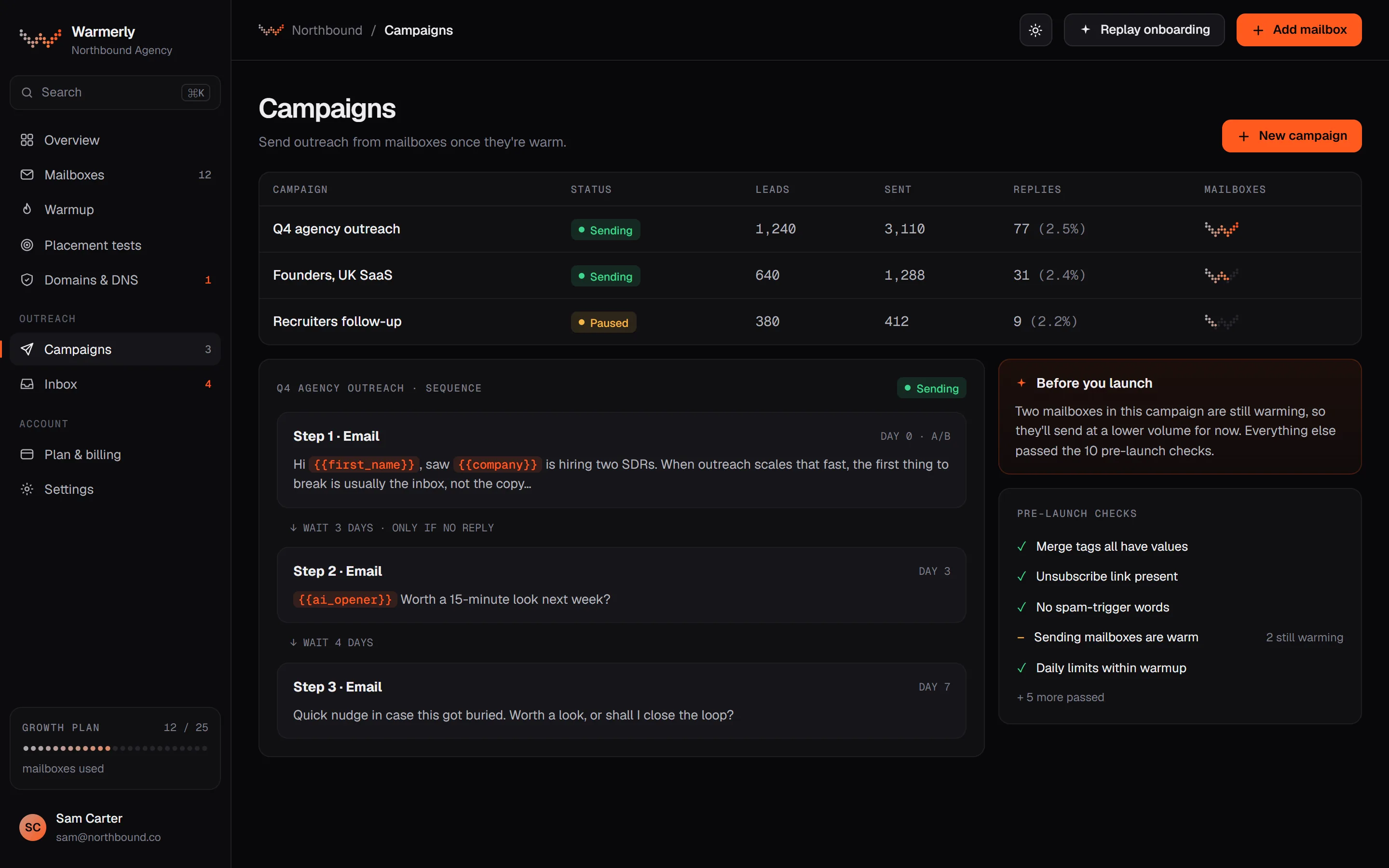
A Warmerly campaign is a sequence you build and launch on a list of leads, from mailboxes you have warmed. It has its own checks, stop rules and reply inbox.
A sequence is made of email steps, wait steps, LinkedIn connection and message steps, and condition steps that branch on opened, clicked, replied or timeout, in a list editor or a drag-and-drop canvas (only the canvas can build branches). Templates include a plain three-step intro and a LinkedIn-then-email sequence.
Warmerly product, checked 21 October 2026
A pre-launch check runs before Start. Errors block the launch, such as no usable step, no sending account, no queued leads or an unknown merge tag. Warnings do not block, but Start refuses once until you acknowledge them, such as a sender whose DNS check is warn or fail, or more than five senders on one domain.
Warmerly product, checked 21 October 2026
A lead's sequence stops on a reply, an out-of-office reply (a switch you control), a bounce, an unsubscribe, the do-not-contact list, removal or the last step. Stop on reply and stop on auto-reply are both on by default.
Warmerly product, checked 21 October 2026
Warmerly finds replies by reading the connected mailbox every few minutes and matching the reply to the email it answers. A reply that arrives without the reply headers can be missed, and the docs say how to remove such a lead by hand.
Warmerly product, checked 21 October 2026
With a verified custom tracking domain Warmerly adds an unsubscribe link and one-click headers to every campaign email. Click tracking is on by default, open tracking is off, and plain text mode removes both.
Warmerly product, checked 21 October 2026
Warmerly supports A/B tests of email copy. Real replies are what a test counts, and auto-replies are not counted.
Warmerly product, checked 21 October 2026
Nothing starts a Warmerly sequence on a website visit or an intent score, because it has neither. A campaign works from a list of leads you import or find.
Warmerly product, checked 21 October 2026
Warmly.ai describes outbound as sequences that start when signals fire, coordinated with chat, ads and nurture, with a human review step you can keep or relax.
The TAM Agent outbound page says sequences start when signals fire, can be built or taken from templates, and can differ by ICP tier, industry, persona or signal type. A sequence pauses when a reply is detected and ends when a meeting is booked.
warmly.ai/p/tam-agent/outbound · read 21 October 2026
The page names 'Email, LinkedIn, phone' and says sending can be native or run through Outreach, Salesloft 'or similar tools'. Its FAQ says 'Native email and LinkedIn sending.'
warmly.ai/p/tam-agent/outbound · read 21 October 2026
Accounts can be excluded, such as customers, competitors or any defined segment. Do-not-contact accounts are also a stated exclusion on its nurture page.
warmly.ai/p/tam-agent/outbound · read 21 October 2026
Its outbound sales automation page says the AI generates a '4-step email sequence', with LinkedIn connection requests and direct messages to different buying committee members, and that buying committee members are pushed to LinkedIn and Meta ad audiences.
warmly.ai/p/solutions/use-cases/outbound-sales-automation · read 21 October 2026
The same page lists 'Max 1 direct touch per day per account', a '72-hour cooldown between emails to same person', a '48-hour cooldown between LinkedIn touches' and 'If chat engages, email pauses for 24 hours'. It does not say whether the rules can be changed.
warmly.ai/p/solutions/use-cases/outbound-sales-automation · read 21 October 2026
Its nurture page names channels as 'Email, LinkedIn ads, content recommendations'. Entry triggers include a low intent score, a website visit and a closed-lost deal, and exits include buying signals, prolonged disengagement and explicit opt-out.
warmly.ai/p/tam-agent/nurture · read 21 October 2026
We looked, and found no statement on these. That is about its published pages only, not about the product.
We report each version rather than pick one.
| Measure | Warmerly | Warmly.ai |
|---|---|---|
| Outbound email sequences | Email, wait, LinkedIn and condition steps from your own mailboxes | Signal-triggered email and LinkedIn sequences, native or through Outreach or Salesloft |
| What starts a sequence | You launch a campaign on a list of leads | A signal firing, such as a visit or an intent score |
| Step types | Email, wait, LinkedIn connection and message, condition | Email, LinkedIn, phone; a 4-step email sequence on its use-case page |
| Branching | Opened, clicked, replied or timeout, on the canvas | Not stated; varies by tier, industry, persona or signal |
| Stops on reply | Yes, on by default | Yes, pauses when a reply is detected |
| Sends through | Your connected mailboxes | Native, or Outreach or Salesloft |
| Check before launch | Yes, errors block and warnings need acknowledging | Review step by a rep, which you can configure |
Our reading of the facts above. Not a promise, and not the only reasonable reading.
If you work from a list, such as dental practices in the UK, Warmerly's campaign model fits. If you want outreach only to people who have shown interest on your site, the trigger is Warmly.ai's.
Its pages do not say whether native email uses your mailbox. That decides whose sender reputation you spend and whether warmup matters, so ask before you start.
One direct touch a day and 72 hours between emails to one person are strict. They protect people from over-contact, but they also cap how fast a signal-triggered sequence can move.
The pre-launch check asks whether the sending mailbox is warm, its DNS passes and the copy has no unknown merge tag. Those are the mistakes that cost a domain, and we found nothing equivalent on Warmly.ai's pages.
You launch a campaign on a list of leads. Steps are email, wait, LinkedIn connection and message, and condition.
A signal firing, such as a visit or an intent score. It can run natively or through Outreach or Salesloft.
Yes on both. Warmerly stops on reply by default, and Warmly.ai pauses when a reply is detected.
Yes. Errors block launch and warnings need acknowledging.
Warmly.ai pages were read on 21 October 2026. Plans and wording change, so check the vendor's own page before you decide. Warmerly details come from the product as it runs today.
Connect a mailbox. Warmerly runs alongside whatever you send from now, so you can compare before you move anything.
Free plan, no card. Paid plans: 7-day trial, first charge on day 8.