Warmerly
A published ramp: 4 emails a day on day 0 to 50 a day by day 30
One row, in depth: what each tool does, the verified numbers, and who each suits.
SmartReach details read from its pricing page, home page and help centre on 21 October 2026.
A published ramp: 4 emails a day on day 0 to 50 a day by day 30
WarmupHero agent, 10 warmup emails a day by default; 2 to 4 weeks before full volume, it says; no ramp published
Warmerly publishes its ramp: 4 emails a day on day 0 rising to 50 a day by day 30, with provider caps and health cuts. SmartReach runs warmup through its WarmupHero agent, sends 10 warmup emails a day by default, and says most accounts need 2 to 4 weeks. It publishes no ramp curve. Last checked 22 October 2026.
A published ramp: 4 emails a day on day 0 to 50 a day by day 30
WarmupHero agent, 10 warmup emails a day by default; 2 to 4 weeks before full volume, it says; no ramp published
Warmerly's ramp is a published curve. SmartReach states a default volume and a time range.
| Tool | What it shows |
|---|---|
| Warmerly | 4 a day on day 0, 8 on day 3, 15 on day 7, 25 on day 14, 35 on day 21, 50 on day 30. |
| SmartReach | 10 warmup emails a day by default, and 2 to 4 weeks before full volume. No ramp curve published. |
Warmerly's quota is also limited by provider caps (Gmail 40, Outlook 30, Zoho 25 a day) and health. SmartReach figures are from its WarmupHero help page, read 21 October 2026.
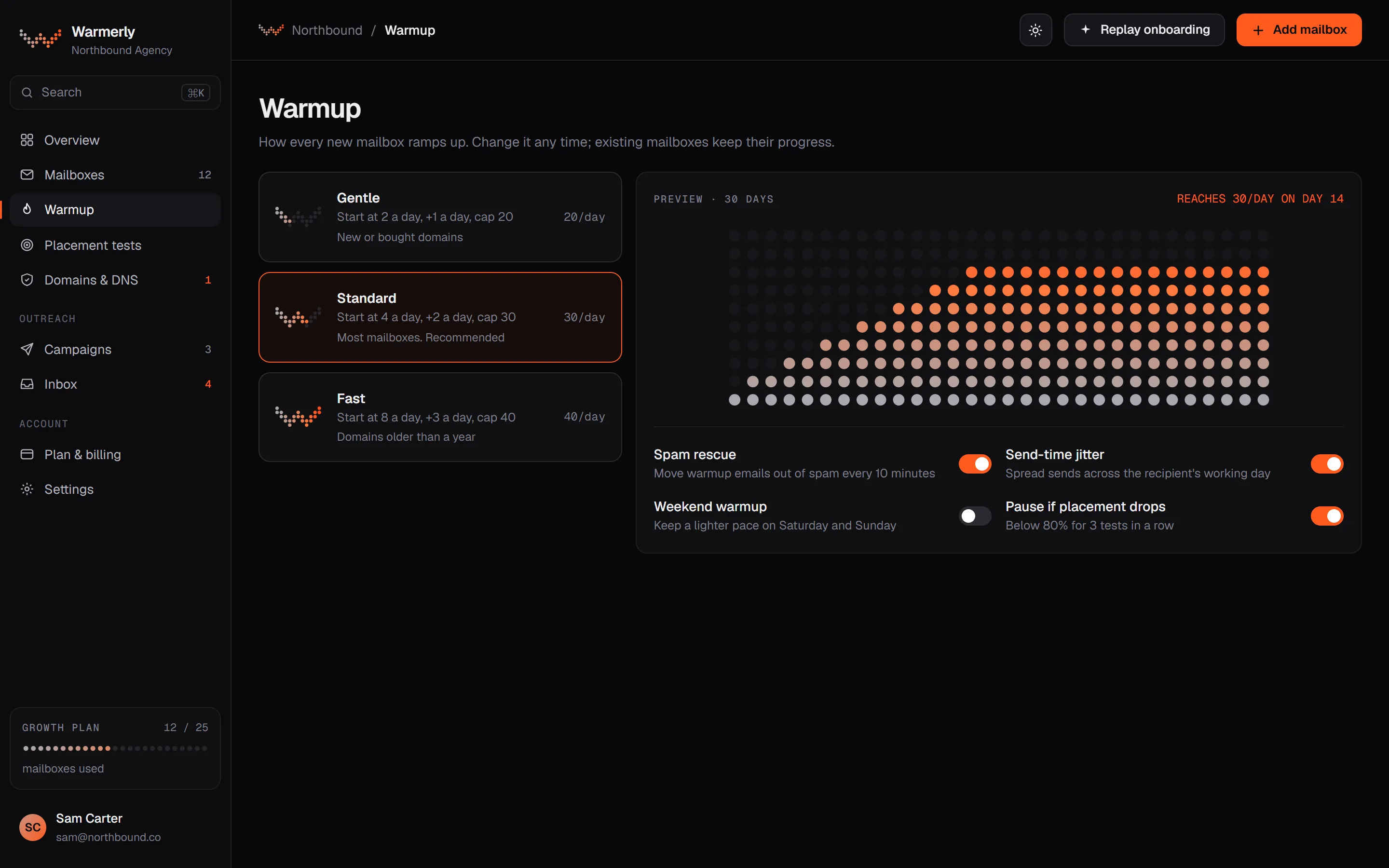
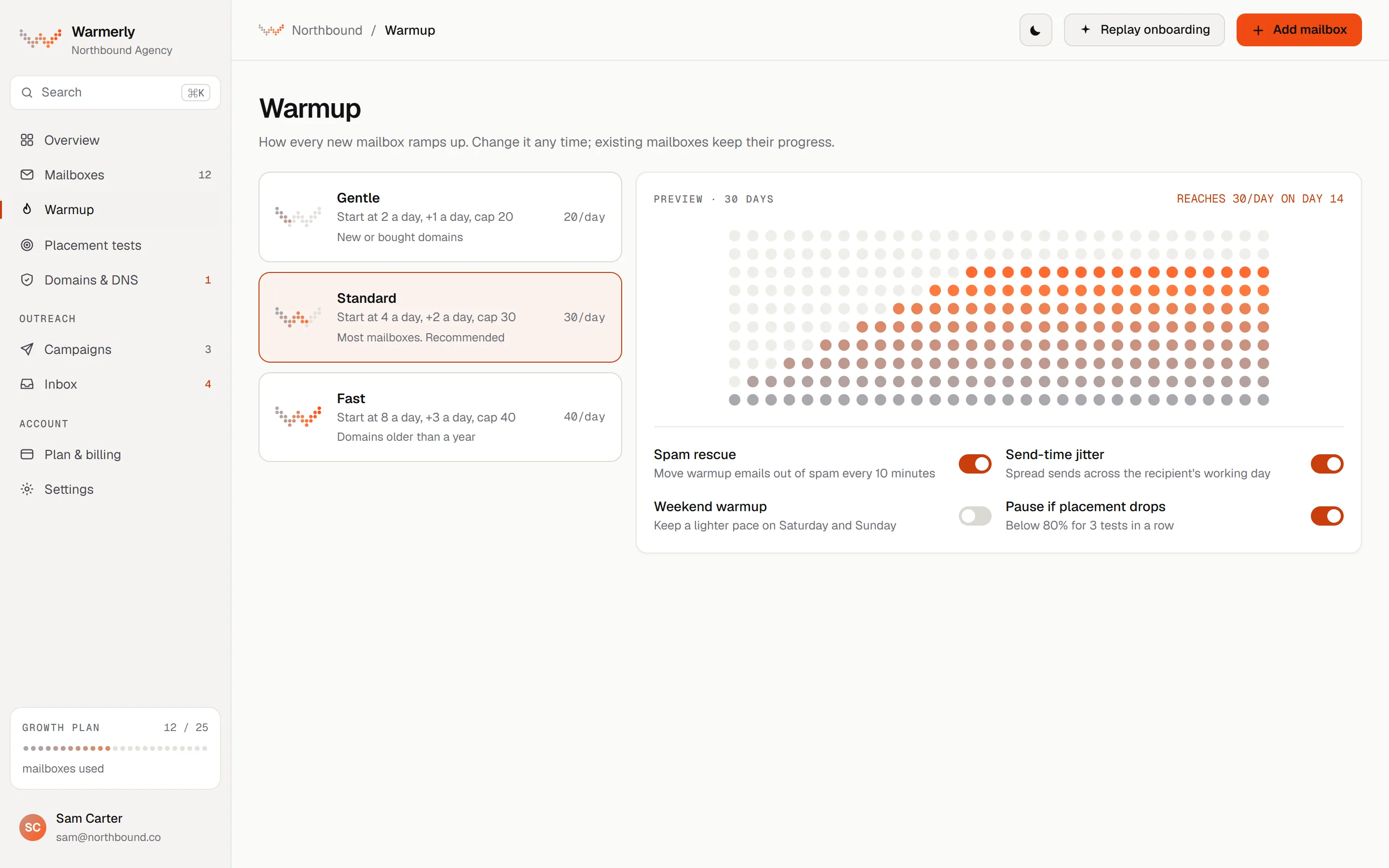
A ramp from fixed anchor points, with a named reason for each mailbox's limit today.
The daily quota rises from 4 a day at day 0 to 8 at day 3, 15 at day 7, 25 at day 14, 35 at day 21 and 50 at day 30. It counts days the mailbox really sent.
Warmerly product, checked 21 October 2026
The quota is also limited by provider caps of Gmail 40, Outlook 30 and Zoho 25, weekends at 0.6 of the weekday quota, and health.
Warmerly product, checked 21 October 2026
The warmup page shows the factor limiting each mailbox today, and you can set a lower daily limit yourself.
Warmerly product, checked 21 October 2026
Warmup runs inside Warmerly's own network. We found no stated figure for how long a mailbox with a poor history takes to recover.
Warmerly product, checked 21 October 2026
When a warmup email lands in spam, the receiving Warmerly mailbox marks it not spam, moves it to the inbox, stars it and queues a reply. It applies to every spam-placed warmup message and never to campaign mail to real prospects.
Warmerly product, checked 21 October 2026
Each warmup message waits a random time of 10 to 120 minutes before it is read, so a rescue never happens within minutes of delivery.
Warmerly product, checked 21 October 2026
Every mailbox starts as aging and becomes active once it has 30 active warmup days. The ramp, not the label, sets the daily volume.
Warmerly product, checked 21 October 2026
Warmup is run by WarmupHero, which its help centre calls SmartReach's built-in warmup agent.
WarmupHero is described as SmartReach's built-in email warmup agent, with no separate sign-up.
help.smartreach.io/docs/signing-up-for-warmuphero.md · read 21 October 2026
It says that by default WarmupHero sends 10 warmup emails every day, adjustable under Update Settings, and advises 5 to 10 a day.
help.smartreach.io/docs/signing-up-for-warmuphero.md · read 21 October 2026
It says most accounts need 2 to 4 weeks of consistent warmup before full-volume campaigns, depending on reputation and sending history.
help.smartreach.io/docs/signing-up-for-warmuphero.md · read 21 October 2026
Microsoft 365 mailboxes bought through SmartReach do not support automated warmup, and external Microsoft 365 connections may drop and need reconnecting.
help.smartreach.io/docs/signing-up-for-warmuphero.md · read 21 October 2026
Its WarmupHero help article says warmup emails are opened, replied to and moved out of spam automatically, and starts with a small number of emails to verified inboxes.
help.smartreach.io/docs/signing-up-for-warmuphero.md · read 22 October 2026
You stop warmup by selecting the email and clicking Stop warm up. The warmup page shows a sending breakdown by category to track inbox placement.
help.smartreach.io/docs/signing-up-for-warmuphero.md · read 22 October 2026
The article says to keep warmup running alongside outreach, especially during high-volume sends.
help.smartreach.io/docs/signing-up-for-warmuphero.md · read 22 October 2026
Its throttling article says campaign sending is spread through the day, one email at a time, with examples of 20 to 30 a day for new inboxes and 30 to 40 for warmed ones. Its pricing page also lists gradual campaign ramp-up on all plans.
help.smartreach.io/docs/email-throttling.md · read 22 October 2026
We looked, and found no statement on these. That is about its published pages only, not about the product.
We report each version rather than pick one.
| Measure | Warmerly | SmartReach |
|---|---|---|
| How warmup runs | A published ramp: 4 emails a day on day 0 to 50 a day by day 30 | WarmupHero agent, 10 warmup emails a day by default; 2 to 4 weeks before full volume, it says; no ramp published |
| Warmup emails on day 0 | 4 a day, per mailbox | 10 a day by default, per its help centre |
| Warmup emails by day 30 | 50 a day, per mailbox | Not stated |
| Time before full volume | Ramp reaches 50 a day by day 30 | 2 to 4 weeks, it says |
| Provider caps | Gmail 40, Outlook 30, Zoho 25 a day | Not stated |
| Warmup emails on day 0 | 4 | 10 a day by default |
| Warmup emails on day 30 | 50 | 10 by default, 5 to 10 recommended |
| Time before full-volume sending | 30 days to reach the full ramp | 2 to 4 weeks, it says |
| Reply and spam rescue | Both described in the code docs | Both described in its help article |
Our reading of the facts above. Not a promise, and not the only reasonable reading.
Warmerly's ramp is a table you can compare with what a mailbox sends today. SmartReach gives a default volume and a time range, which is less to check against.
SmartReach says Microsoft 365 mailboxes bought through it cannot be warmed. Warmerly lists Outlook with a daily cap of 30.
Warmerly's ramp is at 25 a day on day 14. SmartReach's default is still 10 a day unless you change it, and it recommends no more than 10, so the volume is lower by design. We do not know which is better for a given mailbox, and neither side publishes inbox placement results.
Warmerly sends 0.6 of the weekday quota on weekends, so a 25-a-day weekday becomes 15 (25 times 0.6). SmartReach's warmup pages do not mention weekends.
Warmerly caps Gmail at 40 a day of warmup, Outlook at 30 and Zoho at 25, so even at day 30 a ramp of 50 is cut to the provider cap. SmartReach publishes no provider caps for warmup.
On Warmerly the warmup page names the factor limiting each mailbox today. On SmartReach the warmup page shows a breakdown by category. In both cases check a few mailboxes weekly rather than trusting an average.
10 a day by default, per its help centre, with 5 to 10 recommended.
It says 2 to 4 weeks. Warmerly's ramp reaches full volume in 30 days.
Gmail 40, Outlook 30 and Zoho 25 a day.
Yes. Both tools describe reply and spam rescue.
SmartReach pages were read on 21 October 2026. Plans and wording change, so check the vendor's own page before you decide. Warmerly details come from the product as it runs today.
Connect a mailbox. Warmerly runs alongside whatever you send from now, so you can compare before you move anything.
Free plan, no card. Paid plans: 7-day trial, first charge on day 8.