Warmerly
Needs reply view; email, LinkedIn and WhatsApp in one list; suggested reply saved as a draft
One row, in depth: what each tool does, the verified numbers, and who each suits.
SmartReach details read from its pricing page, home page and help centre on 21 October 2026.
Needs reply view; email, LinkedIn and WhatsApp in one list; suggested reply saved as a draft
Unified campaign inbox with sentiment tags and AI replies; team inbox on higher plans
Warmerly's inbox opens on a Needs reply view and brings email, LinkedIn and WhatsApp into one list, with a suggested reply saved as a draft. SmartReach has a unified campaign inbox with sentiment tags and AI replies, and a team inbox on higher plans. Last checked 22 October 2026.
Needs reply view; email, LinkedIn and WhatsApp in one list; suggested reply saved as a draft
Unified campaign inbox with sentiment tags and AI replies; team inbox on higher plans
Warmerly opens on what needs an answer. SmartReach sorts replies by sentiment.
| Tool | What it shows |
|---|---|
| Warmerly | Needs reply is the default view. Email, LinkedIn and WhatsApp in one list. Labels Interested, Not relevant, Spam. Suggested reply under 120 words, saved as a draft. |
| SmartReach | A unified campaign inbox with positive, neutral and negative sentiment tags, AI replies, and a team inbox on higher plans. |
The rows are stylised. They show the shape of each inbox, not real replies or a screenshot of either product.
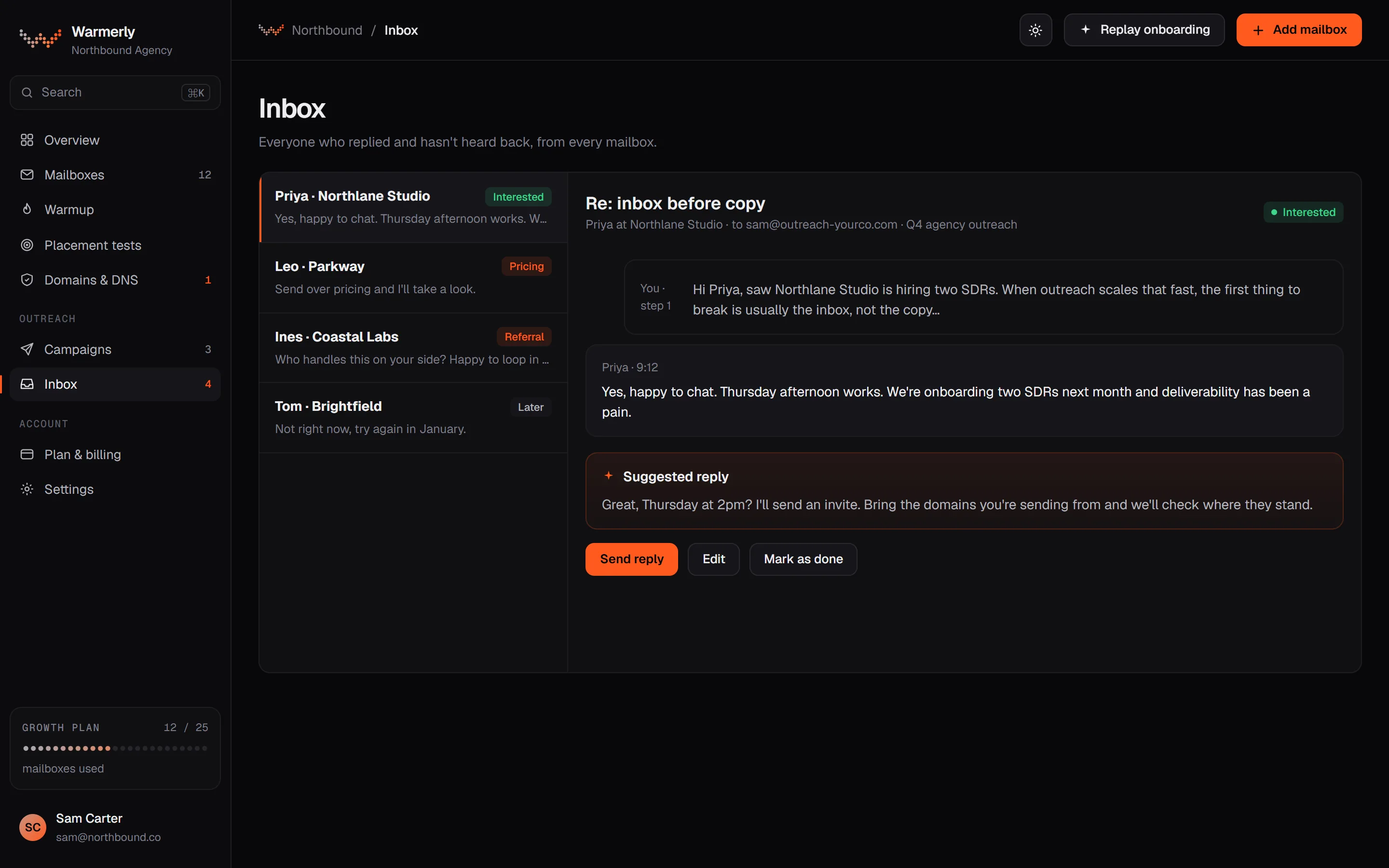
A reply queue first: Needs reply, categories, three channels in one list and a suggested reply.
The default view is conversations whose newest message is theirs and is a lead. Other views are All and View archived, and search covers name, email, phone, company and message text.
Warmerly product, checked 21 October 2026
Replies are sorted as Interested, Not relevant or Spam. Free rules catch own-domain mail, no-reply senders, bulk headers and unsubscribes.
Warmerly product, checked 21 October 2026
Email, LinkedIn and WhatsApp conversations land in one inbox, with a channel filter.
Warmerly product, checked 21 October 2026
Warmerly can draft a reply to the latest inbound email: under 120 words, plain text, saved for you to edit and send.
Warmerly product, checked 21 October 2026
The inbox has no snooze, star or notes, and no conversation tags.
Warmerly product, checked 21 October 2026
Connected mailboxes are read every 5 minutes, folder by folder, in batches of up to 50 new messages, and the Sent folder is read too so your own replies appear.
Warmerly product, checked 21 October 2026
Mailboxes are read eight at a time, at most three on the same mail host, and a slow host is cut off after two minutes so it cannot block the rest.
Warmerly product, checked 21 October 2026
No snooze, no star, no notes and no conversation tags.
Warmerly product, checked 21 October 2026
A unified campaign inbox on every plan, with sentiment and AI replies, and a team inbox on higher plans.
Its help centre says the campaign inbox gathers replies from your connected accounts in one place, and you can reply from any connected mailbox.
help.smartreach.io/docs/campaign-inbox.md · read 21 October 2026
Each email can be tagged positive, neutral or negative and filtered by it. Its pricing page also lists an AI Sentiment Classifier Agent and an AI Response Classifier.
smartreach.io/pricing · read 21 October 2026
Its pricing page lists an AI response agent on all four Sales Engagement plans, and its help centre says replies can be AI-generated.
smartreach.io/pricing · read 21 October 2026
Team Inbox is listed on three of the four Sales Engagement plans, and Unified Campaign Inbox on all four.
smartreach.io/pricing · read 21 October 2026
Its campaign inbox article says it works with 10 or 1,000 inboxes and needs no set-up beyond connecting accounts.
help.smartreach.io/docs/campaign-inbox.md · read 22 October 2026
You can reply from any connected mailbox inside SmartReach, and replies can be AI generated.
help.smartreach.io/docs/campaign-inbox.md · read 22 October 2026
Team inbox is listed on Plus and above, the AI sentiment classifier and AI response classifier on Plus and above, and an AI response agent on all plans.
smartreach.io/pricing · read 22 October 2026
Plus and above include an out-of-office rescheduler and auto-pause when a meeting is booked.
smartreach.io/pricing · read 22 October 2026
Its task manager covers email, LinkedIn, call and WhatsApp tasks on all four Sales Engagement plans, so some replies arrive as work for a person rather than as messages.
smartreach.io/pricing · read 22 October 2026
We looked, and found no statement on these. That is about its published pages only, not about the product.
| Measure | Warmerly | SmartReach |
|---|---|---|
| Reply inbox | Needs reply view; email, LinkedIn and WhatsApp in one list; suggested reply saved as a draft | Unified campaign inbox with sentiment tags and AI replies; team inbox on higher plans |
| Default view | Needs reply | Not stated |
| Channels in one inbox | Email, LinkedIn and WhatsApp | Email, per its help centre |
| Reply labels | Interested, Not relevant, Spam | Positive, neutral, negative |
| Suggested reply | Under 120 words, saved as a draft | AI-generated, review not stated |
| Sync interval | 5 minutes | Not stated |
| Out-of-office rescheduling | None found | Plus and above |
| Channels in the inbox | Email, LinkedIn, WhatsApp | Email and LinkedIn, per its home page; WhatsApp not mentioned |
| Sentiment labels | Interested, Not relevant, Spam | Positive, neutral, negative |
Our reading of the facts above. Not a promise, and not the only reasonable reading.
Warmerly labels by interest and puts Needs reply first. SmartReach labels by sentiment.
Warmerly saves a draft you edit before sending. SmartReach does not say whether its AI replies are reviewed first.
In Warmerly, Needs reply shows the conversations where the newest message is theirs and is a lead, and a draft under 120 words is ready to edit. In SmartReach, filter by sentiment and reply from the mailbox you choose.
SmartReach's Team Inbox is on Plus and above. Warmerly has Owner, Admin and Member roles. We did not check how a shared inbox is divided between members.
SmartReach can reschedule a follow-up when it sees one. In Warmerly we found no equivalent.
If a reply seems missing, Warmerly's five-minute sync means a wait of up to five minutes, not hours.
Warmerly opens on Needs reply, so a lead who has been answered drops out of view. Search covers name, email, phone, company and message text, so an older thread is one search away.
If a prospect answers a call task on SmartReach, the outcome is logged as a call disposition, not as an inbox message. Warmerly has no calling, so this case does not arise there.
Yes, a campaign inbox with positive, neutral and negative sentiment tags and AI replies. Its help centre mentions email, and its home page email and LinkedIn.
Yes. Email, LinkedIn and WhatsApp replies share one list.
With Interested, Not relevant and Spam labels, and a suggested reply under 120 words saved as a draft.
Every 5 minutes. We found no sync interval for SmartReach.
Yes, on Plus and above. We found none in Warmerly.
SmartReach pages were read on 21 October 2026. Plans and wording change, so check the vendor's own page before you decide. Warmerly details come from the product as it runs today.
Connect a mailbox. Warmerly runs alongside whatever you send from now, so you can compare before you move anything.
Free plan, no card. Paid plans: 7-day trial, first charge on day 8.