





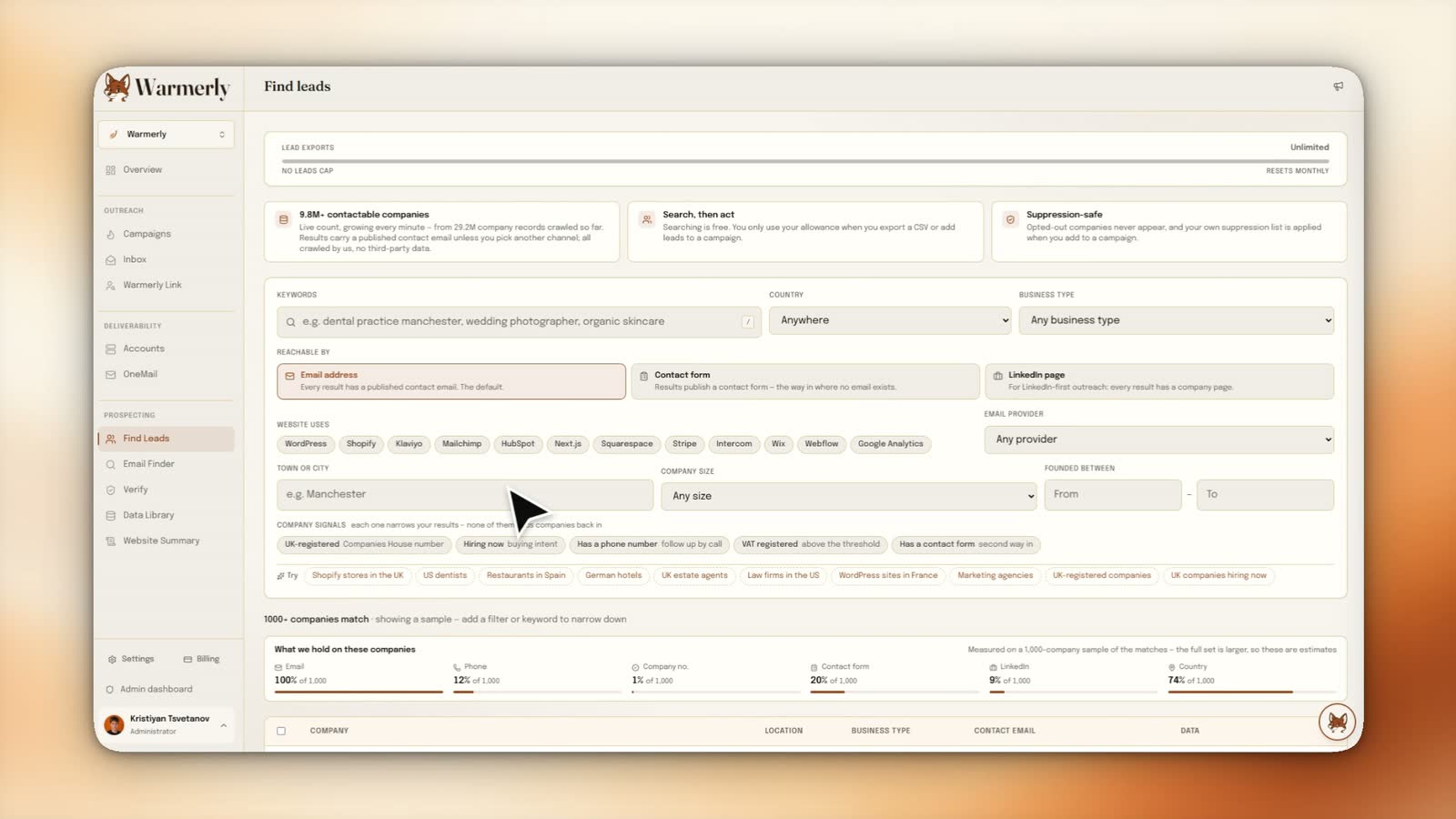
Filter by what a company runs
Technology detected on the live site, plus country, size, founding year and signals like hiring now or VAT registered.
Less boo. More booked. Halloween offer: 30 days free on any paid plan. Claim 30 days free
9.7M+ companies with a published contact route, crawled first-hand rather than licensed. Filter by the technology their site runs, their location, their size and real company signals, and see exactly what data exists before you spend anything.
Searching costs nothing. Allowance is spent on export.
Filter the crawl
Technology detected on the live site, plus country, size, founding year and signals like hiring now or VAT registered.
Browse the company directoryContacts you can use
A published address on a website is not a guarantee of a working mailbox.
See email verificationFrom list to send
Export a CSV or add results to a campaign, and verify the addresses first.
See campaignsSearching costs nothing, allowance is spent on export
The problem
Most B2B databases are the same few datasets resold, with filters that describe firmographics rather than anything you can act on, and gaps you only find after paying. This one is built from a crawl we run ourselves, so it can filter by what a site runs and show what is missing.
Why it matters
Technology detected on the live site, plus country, size, founding year and signals like hiring now or VAT registered.
Each result set shows how much of it carries an email, phone number, company number, contact form and LinkedIn page.
Choose email, contact form or LinkedIn page and get back only companies reachable that way.
How it works
Filter by the technology or signal that says they need you, then add the channel you intend to use.
Check the segment holds the data your message depends on, then layer location and size to size the list.
Export a CSV or add results to a campaign, and verify the addresses first.
Twenty seconds
This is the real Find Leads screen, unedited: pick a country and a business type, watch the coverage bars tell you what the match set actually holds, select the companies and push them straight into a campaign. No import step, no CSV round-trip.
Silent screen recording of the Find Leads page: filters are set to Germany and hotels and accommodation, the result table fills with matching companies and their contact coverage, every match is selected, and the selection is added to a new outreach campaign.
Filters that come from the website
Because the records come from crawling the sites themselves, the filters can be things a licensed list cannot tell you: the site runs WordPress, it has Klaviyo installed, it uses Shopify, it is on HubSpot, it takes payments through Stripe. For anyone selling into a stack, that is the difference between a list of companies and a list of prospects.
Coverage, before you commit
Every result set shows what proportion of it actually carries an email, a phone number, a company number, a contact form and a LinkedIn page, measured on a sample of the matches. Most databases show you a count and let you discover the gaps after paying. Seeing that a segment is 100% email but 3% company number changes what you build with it.
Choose the route in
Not every company publishes an address, and for some segments the contact form is the only real route in. Rather than pretending otherwise and shipping you rows with an empty email column, the search asks which channel you intend to use and returns only companies reachable that way.
Three things. The first is freshness in the places that matter: a company whose site went down, whose contact page changed, or whose stack moved is re-observed rather than remembered. The second is the filter set, technology detection, contact-route detection and site signals only exist if you have looked at the page.
The third is honesty about coverage. When you own the pipeline you know precisely how many records have a phone number, because you know how many pages had one. A reseller has to trust an upstream count, and the incentive runs the wrong way.
The count of companies in a database and the count you can actually email are very different numbers, and the gap is not small. A large majority of crawled company records carry firmographic data (sector, location, size, stack) with no published contact address anywhere on the site. Measured on the live database today: 9.7M+ of those records carry a contact route. That is an estimate, and it moves as the crawl runs.
Warmerly reports the contactable figure as the headline, not the crawl figure, and shows both. It is the less impressive number and it is the only one that describes what you can do. A vendor quoting a total record count while you are shopping for an email list is describing a different product to the one you are buying.
Searching is free; the allowance is spent on the way out
You can search, filter and refine as much as you like without consuming anything. The lead allowance is drawn only when you export a CSV or add results to a campaign, so exploring a segment to find out whether it is worth targeting costs nothing.
Two lists are enforced. Companies that have opted out of appearing in the database do not appear in anyone's results. And when you add leads to a campaign, your own workspace suppression list is applied, so an address you have already been asked never to contact cannot re-enter your outreach through a lead search.
That second one closes the most common route back to a suppressed contact. Suppression is normally thought of as something that happens at send time; applying it at import time as well is what stops the list from being quietly rebuilt.
A published address on a website is not a guarantee of a working mailbox. Pages go stale, staff leave, catch-all domains accept everything and deliver nothing. Running an export through verification before it enters a campaign is the difference between a 1% bounce rate and a 9% one, and a 9% bounce rate is how a healthy sending domain ends up on a blocklist.
Verification is in the same product for exactly this reason. It is not an upsell bolted on to the data. It is the step between having a list and being allowed to send to it.
The rest of the pipeline
The common mistake is inverting steps one and four: building a large geographic list and then hunting for a message that fits it. A narrow, well-qualified segment with a message that could only have been written for it outperforms a list ten times its size, and costs less to send to.
See real segment sizes before you sign up
It is company data with published contact routes, not a database of named individuals with personal email addresses. Where a person's address is needed, the email finder resolves a specific person at a specific company on demand rather than shipping a bulk list of individuals.
That distinction is partly a legal one. Published business contact details sit on much firmer ground under GDPR than a warehouse of personal addresses assembled from scraping, and it is a line worth being on the right side of.
Integrations
Results flow into verification, address finding and campaigns.
More from Warmerly
Common questions
A crawl we operate ourselves, reading companies' own websites. It is not licensed or resold from a third-party list provider, which is what makes technology and contact-route filters possible.
No. Searching and filtering are free. Your lead allowance is drawn only when you export a CSV or add results to a campaign.
Because most company websites do not publish a contact address. The interface reports the contactable count as the headline figure rather than the raw crawl total, since that is the number you can actually use.
Yes, always. A published address is not proof of a live mailbox. Verify before import, a high bounce rate damages the sending domain quickly and is the leading route to a blocklisting.
Yes, when you add leads to a campaign. Companies that opted out of the database entirely never appear in anyone's results at all.
Keep reading
Summarize with AI
Filter by stack, location, size and signals, and read the coverage before you spend a single lead from your allowance.








 ChatGPT
 Claude
 Perplexity