WarmerlyWarmerly ahead on this row
Sequences, pre-launch checks and one reply inbox, with no cap on sends on paid plans.
One row, in depth: what each tool does, the verified numbers, and who each suits.
Mailwarm details read from its pricing page, home page, features page, SMTP warmup page and about page on 21 October 2026.
Sequences, pre-launch checks and one reply inbox, with no cap on sends on paid plans.
No campaign sending found on its pages; it describes itself as a deliverability system.
Warmerly sends sequences from the mailboxes it warms, with pre-launch checks and one reply inbox. Mailwarm lists no campaign sending on the pages we read, so you would pair it with a separate sending tool. Last checked 22 October 2026.
Sequences, pre-launch checks and one reply inbox, with no cap on sends on paid plans.
No campaign sending found on its pages; it describes itself as a deliverability system.
From mailbox to what happens next
We found no campaign sending on Mailwarm's pages. It describes itself as a deliverability system built around warmup.
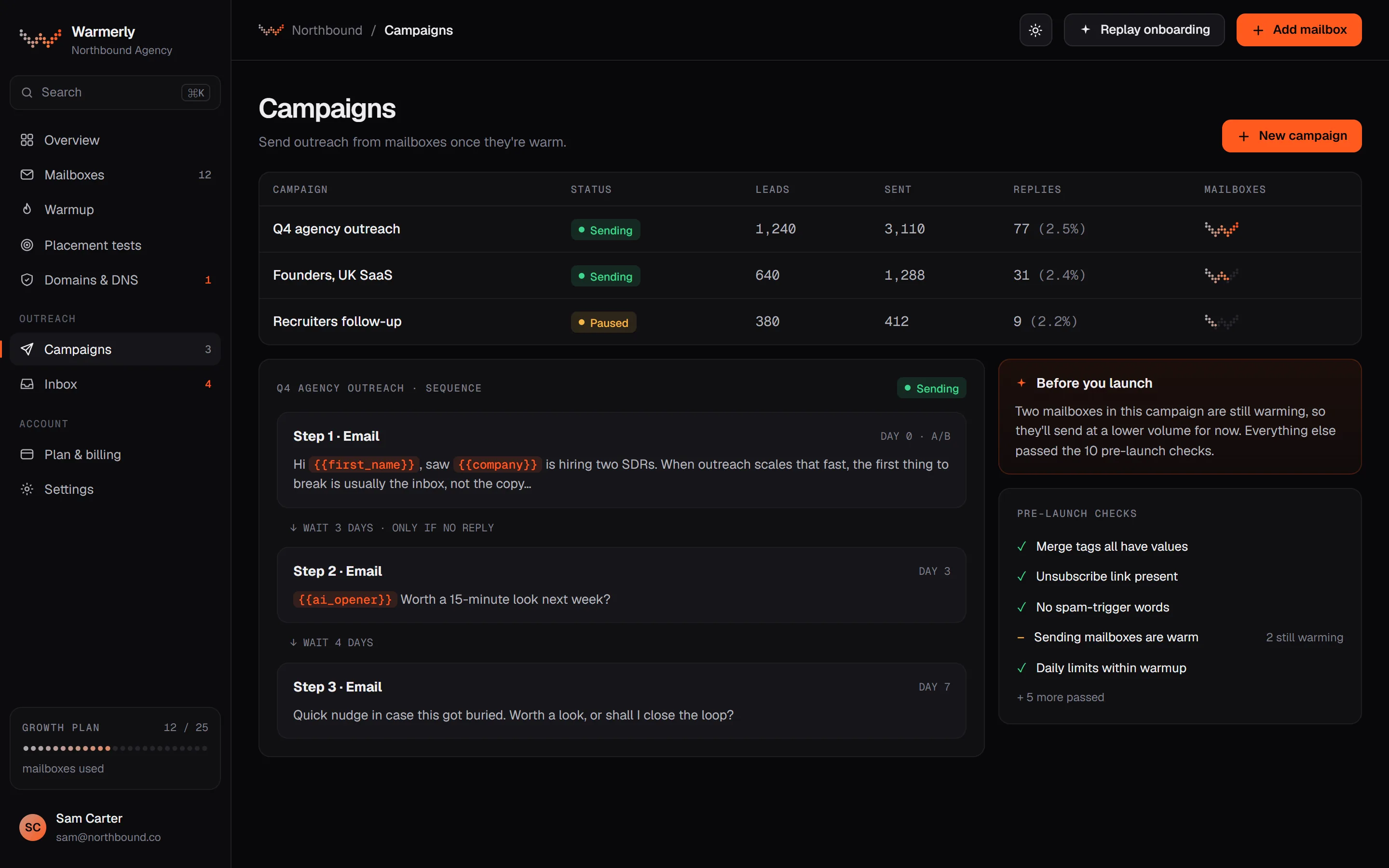
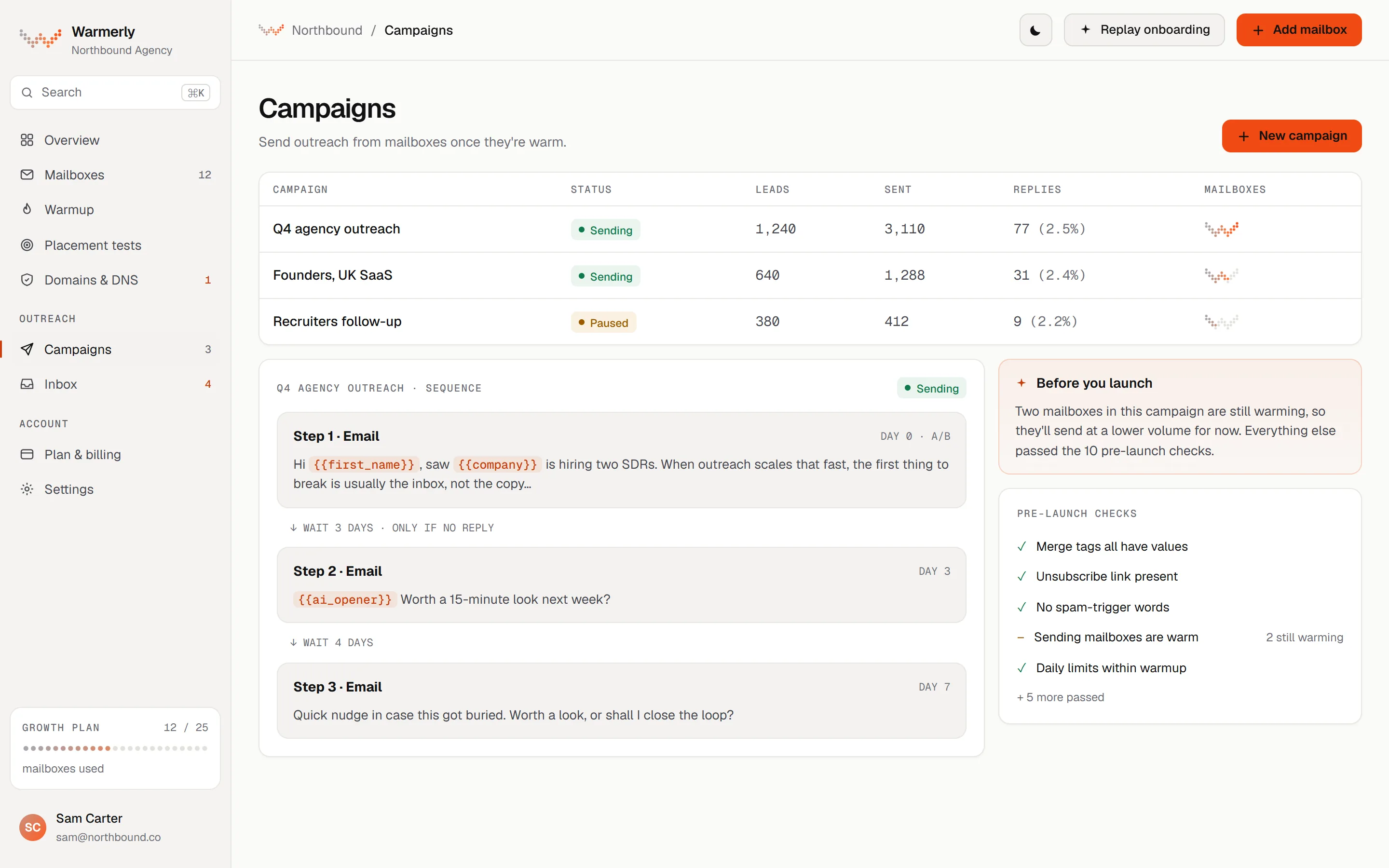
A campaign builder on the same mailboxes you warm.
Email, wait, LinkedIn and branching steps in a list editor or a drag-and-drop canvas, with an AI opener step.
Warmerly product, checked 21 October 2026
A readiness check blocks a launch with no usable step or sender, and warns about DNS problems and spam-style copy.
Warmerly product, checked 21 October 2026
Starter, Growth and Agency send without a monthly meter. Each mailbox still sends inside its daily limit. Free is capped at 100 sends a month.
Warmerly product, checked 21 October 2026
Replies land in one inbox with LinkedIn replies. A genuine reply stops that lead's sequence by default.
Warmerly product, checked 21 October 2026
A campaign sends only inside its days, hours and timezone (Monday to Friday, 09:00 to 17:00 by default), then waits a minimum gap between sends (10 minutes by default), then respects the campaign's daily limit (30 by default) and each mailbox's own daily campaign limit (30 by default), the volume ramp, mailbox health and plan limits. The help article says the daily limit is a ceiling and something else usually stops the campaign first.
Warmerly product, checked 21 October 2026
When a project has no mailbox yet, or any mailbox with fewer than 14 days of warmup, the campaign ramp starts on: 3 emails per mailbox on the first sending day, 1 more each sending day, up to 15 a day, which is reached on the 13th sending day. Weekends you do not send on do not advance it, and pausing does not restart it.
Warmerly product, checked 21 October 2026
An error blocks a launch: no step with usable content, no sending account, no queued lead, an unknown merge tag, or an AI opener with no brief. A warning does not block but asks you to acknowledge it once: a DNS check that warned or failed, more than 5 senders on one domain, no sender postal address, spam-style copy such as more than 5 links or 3 images, or a missing unsubscribe link.
Warmerly product, checked 21 October 2026
A lead's sequence stops when they reply, their address bounces, they unsubscribe, the address is on the do-not-contact list, you remove them or they finish the last step. Stop on reply and Stop on auto-reply are both on by default and are switches you control.
Warmerly product, checked 21 October 2026
Every campaign email carries an unsubscribe link and the one-click unsubscribe headers Gmail and Yahoo require. A lead who uses either goes on the workspace's do-not-contact list, and the sequence stops at once. Addresses are checked against that list right before each send.
Warmerly product, checked 21 October 2026
A permanent bounce marks the lead Unavailable mailbox, stops the sequence and suppresses the address. If a provider refuses mail as spam rather than because the address is bad, the lead is not suppressed. It retries later, and after repeated refusals the mailbox is taken off campaigns while it recovers.
Warmerly product, checked 21 October 2026
Warmup keeps running alongside campaigns and shares the same mailbox, so warmup sends count against the minimum gap. The help article says to keep it on because it builds the reputation that lets volume grow, and that the ramp does not make a brand-new domain safe to blast.
Warmerly product, checked 21 October 2026
A deliverability service: warm-up, monitoring and expert support, with no campaign sender found.
Its plans list warm-up, spam score monitoring, content warm-up, provider-level warm-up and authentication fix tools.
mailwarm.com/pricing · read 21 October 2026
Its features page says you can use your own templates during warmup.
mailwarm.com/features · read 21 October 2026
We found no campaign sending, sequences or reply inbox on its pricing, home or features pages.
mailwarm.com/pricing · read 21 October 2026
None of its pricing, features, home, SMTP or cold outbound pages describes sending campaigns. It names campaign use only as the reason to warm: warm-up for outbound campaigns, with centralized control for campaigns and custom templates marked Active and Queued on the sample dashboard.
mailwarm.com/features · read 22 October 2026
Its tool page says it works with Instantly, lemlist, Smartlead or SMTP: connect the same inbox to both, and turn off any built-in warm-up in your cold email tool to avoid doubling volume.
mailwarm.com/email-warmup-tool · read 22 October 2026
A new inbox should send 5 to 10 cold emails a day and a fully warmed one about 30 to 50. To send more, add warmed inboxes and domains rather than pushing each harder. Google Workspace's cap of 2,000 messages a day is called a limit, not a target.
mailwarm.com/email-warmup-for-cold-outbound · read 22 October 2026
The page says to keep warm-up at a lower maintenance level during campaigns, because cold outreach produces fewer opens and replies than normal email, and that stopping it completely weakens placement when campaigns need it most.
mailwarm.com/email-warmup-for-cold-outbound · read 22 October 2026
It recommends a separate domain for outreach to protect the main company domain, SPF, DKIM and DMARC in place before sending, and warming the domain for a few weeks before launch.
mailwarm.com/email-warmup-for-cold-outbound · read 22 October 2026
Its agency page describes connecting client inboxes, setting sending patterns per client and activating automated interactions, with volume and behaviour adjustable per client. It lists no sequences, schedules or lead handling.
mailwarm.com/email-warmup-for-agencies · read 22 October 2026
We looked, and found no statement on these. That is about its published pages only, not about the product.
| Measure | Warmerly | Mailwarm |
|---|---|---|
| Campaign sending | Sequences, pre-launch checks and one reply inbox, with no cap on sends on paid plans. | No campaign sending found on its pages; it describes itself as a deliverability system. |
| Campaign sends on a paid plan | No cap | Not offered |
| Sender on the pricing page | Yes | No |
| Reply inbox | One, with LinkedIn replies | Not listed |
| Default daily limit per mailbox | 30 campaign emails a day | Not applicable, it does not send |
| New-mailbox campaign ramp | 3 a day, up to 15, over 13 sending days | Guidance: 5 to 10 a day for a new inbox |
| Warmed mailbox, cold sends a day | 30 by default, set per mailbox | About 30 to 50, as guidance |
| Default gap between sends | 10 minutes | Not stated |
| Launch checks before a campaign starts | Yes, errors and warnings | Not described |
Our reading of the facts above. Not a promise, and not the only reasonable reading.
With Mailwarm you run warmup there and campaigns elsewhere. With Warmerly you can do both from the same mailboxes, or run warmup alone beside another sender.
Five mailboxes at 30 emails a day is about 150 a day, whatever the plan, because paid Warmerly plans have no send meter and volume is mailboxes times each mailbox's daily limit. An 8-hour window with a 10-minute gap allows about 48 sends per mailbox, so the 30 limit is the one that bites.
If you set a campaign limit of 500 and attach two mailboxes at 30 each, you send at most 60. The help article calls this out because raising the campaign limit changes nothing until you add mailboxes, widen the hours or shorten the gap.
You can use Warmerly for warmup alone and keep another tool sending, as Mailwarm's own advice assumes. If you do both on Warmerly, one mailbox, one reply inbox and one set of limits cover warmup and campaigns, so you cannot double the volume by accident.
Mailwarm's advice to turn off a cold email tool's built-in warm-up applies in reverse: if Warmerly and Mailwarm both warm one inbox, the warm-up volume doubles. Pick one for each mailbox, or use them on different mailboxes.
Warmerly lets you launch before a mailbox has finished warming, keeping the early sending gentle with the 3-a-day ramp. Mailwarm's guidance is to warm a new domain for 2 to 4 weeks before the first cold campaign. The two are not the same advice, and the ramp does not replace warmup.
We found no campaign sender on its pages. It describes itself as a deliverability system built around warmup.
Yes. Warmerly warms mailboxes that another tool sends from.
5 to 10 a day for a new inbox and about 30 to 50 for a fully warmed one, as guidance on its cold outbound page. It gives no source for the figures.
The daily limit is a ceiling. The minimum wait between sends, the mailbox's own daily limit, the ramp on new mailboxes and the sending hours usually stop a campaign first.
Mailwarm pages were read on 21 October 2026. Plans and wording change, so check the vendor's own page before you decide. Warmerly details come from the product as it runs today.
Connect a mailbox. Warmerly runs alongside whatever you send from now, so you can compare before you move anything.
Free plan, no card. Paid plans: 7-day trial, first charge on day 8.