Warmerly
One queue of everyone who replied, across email and LinkedIn, with a suggested reply.
One row, in depth: what each tool does, the verified numbers, and who each suits.
La Growth Machine details read from its pricing page, features pages, LinkedIn safety page, integrations page, developer docs and help centre on 21 and 22 October 2026.
One queue of everyone who replied, across email and LinkedIn, with a suggested reply.
A shared LinkedIn and email inbox with tags, snooze, notes, Slack alerts and out-of-office detection.
Warmerly has one queue of everyone who replied across email and LinkedIn, with a suggested reply but no snooze, star or notes, while La Growth Machine has a shared inbox with tags, snooze, notes and CRM sync, so it is ahead. La Growth Machine has a shared inbox for LinkedIn and email with qualification tags, snooze, notes, Slack alerts, out-of-office detection and CRM sync. Warmerly has one queue of everyone who replied across email and LinkedIn, with a suggested reply, but no snooze, star or notes. Last checked 22 October 2026.
One queue of everyone who replied, across email and LinkedIn, with a suggested reply.
A shared LinkedIn and email inbox with tags, snooze, notes, Slack alerts and out-of-office detection.
How each describes it
A Needs reply queue
A shared team inbox
Warmerly's inbox has no snooze, star or notes. La Growth Machine's inbox is on Pro and Ultimate.
What happens next
Both stop a lead's sequence on a genuine reply by default.
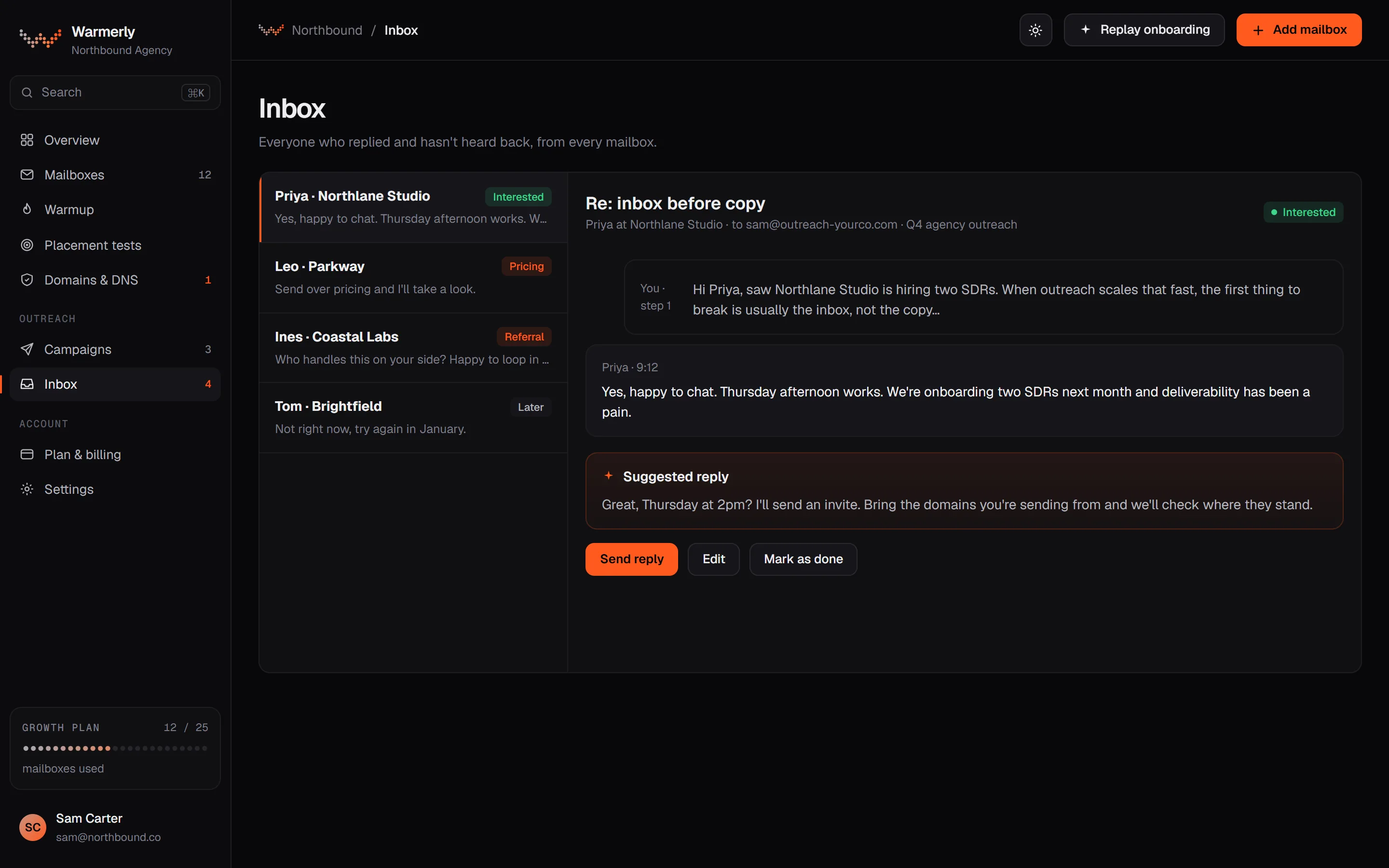
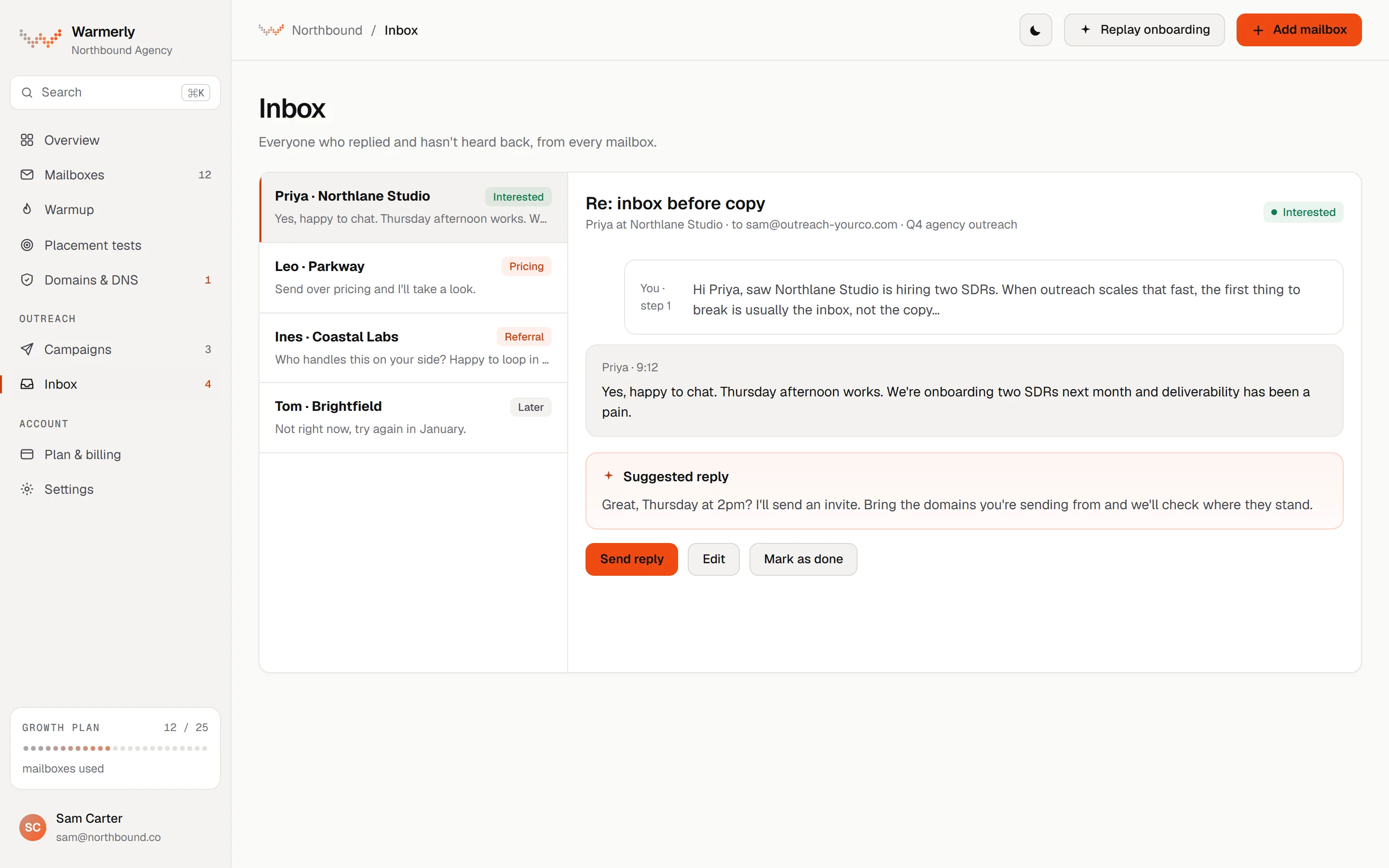
A reply queue first: a 'Needs reply' view, labels with rules and AI, email and LinkedIn in one list, and a suggested reply for the latest inbound email.
The default view is conversations where the newest message is theirs and it is either labelled a lead or not labelled at all. Other views are All and Archived, and the list can be searched by name, email, company or message text with a prefix match, so 'invo' finds 'invoice'.
Warmerly product, checked 21 October 2026
Mail is labelled lead, not relevant or spam. Free rules at ingest catch own-domain mail, no-reply senders, bulk and auto-reply headers, unsubscribe mail and the spam folder. An AI step labels campaign replies only, and your own override sticks. Warmerly does not list reply intents such as 'meeting booked' for email.
Warmerly product, checked 21 October 2026
LinkedIn replies land in the same inbox as email replies. LinkedIn campaign replies are labelled by their reply label: interested, question and referral count as leads, and not interested, stop and out of office as not relevant.
Warmerly product, checked 21 October 2026
Warmerly can draft a reply to the latest inbound email: under 120 words, plain text, signed with the sender's first name. The draft is saved for you to edit and send. The same draft function is available to AI assistants through the Warmerly MCP server.
Warmerly product, checked 21 October 2026
The inbox has no snooze, star or notes: its own test asserts that those controls are absent. We also found no tags on a conversation, no scheduled reply, and no single inbox that spans many LinkedIn accounts with role-based access.
Warmerly product, checked 21 October 2026
A sweep in the cron worker walks every workspace's mailboxes every 5 minutes. A mailbox that keeps failing to log in is paused after 3 sweeps, about 15 minutes, rather than retried for ever.
Warmerly product, checked 21 October 2026
The conversation list returns 50 by default and up to 200, ordered by latest activity, with every filter applied before paging so the Archived view is complete. Unread state is cleared only when you open a conversation, not by scrolling.
Warmerly product, checked 21 October 2026
With a filter active, an empty list says nothing matched. With nothing at all, it says No replies yet and offers one action. Needs reply and Archived have their own wording.
Warmerly product, checked 21 October 2026
A unified inbox included in Pro and Ultimate and in the trial, using no credits.
LinkedIn and email replies from every identity land in one thread per lead. You reply by email or LinkedIn as the identity that ran the campaign.
lagrowthmachine.com/features/multichannel-inbox · read 21 October 2026
New replies are tagged To qualify. One click files a reply as Replied, Won or Lost, and tags such as Interested, Call booked and Wrong timing are named on the page.
lagrowthmachine.com/features/multichannel-inbox · read 21 October 2026
Several people can share the inbox. Archive, snooze and internal notes apply to the whole team, favourites and unread status stay personal, and Slack alerts link to the conversation.
lagrowthmachine.com/features/multichannel-inbox · read 21 October 2026
AI detects out-of-office replies, tags the lead, leaves it out of your reply rate and resumes the sequence 3 days after the return date.
lagrowthmachine.com/features/multichannel-inbox · read 21 October 2026
Reply Agent is in beta, rolling out to Pro and Ultimate. The MCP server lets Claude or ChatGPT sort replies and draft answers, and by default nothing is sent until you approve it.
lagrowthmachine.com/features/multichannel-inbox · read 21 October 2026
You can see all identities or one, with unread counts, and filter to leads who replied, Remind later, Favourite, No answer or Archived. You can also filter by campaign, read or unread, and search by name.
lagrowthmachine.com/features/multichannel-inbox · read 22 October 2026
Only conversations with leads from its campaigns appear. Your other LinkedIn messages and emails stay private, and messages you send from Gmail or LinkedIn to a campaign lead sync into the thread.
lagrowthmachine.com/features/multichannel-inbox · read 22 October 2026
Replies go out as the identity that ran the campaign, even when a colleague is away. Archive, snooze and notes are shared, favourites and unread are personal. Team members are free: 3 on Basic, 25 on Pro, unlimited on Ultimate.
lagrowthmachine.com/pricing · read 22 October 2026
Each campaign shows its Won and Interested rates, and out-of-office replies are left out of the reply rate. HubSpot lifecycle stages can follow your tags on Ultimate.
lagrowthmachine.com/features/multichannel-inbox · read 22 October 2026
The inbox is part of Pro, Ultimate and the 14-day trial and uses no credits. Basic does not list it.
lagrowthmachine.com/features/multichannel-inbox · read 22 October 2026
We looked, and found no statement on these. That is about its published pages only, not about the product.
We report each version rather than pick one.
| Measure | Warmerly | La Growth Machine |
|---|---|---|
| Reply inbox | One queue of everyone who replied, across email and LinkedIn, with a suggested reply. | A shared LinkedIn and email inbox with tags, snooze, notes, Slack alerts and out-of-office detection. |
| Channels in one inbox | Email and LinkedIn | Email and LinkedIn |
| Snooze, notes and tags | None | Snooze, internal notes and tags |
| Suggested reply | Yes, under 120 words, for you to edit | Reply Agent in beta |
| Out-of-office detection | Not found | Yes, resumes 3 days after return |
| Team members at no extra cost | Not found | 3 Basic, 25 Pro, unlimited Ultimate |
| How new mail arrives | Mailbox sweep every 5 minutes | Not stated |
| Plans with the inbox | Every plan | Pro, Ultimate and trial |
| Reply draft length | Under 120 words | Not stated |
Our reading of the facts above. Not a promise, and not the only reasonable reading.
Its inbox has no snooze, star or notes, and no tags on a conversation.
The default view is a Needs reply queue, so you open it and see who is waiting.
On La Growth Machine three people can share one inbox on Pro, since 25 team members are free. The seats you pay for are the identities that run campaigns, at $135 each a month billed monthly. On Warmerly we found no role-based access to the inbox.
La Growth Machine tags it, leaves it out of the reply rate and resumes the sequence 3 days after the return date. On Warmerly a free rule at ingest catches auto-reply headers, and mail labelled not relevant stays out of Needs reply. We found nothing that reads a return date or restarts a sequence.
Warmerly opens on Needs reply: conversations where the newest message is theirs and labelled lead or not labelled. La Growth Machine opens on its leads-who-replied views with unread counts, and tags new replies To qualify.
Yes. It puts LinkedIn and email replies in one thread per lead, with tags, snooze, internal notes and Slack alerts, on Pro and Ultimate.
It lists who replied across email and LinkedIn, defaults to a Needs reply view, labels mail as lead, not relevant or spam, and can draft a short reply for you to edit.
No. Only conversations with leads from its campaigns appear, per its inbox page.
No. Its inbox has no snooze, star or notes.
A beta AI agent that follows up on LinkedIn replies worth exploring, with its conversations marked in the inbox. It is rolling out to Pro and Ultimate.
La Growth Machine pages were read on 21 October 2026. Plans and wording change, so check the vendor's own page before you decide. Warmerly details come from the product as it runs today.
Connect a mailbox. Warmerly runs alongside whatever you send from now, so you can compare before you move anything.
Free plan, no card. Paid plans: 7-day trial, first charge on day 8.