Warmerly
One queue of everyone who replied, across email and LinkedIn.
One row, in depth: what each tool does, the verified numbers, and who each suits.
Dripify details read from its pricing page, FAQ, features pages and help centre on 21 October 2026.
One queue of everyone who replied, across email and LinkedIn.
A lead inbox with reply and last-message filters, notes, stars and a blacklist; its help overview covers LinkedIn conversations.
Warmerly has a Needs reply view across email and LinkedIn with labels and suggested replies, but no notes or stars. Dripify has a Smart Inbox that shows only your leads' conversations, with reply-status and last-message filters, notes, starred messages and a blacklist. Its feature page says it holds LinkedIn and email conversations, while its help overview covers LinkedIn. Last checked 22 October 2026.
One queue of everyone who replied, across email and LinkedIn.
A lead inbox with reply and last-message filters, notes, stars and a blacklist; its help overview covers LinkedIn conversations.
As each side lists it
Neither list is a score. Warmerly's inbox has no notes, stars or tags. Dripify's two pages disagree on whether email replies are included.
What you see first
Who needs a reply
Your leads' conversations
Warmerly syncs connected mailboxes every 5 minutes. We did not find how often Dripify syncs email replies.
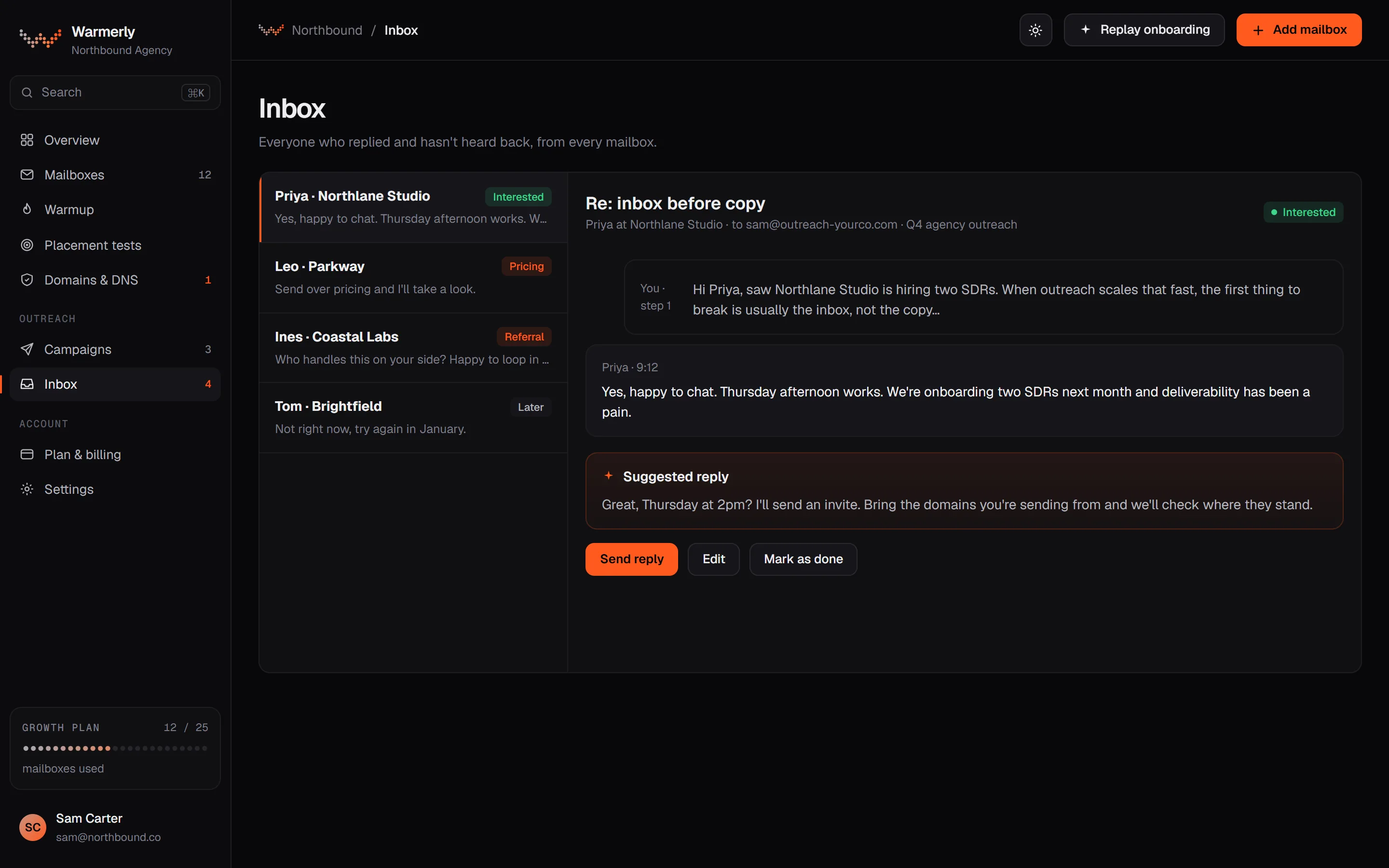
A reply queue first: a 'Needs reply' view, labels with rules and AI, email and LinkedIn in one list, and a suggested reply for the latest inbound email.
The default view is conversations where the newest message is theirs and it is either labelled a lead or not labelled at all. Other views are All and Archived, and the list can be searched by name, email, company or message text with a prefix match, so 'invo' finds 'invoice'.
Warmerly product, checked 21 October 2026
Mail is labelled lead, not relevant or spam. Free rules at ingest catch own-domain mail, no-reply senders, bulk and auto-reply headers, unsubscribe mail and the spam folder. An AI step labels campaign replies only, and your own override sticks. Warmerly does not list reply intents such as 'meeting booked' for email.
Warmerly product, checked 21 October 2026
LinkedIn replies land in the same inbox as email replies. LinkedIn campaign replies are labelled by their reply label: interested, question and referral count as leads, and not interested, stop and out of office as not relevant.
Warmerly product, checked 21 October 2026
Warmerly can draft a reply to the latest inbound email: under 120 words, plain text, signed with the sender's first name. The draft is saved for you to edit and send. The same draft function is available to AI assistants through the Warmerly MCP server.
Warmerly product, checked 21 October 2026
The inbox has no snooze, star or notes: its own test asserts that those controls are absent. We also found no tags on a conversation, no scheduled reply, and no single inbox that spans many LinkedIn accounts with role-based access.
Warmerly product, checked 21 October 2026
A lead-only inbox with reply and last-message filters, notes, stars and a blacklist, on both plans.
Only messages from your leads. The help overview says there is no option to show LinkedIn messages that are not from your leads.
help.dripify.com/en/articles/5030193-dripify-inbox-overview · read 21 October 2026
Lead replied or has not replied yet, and last message from the lead or from you, which finds chats you have not answered.
help.dripify.com/en/articles/5030193-dripify-inbox-overview · read 21 October 2026
Notes on profiles, starring important messages and blacklisting people. The pricing table ticks Notes and Inbox on both plans.
help.dripify.com/en/articles/5030193-dripify-inbox-overview · read 21 October 2026
The inbox feature page says it centralises lead conversations from LinkedIn and email. The help overview describes LinkedIn conversations only.
dripify.com/features/personal-inbox · read 21 October 2026
The pricing table ticks lead tagging on Advanced only.
dripify.com/pricing · read 21 October 2026
The pricing page lists 'email connected to the inbox' and says email steps run alongside LinkedIn actions, which supports the feature page against the narrower help overview.
dripify.com/pricing · read 22 October 2026
The pricing page lists a dedicated inbox on Pro, so it is not an Advanced upgrade.
dripify.com/pricing · read 22 October 2026
The FAQ says owners can invite members, assign roles and view each member's stats separately. The pricing table ticks one-click access to team accounts on Advanced.
dripify.com/faq · read 22 October 2026
You can blacklist people so Dripify does not process them, and the FAQ says it skips anyone it detects has already been contacted.
dripify.com/faq · read 22 October 2026
We looked, and found no statement on these. That is about its published pages only, not about the product.
We report each version rather than pick one.
| Measure | Warmerly | Dripify |
|---|---|---|
| Reply inbox | One queue of everyone who replied, across email and LinkedIn. | A lead inbox with reply and last-message filters, notes, stars and a blacklist; its help overview covers LinkedIn conversations. |
| Default view | Needs reply | Leads only, filtered by reply status |
| Channels | Email and LinkedIn in one list | LinkedIn, and email per its feature page |
| AI reply drafts | Under 120 words each | Not found |
| Notes and stars | None; the inbox has no notes or snooze | Notes, stars and a blacklist |
| Tags | None on a conversation | Lead tagging, Advanced |
| Inbox on the lowest paid plan | Yes | Yes, Pro |
| Team-wide reply view | Not found | Advanced, with roles |
| Exclude a person | Not found | Blacklist |
Our reading of the facts above. Not a promise, and not the only reasonable reading.
Warmerly's inbox has no notes, stars or tags. If you work leads by hand in the inbox, that matters.
One default view of who is waiting for you, with labels and a drafted reply.
Dripify's two pages disagree on whether email replies are in the inbox.
In Warmerly's Needs reply view a conversation drops out as soon as your message is the newest, because the view lists only threads where theirs is the latest. Dripify's 'last message from you' filter shows the opposite list, so you can chase chats you answered.
A LinkedIn out-of-office reply is labelled not relevant in Warmerly, so it does not sit in Needs reply with real leads. Dripify offers no label of that kind that we found; you would use its reply-status filters.
Warmerly searches name, email, company or message text with a prefix match, so typing 'invo' finds 'invoice'. Dripify's help overview lists filters and notes but names no text search, so check before you rely on one.
Its inbox feature page says it holds LinkedIn and email conversations. The help overview we read describes LinkedIn only, so check with Dripify before relying on email replies there.
No. We found no notes, stars or tags in the inbox, and its own test asserts that those controls are absent.
Its pricing page lists email connected to the inbox and its feature page says it holds LinkedIn and email conversations. The help overview describes LinkedIn conversations only, so confirm email in the trial.
Lead tagging is ticked on Advanced only.
We found no single inbox that spans many LinkedIn accounts with role-based access. Dripify's Advanced plan is ahead here.
Dripify pages were read on 21 October 2026. Plans and wording change, so check the vendor's own page before you decide. Warmerly details come from the product as it runs today.
Connect a mailbox. Warmerly runs alongside whatever you send from now, so you can compare before you move anything.
Free plan, no card. Paid plans: 7-day trial, first charge on day 8.