WarmerlyWarmerly ahead on this row
Gmail, Outlook, Zoho or any SMTP and IMAP mailbox; 30 emails a day per mailbox by default and no monthly cap.
One row, in depth: what each tool does, the verified numbers, and who each suits.
Dripify details read from its pricing page, FAQ, features pages and help centre on 21 October 2026.
Gmail, Outlook, Zoho or any SMTP and IMAP mailbox; 30 emails a day per mailbox by default and no monthly cap.
Gmail and Outlook only; a maximum of 200 emails a day, with about 30 recommended.
Warmerly connects Gmail, Outlook, Zoho or any SMTP and IMAP mailbox, defaults to 30 a day per mailbox and has no monthly cap on paid plans. Warmerly is ahead on providers and on volume controls. Dripify connects Gmail and Outlook accounts only, links each to one Dripify account, and sets a maximum of 200 emails a day while recommending about 30. Last checked 21 October 2026.
Gmail, Outlook, Zoho or any SMTP and IMAP mailbox; 30 emails a day per mailbox by default and no monthly cap.
Gmail and Outlook only; a maximum of 200 emails a day, with about 30 recommended.
As each side lists them
Dripify's help article says other providers are on its roadmap, with no date. Each of its mailboxes links to a single Dripify account.
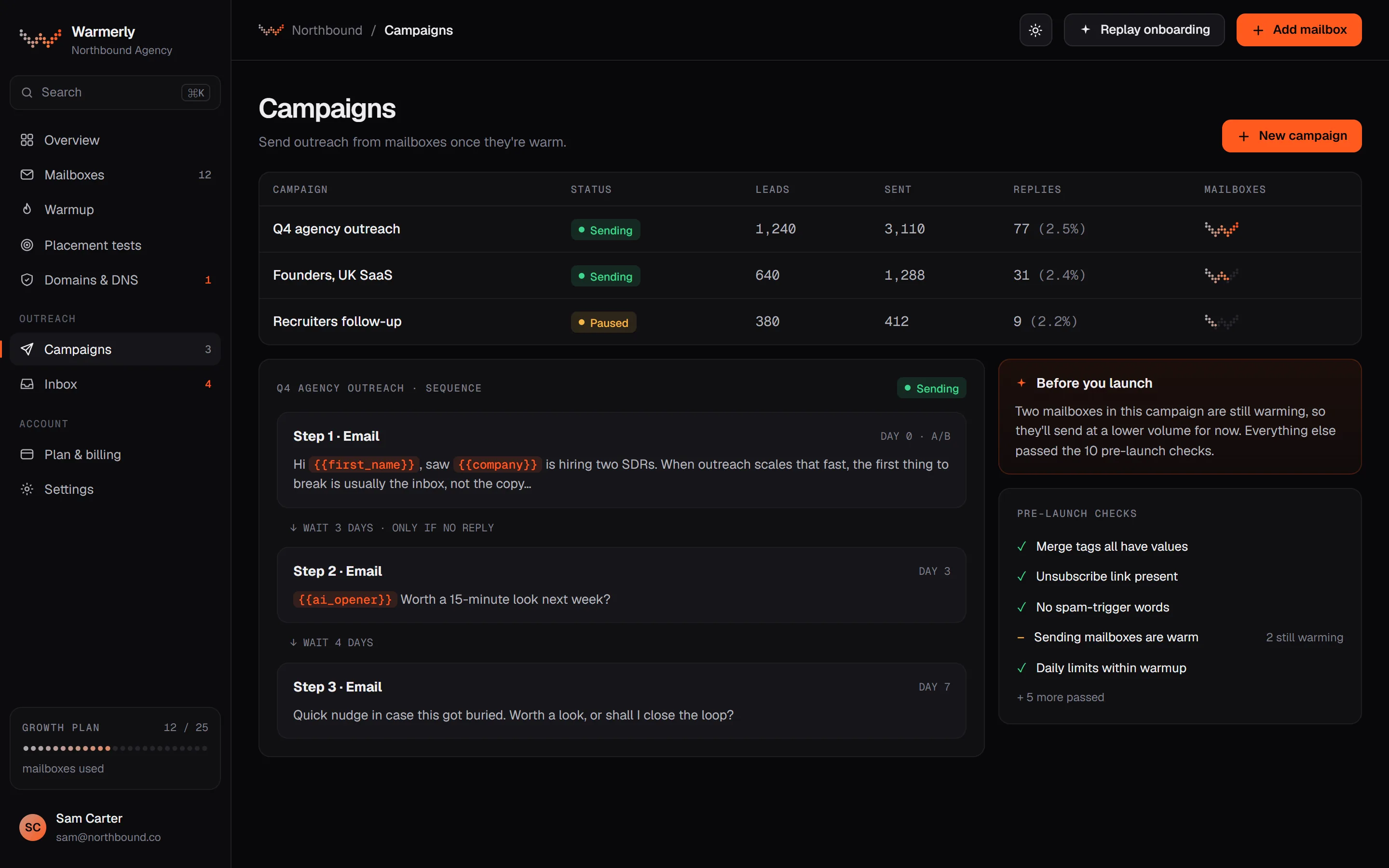
A full email campaign engine: sequence steps, scheduling, a 30 a day default per mailbox, a ramp from 3 to 15 a day, a bounce brake from 2 per cent, and 13 kinds of pre-launch check.
Each mailbox has its own daily campaign limit, 30 by default. A campaign has its own daily limit field too, also 30 by default. Sending is not metered on paid plans: what bounds volume is mailboxes times each mailbox's daily limit. The Free plan allows 100 campaign sends a month.
Warmerly product, checked 21 October 2026
A campaign can ramp each mailbox from 3 emails on sending day 1, adding 1 a day, up to 15 by default, so full volume arrives on the 13th sending day. It is switched on automatically for young mailboxes. A sending day means a day in the campaign's sending days, so weekends hold the cap flat. The ramp can only tighten a mailbox's own limit, never raise it.
Warmerly product, checked 21 October 2026
Over a rolling 7 days, below 2 per cent bounces a mailbox is untouched. From 2 per cent its daily cap is multiplied by 0.75, from 3 per cent by 0.5 and from 5 per cent by 0.25. At 7 per cent the mailbox is paused. A campaign also pauses when 30 per cent of the leads it tried were rejected outright. None of it applies under 25 sends.
Warmerly product, checked 21 October 2026
The readiness table in the pre-flight doc lists 13 kinds of check before Start: 7 that block (no usable step, plan gate, no sender, no queued leads, unknown merge tag, missing brief for an AI opener, failed AI provider probe) and 6 that warn (no postal address, thin lead research, DNS warn or fail or more than 5 senders on one domain, a free mailbox still waiting, no tracking domain for the unsubscribe link, spam-style copy). A warning needs one acknowledgement.
Warmerly product, checked 21 October 2026
An MCP server at /api/mcp lets Claude, ChatGPT, Claude Code and Cursor read and act in a workspace after an OAuth 2.1 sign-in. It is on every plan including Free and needs no API key. Reads and writes share 60 calls a minute per connection, and no tool can start or resume campaign sending.
Warmerly product, checked 21 October 2026
Email steps sit inside a LinkedIn sequence, sent from a connected Gmail or Outlook account, with a daily cap.
Gmail and Outlook only. Other providers are on its roadmap, with no date given.
help.dripify.com/en/articles/11056519-what-email-providers-are-supported-by-dripify · read 21 October 2026
Each Gmail or Outlook account can be linked to a single Dripify account.
help.dripify.com/en/articles/9134046-how-to-send-automated-emails-via-dripify · read 21 October 2026
The help article sets the maximum at 200 emails a day, to build up to gradually, with limits set by hand or by Activity Control. Its safe-sending article recommends about 30 outreach emails a day.
help.dripify.com/en/articles/9134046-how-to-send-automated-emails-via-dripify · read 21 October 2026
Add a Find Email step, then a Send Email step with a subject and body and variables. An 'if email available' condition is added for you. Later steps can use a new thread or the same thread.
help.dripify.com/en/articles/9134046-how-to-send-automated-emails-via-dripify · read 21 October 2026
A bounced lead skips the remaining email steps while LinkedIn steps still run. The article flags a 2% bounce threshold and says a dashboard warning near 2% is being worked on.
help.dripify.com/en/articles/16886772-how-to-safely-send-emails-and-improve-deliverability · read 21 October 2026
We looked, and found no statement on these. That is about its published pages only, not about the product.
We report each version rather than pick one.
| Measure | Warmerly | Dripify |
|---|---|---|
| Email sending and mailboxes | Gmail, Outlook, Zoho or any SMTP and IMAP mailbox; 30 emails a day per mailbox by default and no monthly cap. | Gmail and Outlook only; a maximum of 200 emails a day, with about 30 recommended. |
| Mailbox connection | Gmail, Outlook, Zoho, SMTP and IMAP | Gmail and Outlook only |
| Daily limit per mailbox | 30 a day by default | 200 a day maximum, about 30 recommended |
| Monthly cap | None on paid plans | Not metered |
| Volume ramp | 3 a day, up 1 a day to 15 | Build up gradually, by hand or Activity Control |
| Bounce brake | Cap x0.75 from 2%, x0.5 from 3%, x0.25 from 5%, paused at 7% | Skips email steps for a bounced lead; warning near 2% in progress |
| Pre-launch checks | 13 kinds (7 block, 6 warn) | Not found |
Our reading of the facts above. Not a promise, and not the only reasonable reading.
If your mailbox is on Zoho or a custom server, Dripify cannot connect it today.
Dripify's 200 is its maximum and about 30 is its advice. Warmerly's 30 is the default for each mailbox and you can change it.
Its email steps are one action in a LinkedIn sequence. Warmerly's engine is built around email.
Gmail and Outlook accounts only, per its help article. More are on its roadmap with no date.
30 emails a day for each mailbox, with no monthly send meter on paid plans. The Free plan allows 100 campaign sends a month.
It sets a maximum of 200 emails a day while recommending about 30.
No. Paid plans have no monthly send meter.
Dripify pages were read on 21 October 2026. Plans and wording change, so check the vendor's own page before you decide. Warmerly details come from the product as it runs today.
Connect a mailbox. Warmerly runs alongside whatever you send from now, so you can compare before you move anything.
Free plan, no card. Paid plans: 7-day trial, first charge on day 8.