Less boo. More booked. Halloween offer: 30 days free on any paid plan. Claim 30 days freeEvery new account gets one free mailbox for warmup and replies. No domain to buy. See how it works

Skip to content
Warmerly
Email warmup and cold email

Cold mailboxes,
warmed up.

Warm your Gmail and Microsoft 365 mailboxes with real threaded conversations, then send cold email that lands. One flat rate, no per-inbox fees, from $19 a month.
Free plan: 1 mailbox · paid plans: unmetered sending
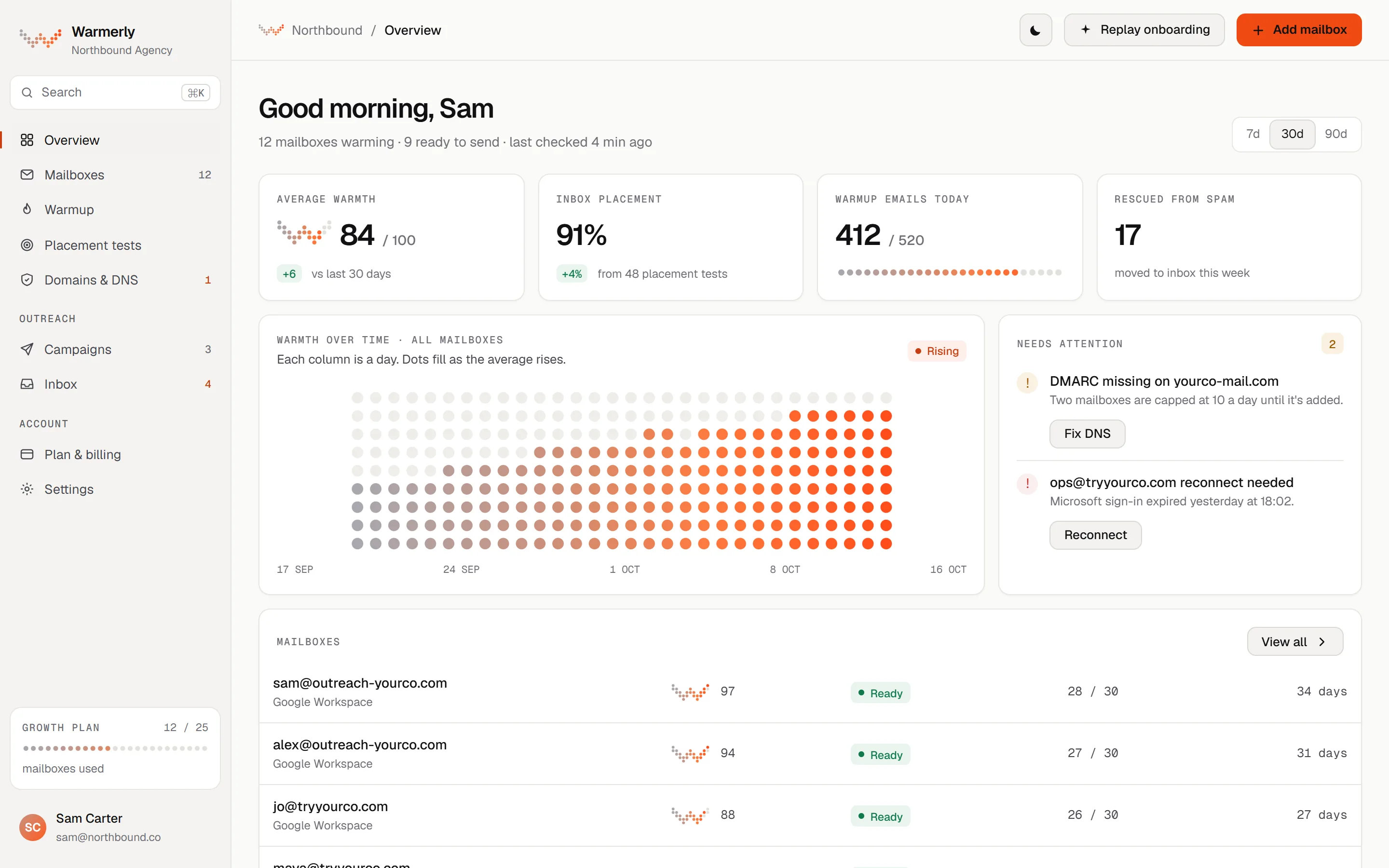
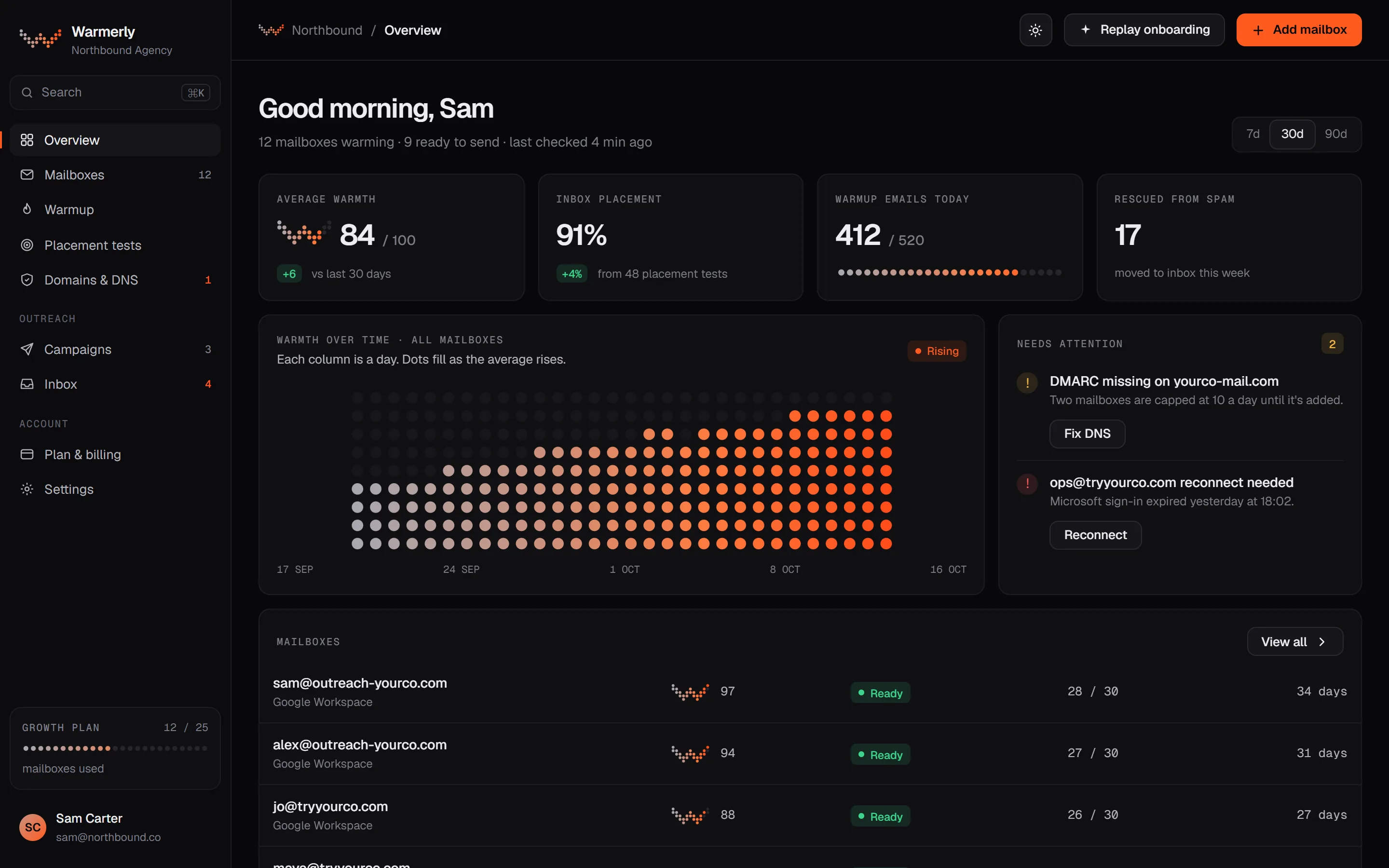
warmerly · overview
Warmerly overview screenWarmerly overview screen
Works with

Plugs into the inboxes you already run.

Connect Google Workspace or Microsoft 365 mailboxes in a couple of clicks. Test placement at the providers your buyers read on. Connect ChatGPT or Claude through the MCP server.

ConnectConnect and warm
Google WorkspaceGmailMicrosoft 365OutlookExchange Online
Test placementSeed inboxes at
GmailOutlookYahoo Mail
Use it fromApps and assistants
Android app (coming)ChatGPTClaude

Names and logos belong to their owners and are shown to describe compatibility, not endorsement.

See it in one short film.

Warm your mailboxes first, then send campaigns that pass their checks before anything goes out.

How it works

Warm first. Then send.

Connect a mailbox and Warmerly builds its reputation with real conversations every day. When it's warm, your campaigns go out from it, inside the limits warmup has earned.

01

Connect a mailbox

Connect Gmail or Google Workspace with an app password, or Microsoft 365 with sign-in. Or let Warmerly host them with OneMail: mailboxes we set up and start warming for you.

02

Let it warm

Daily volume starts small and grows each day. Real threads, spam rescue and daily DNS checks run on their own.

Day 04 a day
Day 1425 a day
Day 3050 a day
03

Send cold email

Build a sequence and launch it from warmed mailboxes. Launch checks run first and block a send that would go out broken.

Pre-launch checks
Every merge tag exists in your leads
Unsubscribe link in place
No spam-trigger words
Senders on one domain6 on one domain
Leads queued
+ more checks passed
ColdWarmingWarmReady

A new mailbox has no history, so providers have nothing to trust. Every dot starts grey.

Why it works Reputation

Spam is a reputation problem.
Reputation is built one reply at a time.

Gmail and Outlook decide where a message lands from what the mailbox has done before. A mailbox with no history gets no benefit of the doubt. Warmup gives it a history worth trusting.

The product

Warmup and cold email in one calm app.

MailboxesRampCampaignsInbox
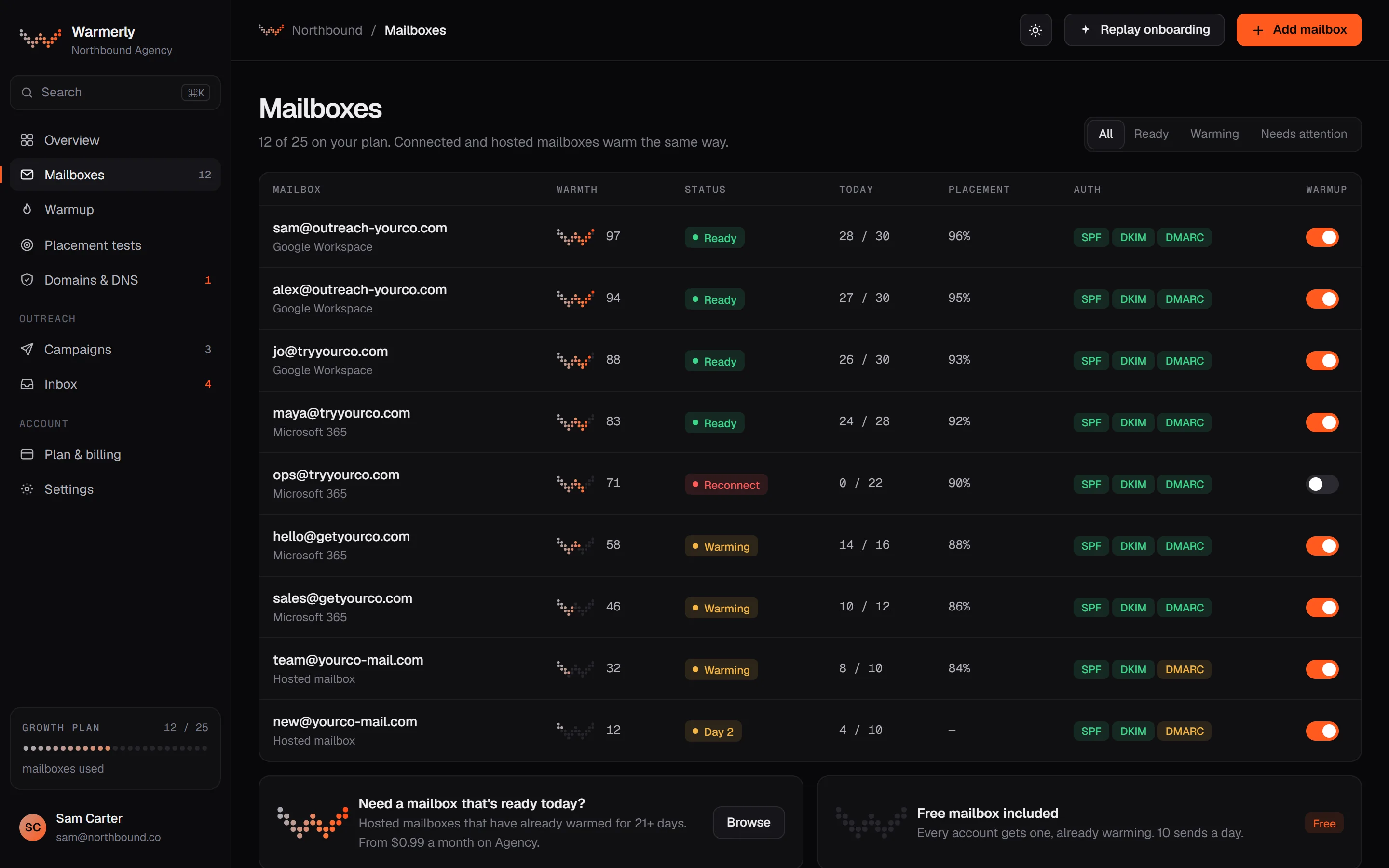
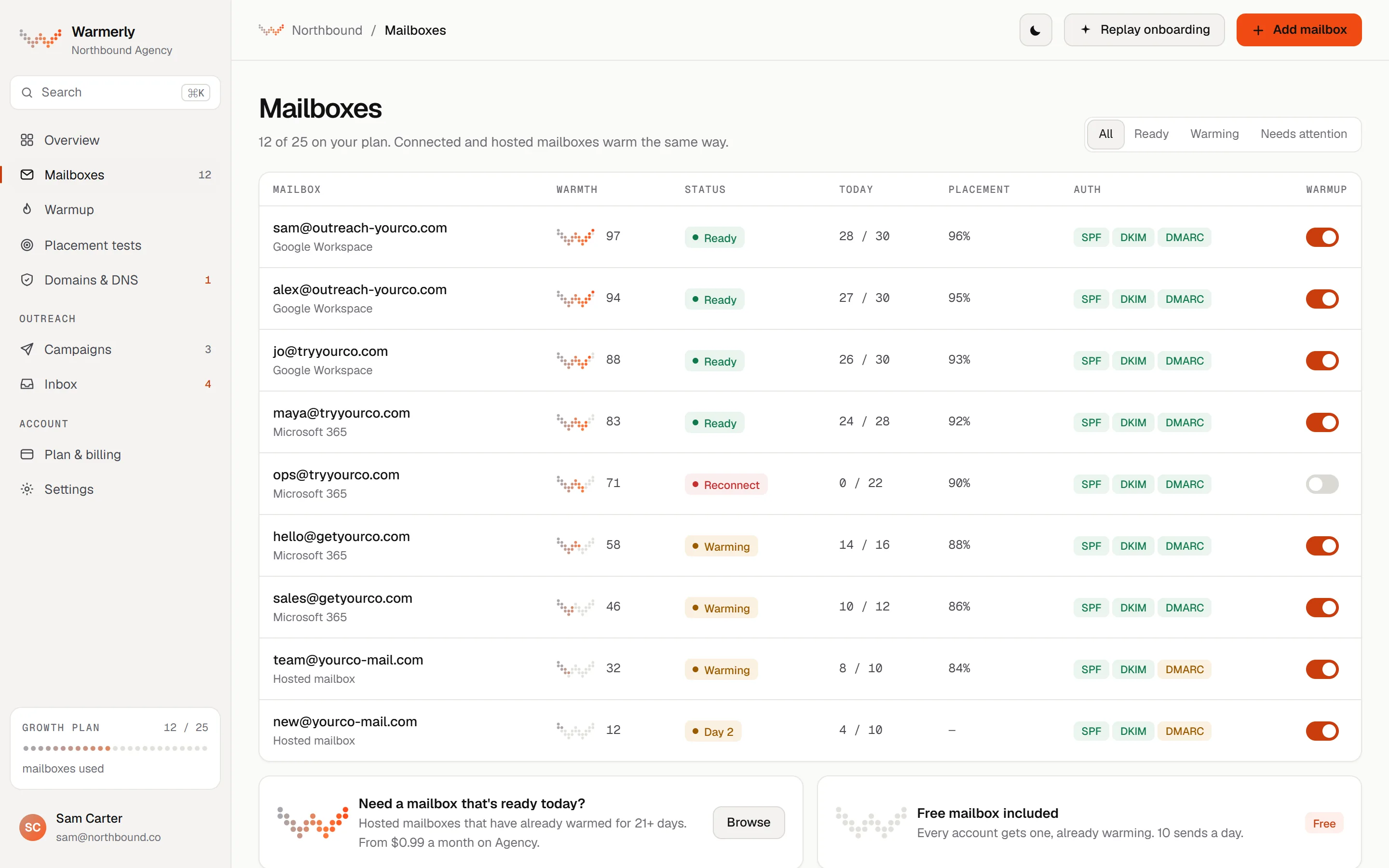
01 · Mailboxes

Every mailbox, one row.

Warmth as a dot W, today's sends against today's limit, and SPF, DKIM and DMARC status. Pause or resume with one switch.

  • Google Workspace, Microsoft 365, hosted
  • Per-mailbox authentication badges
  • Reconnect prompts when a sign-in expires
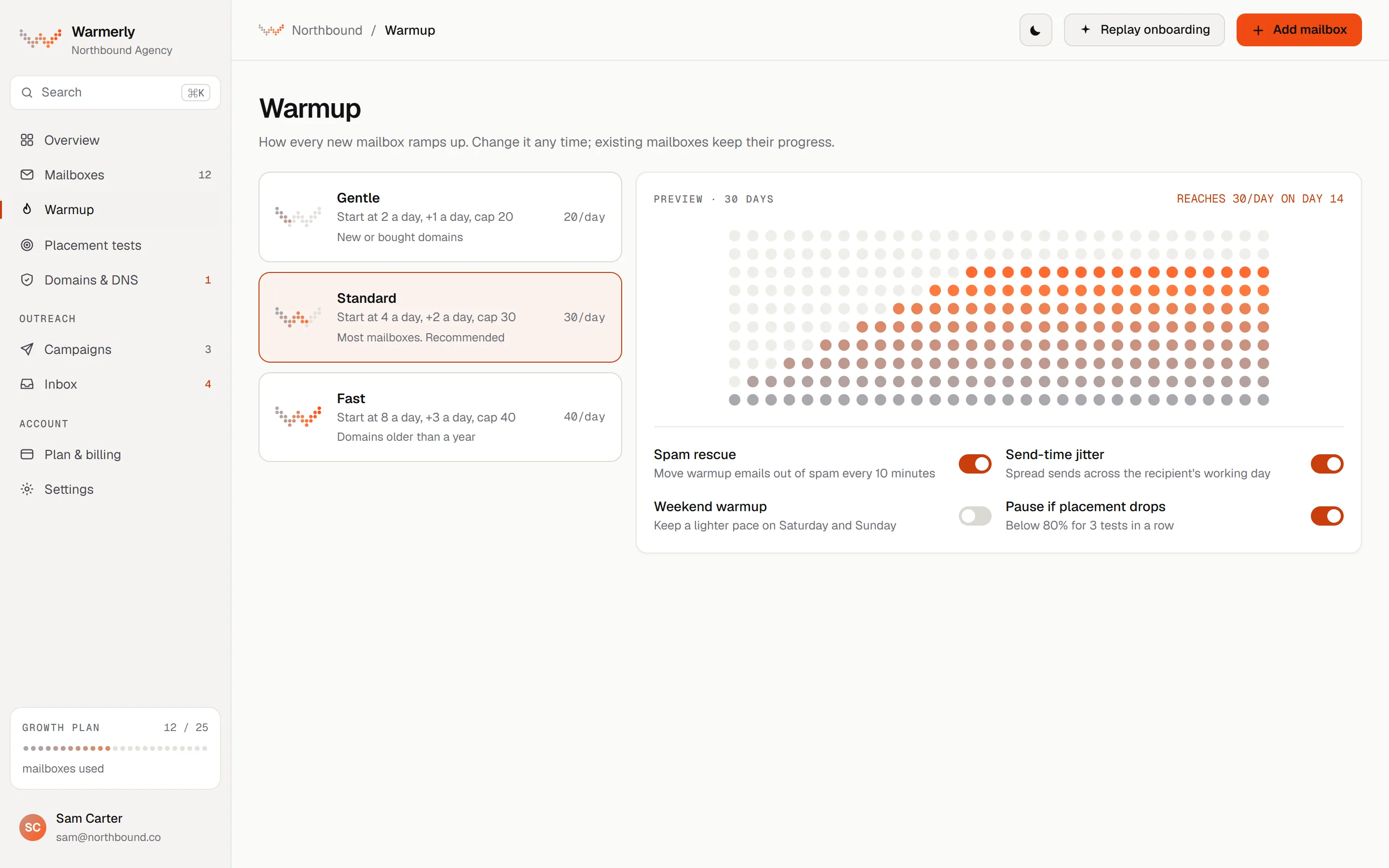
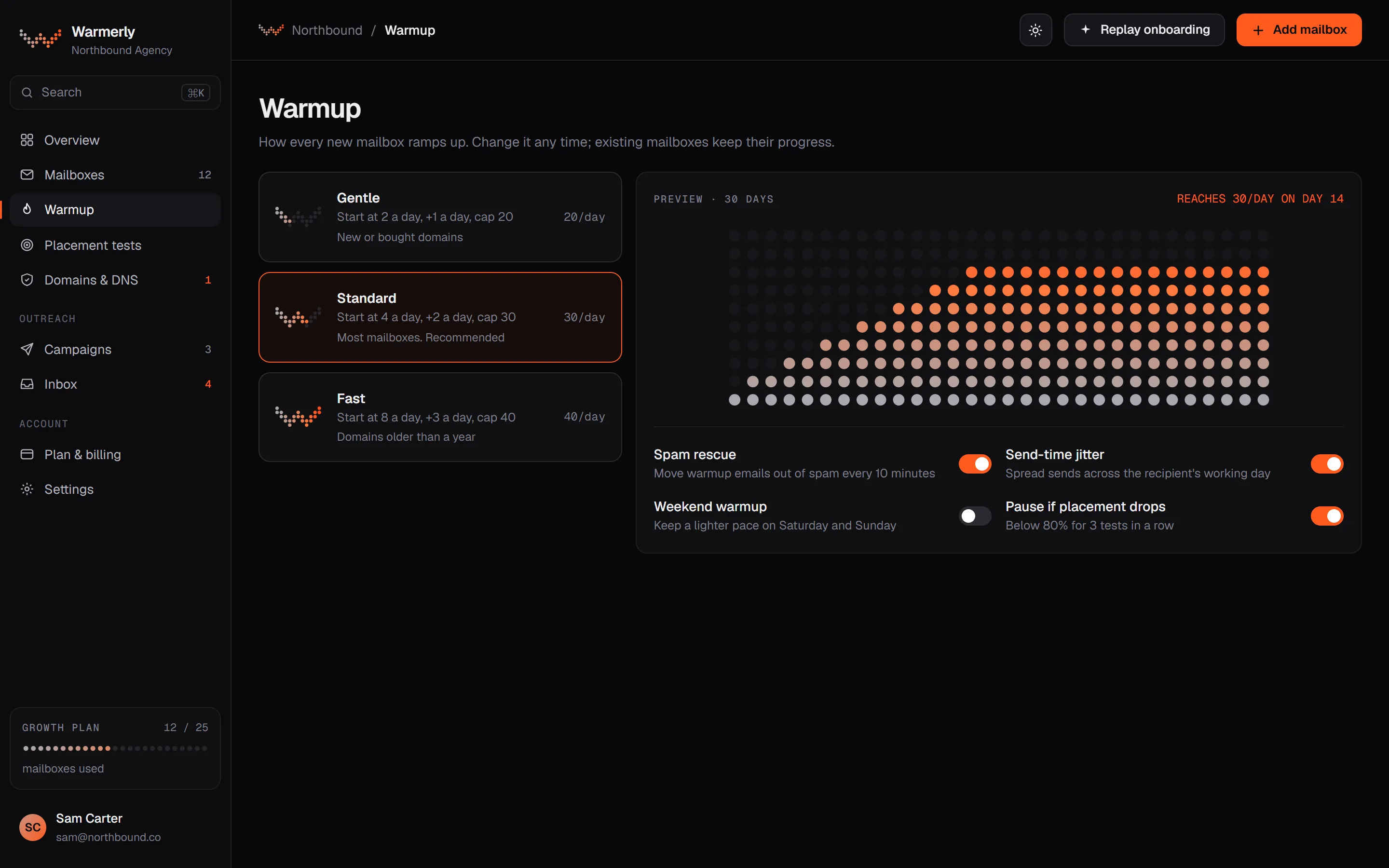
02 · Ramp

A ramp you can read.

The preview shows thirty days of volume, dot by dot, so you know what will go out and when.

  • Spam rescue and send-time jitter
  • Lighter weekend pace if you want it
  • Auto-pause if placement tests drop
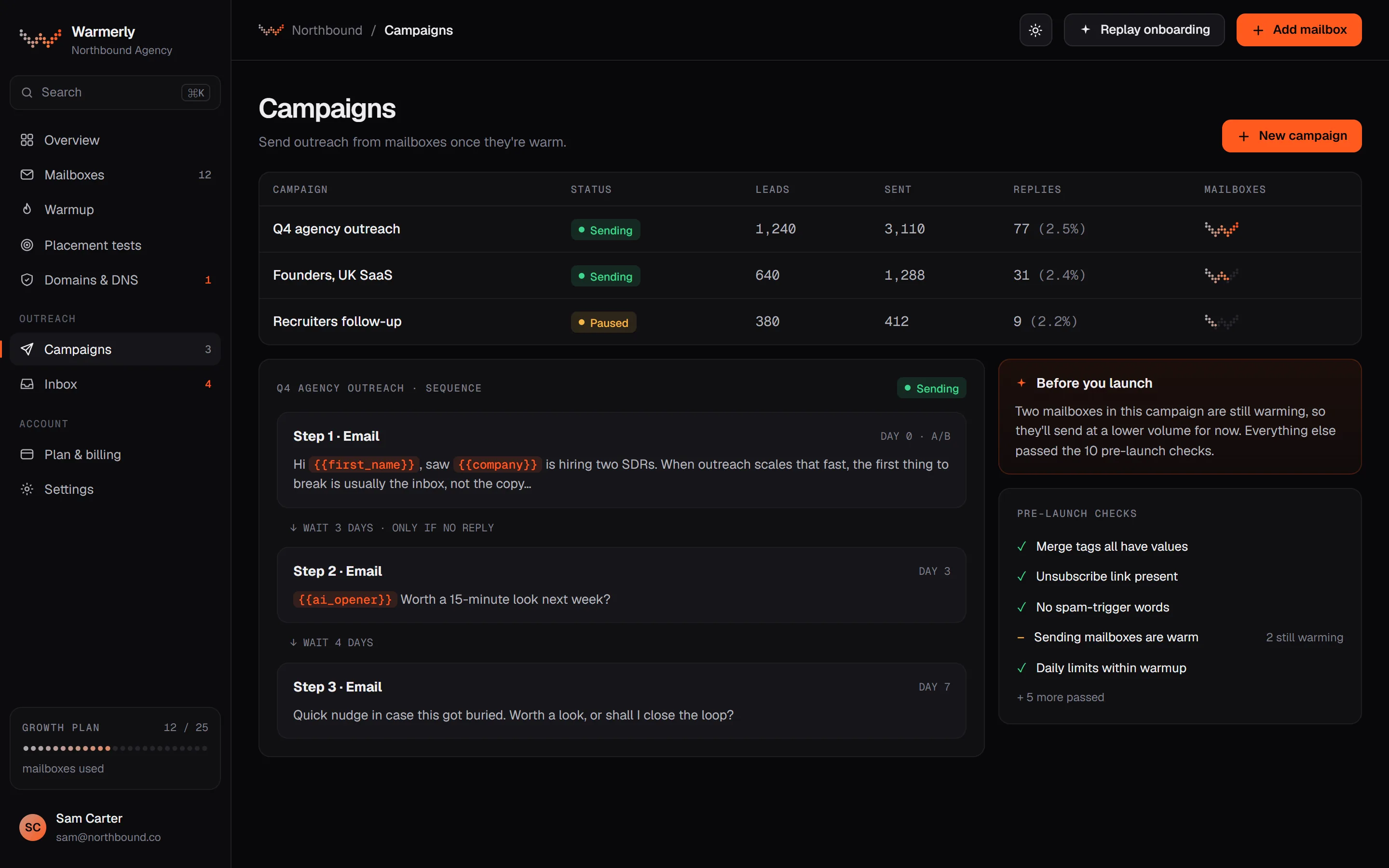
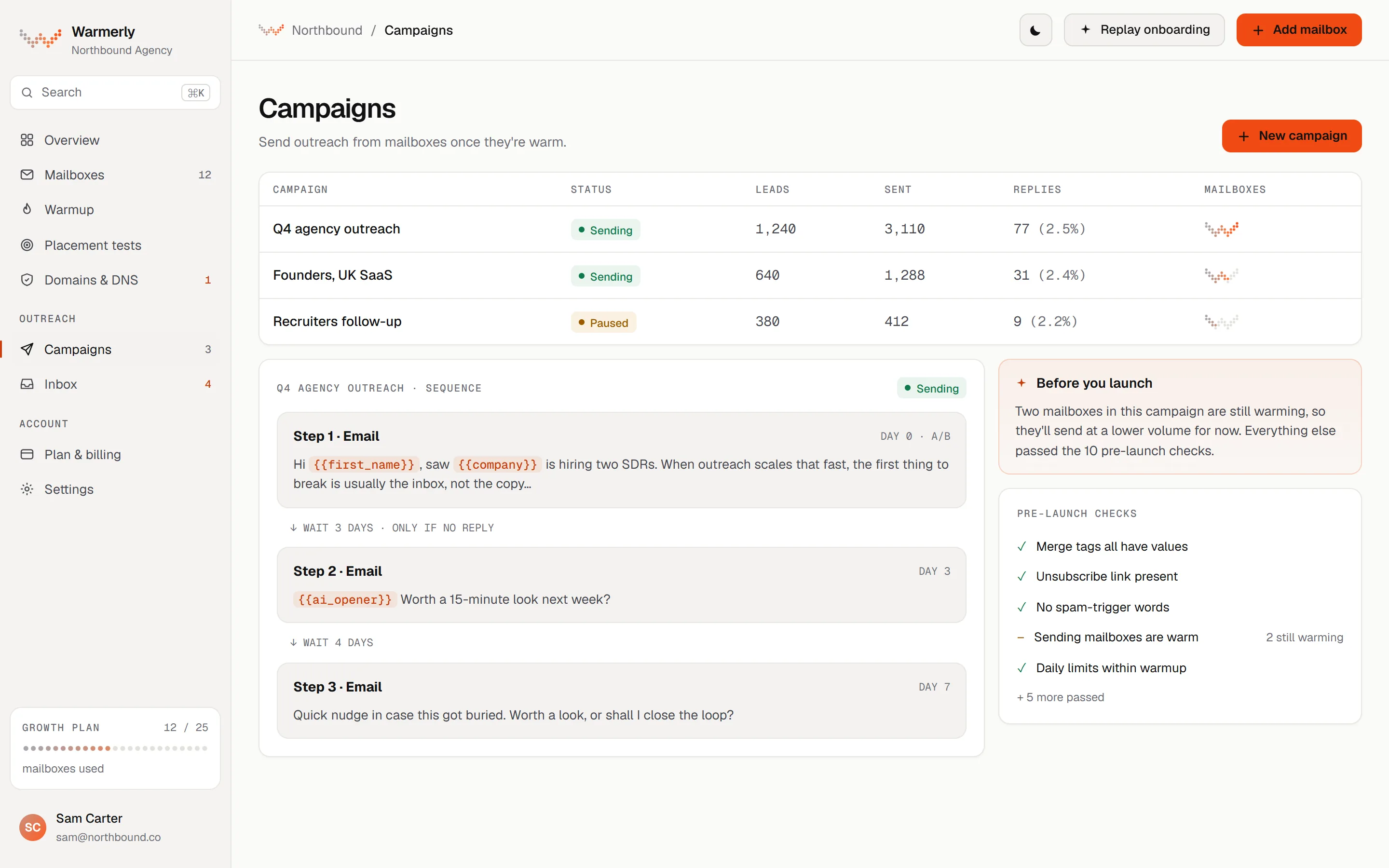
03 · Campaigns

Send from warm mailboxes.

Campaigns, sequences and the checks that run before launch, side by side. If a free mailbox is still warming, you're told before anything goes out.

  • Steps and waits in one sequence
  • Pre-launch checks
  • Advice that stays quiet when all is well
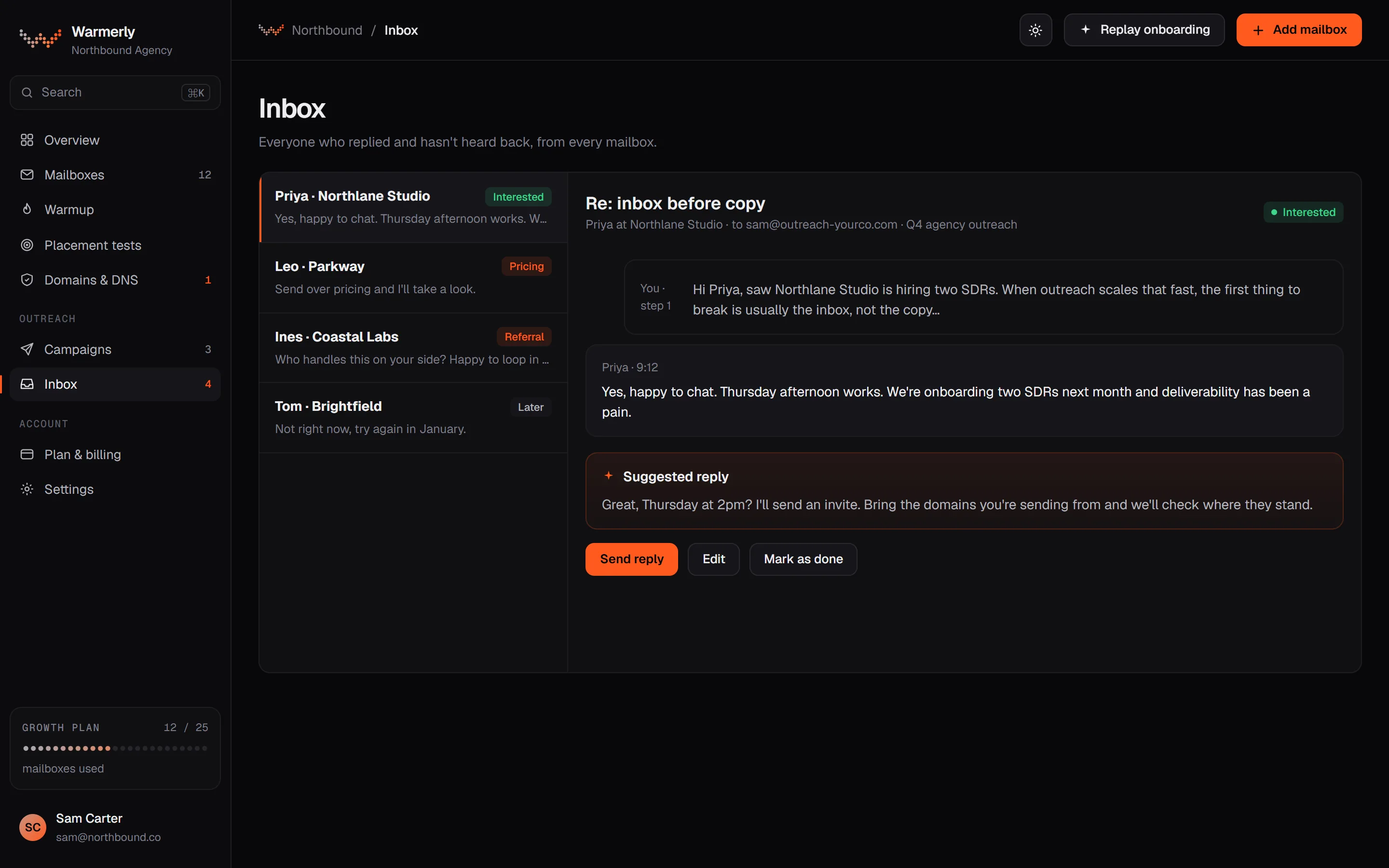
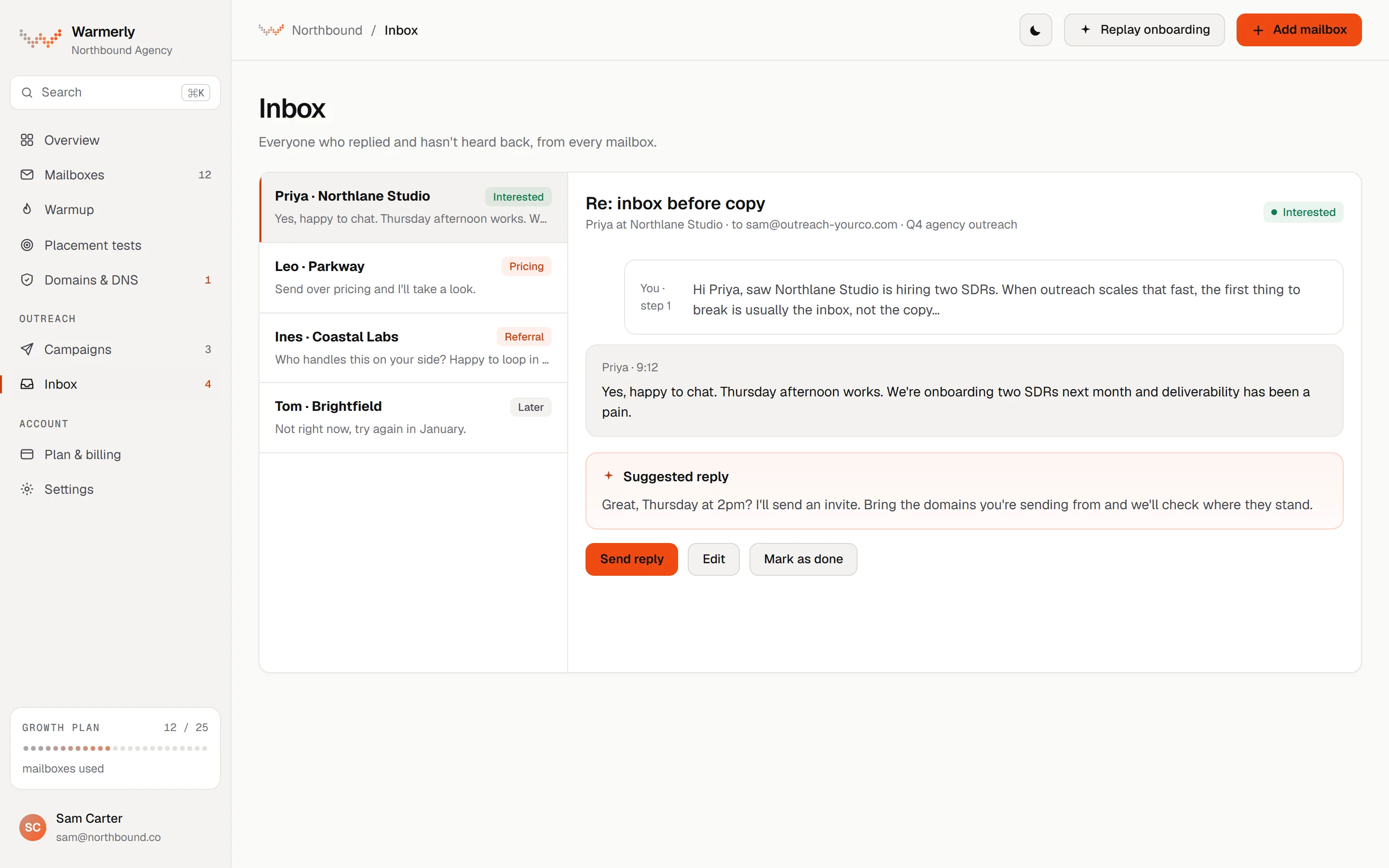
04 · Inbox

Everyone who replied, in one queue.

Replies from every mailbox in one list, sorted as interested, not relevant or spam, with a suggested reply.
  • One queue across all mailboxes
  • Interested, not relevant and spam labels
  • Mark as done to clear the queue
warmerly · mailboxes
Warmerly Mailboxes screen, dark themeWarmerly Mailboxes screen, light theme
Warmerly Ramp screen, dark themeWarmerly Ramp screen, light theme
Warmerly Campaigns screen, dark themeWarmerly Campaigns screen, light theme
Warmerly Inbox screen, dark themeWarmerly Inbox screen, light theme
01 · Mailboxes

Every mailbox, one row.

Warmth as a dot W, today's sends against today's limit, and SPF, DKIM and DMARC status. Pause or resume with one switch.

  • Google Workspace, Microsoft 365, hosted
  • Per-mailbox authentication badges
  • Reconnect prompts when a sign-in expires
warmerly · mailboxes
Warmerly Mailboxes screen, dark themeWarmerly Mailboxes screen, light theme
02 · Ramp

A ramp you can read.

The preview shows thirty days of volume, dot by dot, so you know what will go out and when.

  • Spam rescue and send-time jitter
  • Lighter weekend pace if you want it
  • Auto-pause if placement tests drop
warmerly · warmup
Warmerly Ramp screen, dark themeWarmerly Ramp screen, light theme
03 · Campaigns

Send from warm mailboxes.

Campaigns, sequences and the checks that run before launch, side by side. If a free mailbox is still warming, you're told before anything goes out.

  • Steps and waits in one sequence
  • Pre-launch checks
  • Advice that stays quiet when all is well
warmerly · campaigns
Warmerly Campaigns screen, dark themeWarmerly Campaigns screen, light theme
04 · Inbox

Everyone who replied, in one queue.

Replies from every mailbox in one list, sorted as interested, not relevant or spam, with a suggested reply.
  • One queue across all mailboxes
  • Interested, not relevant and spam labels
  • Mark as done to clear the queue
warmerly · inbox
Warmerly Inbox screen, dark themeWarmerly Inbox screen, light theme
warmerly
04 Reputation

Warmup earns the reputation. Campaigns spend it, inside the limits it set.

Warmup

What warmup actually does.

No shortcuts. The things done every day that make a mailbox look like what it is: a real person who sends real email. Then the checks that tell you it'll land.

Warmflow

Real threaded conversations

Your mailbox writes to a network of other mailboxes, including well-aged ones, and they write back. Replies quote the message before, the way people email, so providers see a live conversation, not a blast.

sam@outreach-yourco.com09:14
Quick one before Thursday: are we still on for the Q3 planning notes? Happy to send a draft first.
priya@northlane.studio09:52
Yes, send the draft over. Thursday afternoon works.
> Happy to send a draft first.
sam@outreach-yourco.com10:03
Attached. Shout if anything's missing.
> Thursday afternoon works.
Thread
Spam rescue

Pulled out of spam

If a warmup email lands in spam, the receiving mailbox moves it to the inbox. Providers learn that people want your mail.

Spam1
Re: Q3 planning notessam@outreach-yourco.com
Inbox2
Invoice questionalex@outreach-yourco.com
Thursday worksjo@tryyourco.com
Folders
Placement tests

Know you'll land

Before a campaign goes out, send a test to seed inboxes and see where it lands, provider by provider.

/ 26 seed inboxes checked
Gmailwaiting
Outlookwaiting
Yahoo & otherswaiting
Placement test
InboxSpam
Ramp

Grows a little every day

A brand-new domain sending 40 emails on day one looks like a spammer. The ramp starts small and sends a little more each day, and the app shows why today's limit is what it is.

Warmup ramp4 a day at the start, 50 a day by day 30
Warmup ramp · 30 days
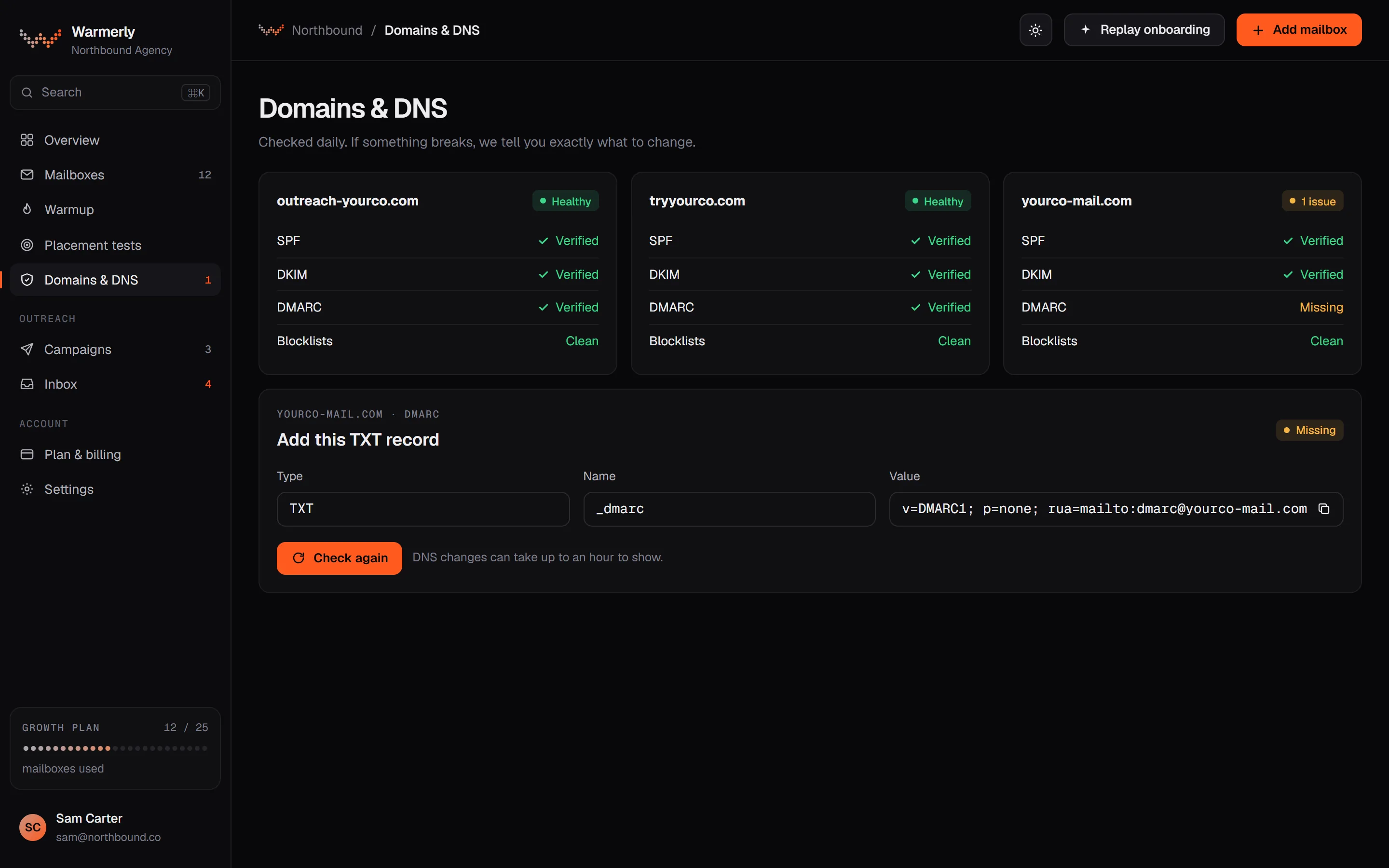
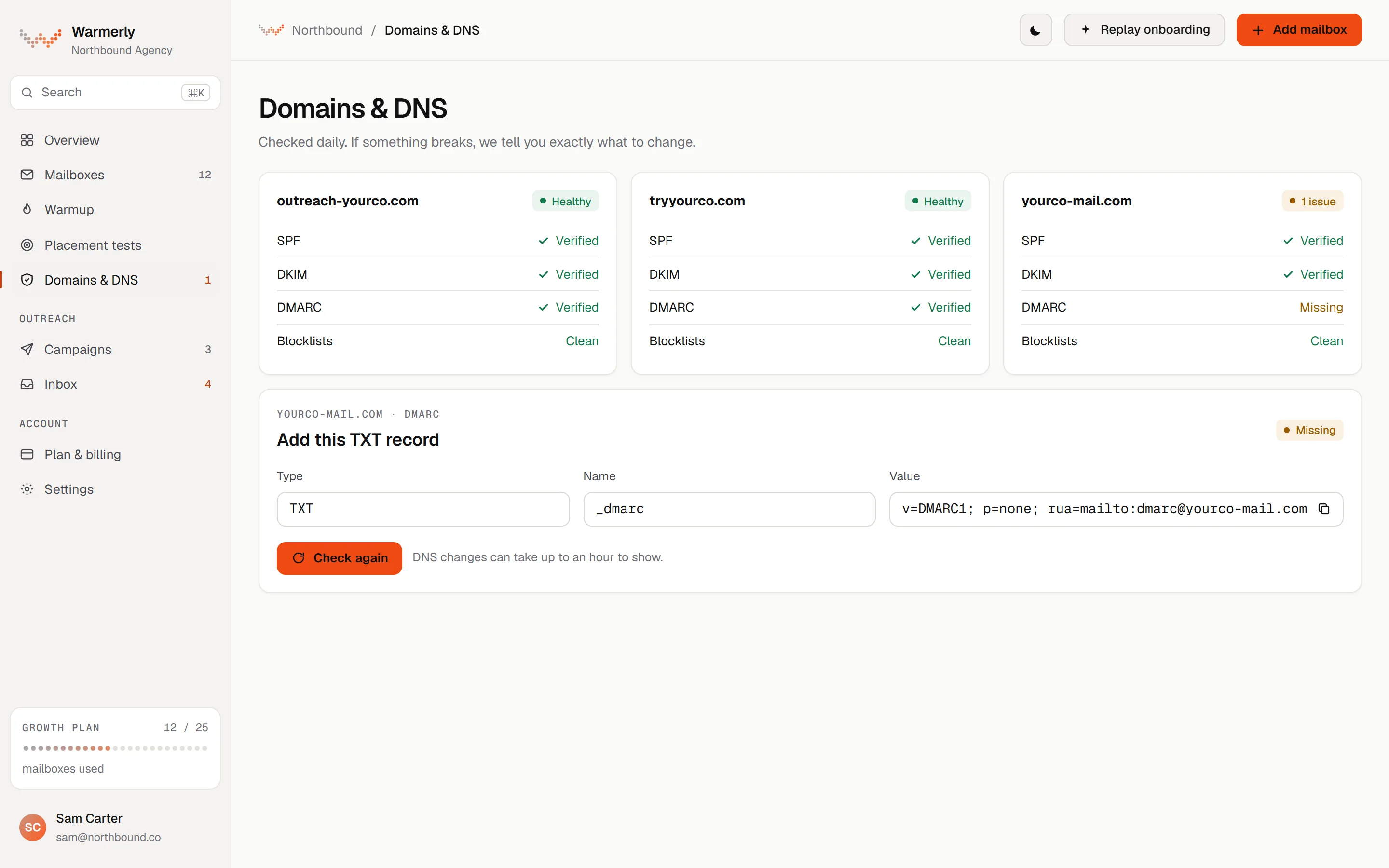
Authentication

SPF, DKIM and DMARC, checked daily

Each domain is checked for SPF, DKIM, DMARC and MX, plus blocklists. If something breaks, you get the exact record to add.

SPFchecking…
DKIMchecking…
DMARCchecking…
MXchecking…
Blocklistschecking…
DNS check · 3 domains
Hosted mailboxes

Or let us host them

OneMail mailboxes are hosted by Warmerly: we publish the DNS records and start warmup on every one, from $0.99 to $2.99 a month by plan. Ready-warmed Instant mailboxes are also offered when some are in stock. Every signup also gets a free sandbox mailbox that's already warming.

hello@yourco-mail.comOneMail · Hosted
Warming
team@yourco-mail.comOneMail · Hosted
Warming
sandbox@yourco-mail.comFree sandbox
Warming
Mailboxes
Cold email

Then send cold email that lands.

Campaigns run from the mailboxes you've warmed, inside the limits warmup has earned. Sequences, checks before launch, and every reply in one place.

Campaigns

Sequences that read like a person wrote them

Steps and waits in one sequence. Merge tags are checked against every lead before launch, and {{ai_opener}} writes a first line for each one.

Step 1 · EmailDAY 0
Hi {{firstName}}, saw {{companyName}} is hiring two SDRs. When outreach scales that fast, the first thing to break is usually the inbox.
↓ Wait 3 days · only if no reply
Step 2 · EmailDAY 3
{{ai_opener}} Worth a 15-minute look next week?
↓ Wait 4 days
Step 3 · EmailDAY 7
Quick nudge in case this got buried. Worth a look, or shall I close the loop?
Sequence
Sending limits

Volume never outruns reputation

Campaign sends share each mailbox's daily limit with warmup. Mailboxes still warming send less, and the app tells you so before you launch.

sam@outreach-yourco.com28 / 30
jo@tryyourco.com28 / 30
hello@getyourco.com14 / 16
sales@getyourco.com10 / 12
CampaignWarmupHeadroom
Before you launchTwo mailboxes in this campaign are still warming, so they'll send at a lower volume for now.
Campaign · today
Inbox

Every reply, one queue

Everyone who replied and hasn't heard back, from every mailbox, labelled by intent with a suggested answer. Clear it and it tells you you're caught up.

P
Priya · Northlane StudioYes, happy to chat. Thursday afternoon?
Interested
L
Leo · ParkwaySend over pricing and I'll take a look.
Interested
I
Ines · Coastal LabsNot for us right now, thanks.
Not relevant
Suggested replyGreat, Thursday at 2pm. I'll send an invite.
All caught upEveryone who replied has heard back.
Replies3 waiting
Prospecting

Who to send to

Find leads in Warmerly's own company database, find their address and verify it before it joins a sequence. Fewer bounces, less damage to the reputation you've built.

priya@northlane.studioverifying…
leo@parkway.coverifying…
info@coastal-labs.ioverifying…
tom.b@brightfield.devverifying…
Leads
In your pocket

Replies don't wait for your desk.

Home, mailboxes, inbox and campaigns, sized for one hand. When someone replies, you see it, read the thread and answer from the queue before the lead goes cold.

iPhone and Android apps in developmentExpected autumn 2027

Design renders with sample data. The date is a target and the screens may change. See the iPhone app or the Android app.

  1. Lock screen notification: a lead repliedLock screen notification: a lead replied
    01

    Notified

    A reply lands on the lock screen with who it is and what they said.

  2. The reply queue, sorted by intentThe reply queue, sorted by intent
    02

    Read

    One queue across every mailbox, sorted into interested, not relevant or spam.

  3. Answering with a suggested replyAnswering with a suggested reply
    03

    Answered

    A suggested reply to edit and send. The thread stays in the mailbox it came from.

Both lights

Pre-dawn or midday. Same warmth.

Every screen is designed twice, not inverted. Drag across to compare, or use the switch in the top bar: your choice is remembered across the site and the app.

Warmerly mailbox detail in the dark themeWarmerly mailbox detail in the light theme
Dark on the left · light on the right · drag to compare#08080A / #FAFAF8 · ember #FF5A1F / #F04A12
Pricing

Flat rate.
No per-inbox fees.

Pick a plan by how many mailboxes you warm. Paid plans send without a meter. Prices in USD.

Free
$0/month
1 mailbox
  • Warmup on 1 mailbox
  • Capped campaign sends
  • Free sandbox mailbox
Start free
7-day trialOn paid plans, standard.
30-day inbox guaranteeOn paid warmup plans. Conditions apply.
OneMail mailboxesHosted by Warmerly and warming from day one, $0.99 to $2.99 a month, by plan.
Free sandbox mailboxEvery signup gets one, already warming.
Compare every plan
Questions

Straight answers.

How warmup works, what it costs and what it doesn't do.

What does email warmup actually do?
It gives a mailbox a sending history. Warmerly sends a small, growing number of real conversations between your mailbox and a network of others. They're opened, replied to with quoted text, and moved out of spam if they land there. Inbox providers read that history when deciding where your outreach goes.
How long until a mailbox is ready?
The warmup ramp runs 30 days, from 4 messages a day to 50 (Gmail stops at 40 and Outlook at 30), and it grows each day. You can launch sooner: a campaign on a young mailbox starts slowly by itself. The app shows each mailbox's warmth, today's limit and the reason for it, so you can see progress rather than guess.
Do I pay per mailbox?
No. Each plan includes a number of mailboxes (1, 5, 25 or 100) at a flat monthly price, and paid plans have unmetered sending. OneMail hosted mailboxes are the only per-unit extra.
Which mailboxes can I connect?
Google Workspace and Gmail, and Microsoft 365. You can also add OneMail, our own hosted mailboxes, including ready-warmed ones when some are in stock. Every signup gets a free sandbox mailbox that's already warming.
Will warmup emails reach my real contacts?
No. Warmup conversations go between mailboxes in the warmup network, not to your prospects or customers. Your campaigns are separate and only go to the leads you add.
Can I send campaigns from Warmerly too?
Yes. Campaigns and sequences run from your warmed mailboxes, with pre-launch checks and merge-tag checking. Sends share each mailbox's daily limit with warmup, and replies from every mailbox land in one inbox.
Is there a mobile app?
Not yet. We are building apps for iPhone and Android, and we expect to launch them in autumn 2027. That is a target and it may move. The phone screens on this page are design renders with sample data. See the iPhone app and Android app pages. Warmerly is available on the web today.

Warm it up
before you send.

Connect a mailbox today. It starts warming the same day, and you'll see every degree it gains.

Start warming freeSee pricing
  • Free plan, no time limit
  • 7-day trial on paid plans
  • 30-day inbox guarantee, with conditions
  • Customer data is hosted in the EU
Free plan: 1 mailbox · Starter from $19 a month